
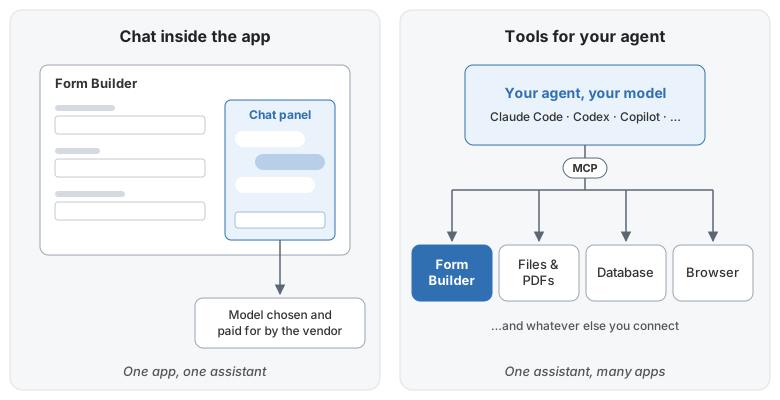
Earlier this year, we set out to add AI to Form Builder. We had two options. We could add a chat inside Form Builder. Or we could create an MCP server that your own AI agent connects to. We went with MCP, but we think both are valid choices. So we’d like to share our thinking behind this decision, in case you’re facing a similar choice, or you’d simply like to better understand the Form Builder MCP.
Where the approaches differ
Here’s how the two approaches compare at a glance. We’ll go through the main points one by one.
| Chat inside the app | MCP tools for your agent | |
|---|---|---|
| Setup for the user | None | Client, config, token |
| Who picks the model | Vendor | User |
| Who pays for inference | Vendor, typically | User |
| Can run on a customer-approved model | Rarely | Yes |
| Can read your PDFs, sheets, schemas | Only what we build | Yes |
| Bulk changes across many forms | Awkward | Natural |
| Control over the experience | Full | None |
| What we maintain | Chat UI, prompts, LLM | MCP tools |
Where chat inside the app wins: simplicity and control
A chat inside the app has two big advantages.
- There’s nothing to set up. You open Form Builder, and it’s right there. With MCP, you need a separate app, like Claude or ChatGPT, and you need to connect it to Form Builder. Developers are used to this. But a business analyst might have to learn something new, and that creates friction.
- We control the whole experience. We decide how the chat looks, what it says, and how it guides you. With MCP, that part belongs to your agent, not to us.
Where MCP wins: flexibility and capability
On the other hand, MCP is both more flexible and more capable.
- You pick the model. It can run locally or in the cloud. It can be a frontier model, or something more cost-effective. If your organization only allows certain approved models, you can use one of those. And since you pay for it directly, you decide how much to spend.
- You use the agent you already know and like. Whichever one you choose, it’s very likely to be better than any chat we could build. If we built our own, we’d basically be building a worse Claude Code. Agent loops, context management, and chat interfaces get better every month, and the companies working on them have far more people on the problem than we do. Every hour we spend on our own chat is an hour we don’t spend on forms.
- Your agent sees more than just Form Builder. This might be the most important point. Forms rarely start from scratch. They start from a PDF someone’s been printing since 2009, a spreadsheet listing fields, a database schema, or a long email thread. A general-purpose agent can already read all of that. A chat inside Form Builder could only read what we taught it to read.
Where this is going
We think apps are becoming tool providers for a handful of general-purpose assistants, rather than each shipping its own. Most people won’t keep a dozen assistants, one per app. They’ll keep one or two, and connect them to everything else. And MCP has become the standard way to make those connections.
The gaps on the MCP side are closing too. In particular, we’re excited about WebMCP, which lets a web page expose tools to an agent running in the browser. WebMCP isn’t widely supported yet, but we think it soon will be. And when it is, you’ll get the best of both worlds: nothing to set up, as with a chat inside the app, and the flexibility of bringing your own agent, as with MCP.
So, which one should you build?
If your users are mostly non-technical and need something that works with zero setup, a chat inside your app has a real edge. But if they work from existing documents, care about which model is used, or already have an agent they like, MCP is hard to beat. For Form Builder, the second case won.
To learn more about our implementation, see the Form Builder MCP documentation. It explains how to connect Claude Code, Codex, Copilot, or any other MCP client.