<?xml version="1.0" encoding="utf-8"?><feed xmlns="http://www.w3.org/2005/Atom" ><generator uri="https://jekyllrb.com/" version="3.10.0">Jekyll</generator><link href="https://www.orbeon.com/feeds/posts/default" rel="self" type="application/atom+xml" /><link href="https://www.orbeon.com/" rel="alternate" type="text/html" /><updated>2026-05-28T03:19:31+00:00</updated><id>https://www.orbeon.com/feeds/posts/default</id><title type="html">Orbeon Forms</title><subtitle>Orbeon Forms allows you to manage your web forms&apos; entire lifecycle, and run your forms on-premises or in the cloud, with a focus on security and compliance.</subtitle><entry><title type="html">New Timestamp and IBAN form controls</title><link href="https://www.orbeon.com/2026/05/timestamp-iban-controls" rel="alternate" type="text/html" title="New Timestamp and IBAN form controls" /><published>2026-05-28T03:18:00+00:00</published><updated>2026-05-28T03:18:00+00:00</updated><id>https://www.orbeon.com/2026/05/timestamp-iban-controls</id><content type="html" xml:base="https://www.orbeon.com/2026/05/timestamp-iban-controls"><![CDATA[<p>With <a href="https://doc.orbeon.com/release-notes/orbeon-forms-2025.1.1">Orbeon Forms 2025.1.1</a>, we have included two new form controls:</p>
<ul>
  <li>The <em>Timestamp</em> control</li>
  <li>The <em>IBAN</em> control</li>
</ul>

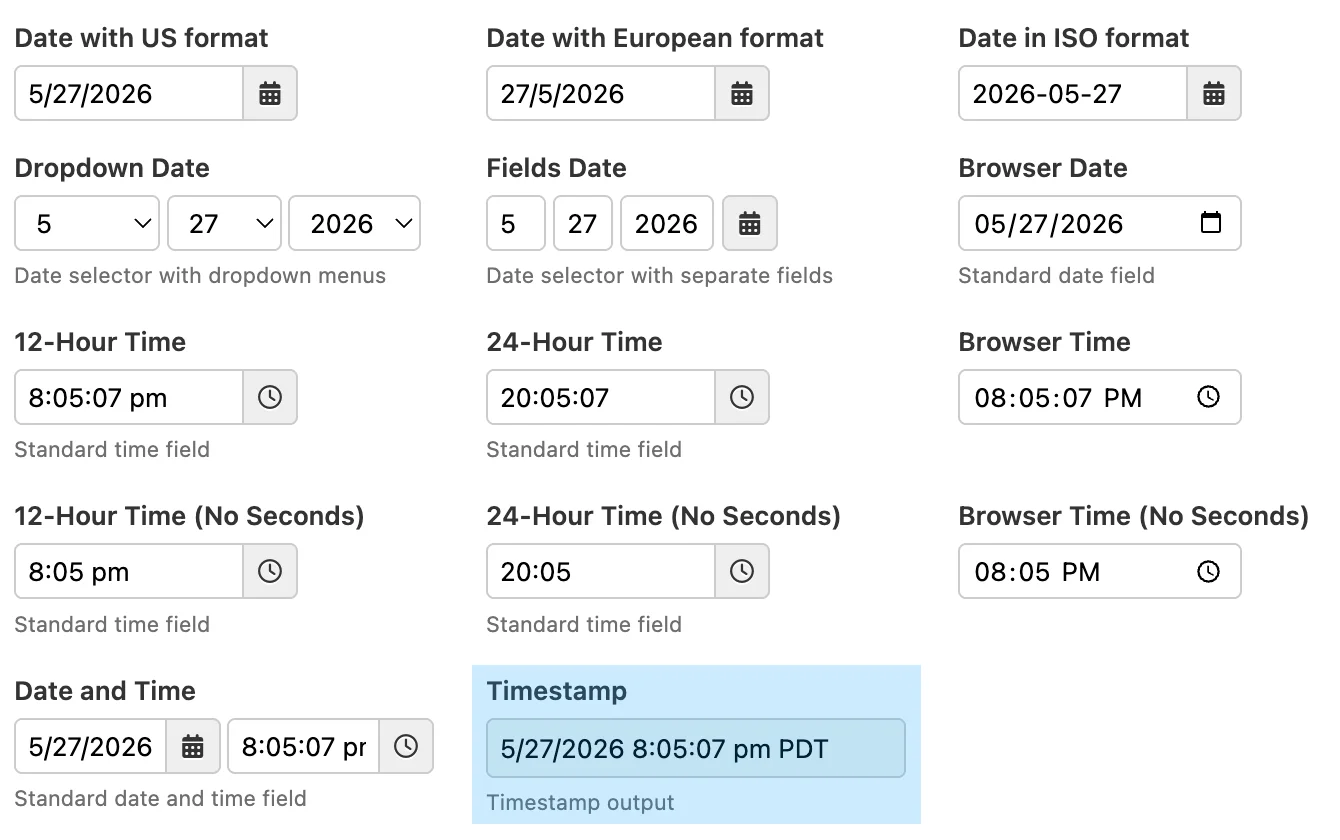
<p>The <em>Timestamp</em> control is a simple readonly form control which allows showing an <em>instant</em> in time in the timezone of the user. Use cases include storing moments where a specific action happens, such as a last modification date, or the time a user approved or rejected a workflow action. The Timestamp control adds to the other date- and time-related form controls in Orbeon Forms.</p>

<figure class="">
  <img src="/assets/posts/xbl-date-time-controls.webp" alt="Date and time controls, including Timestamp" />
  <figcaption>Date and time controls, including Timestamp</figcaption>
</figure>

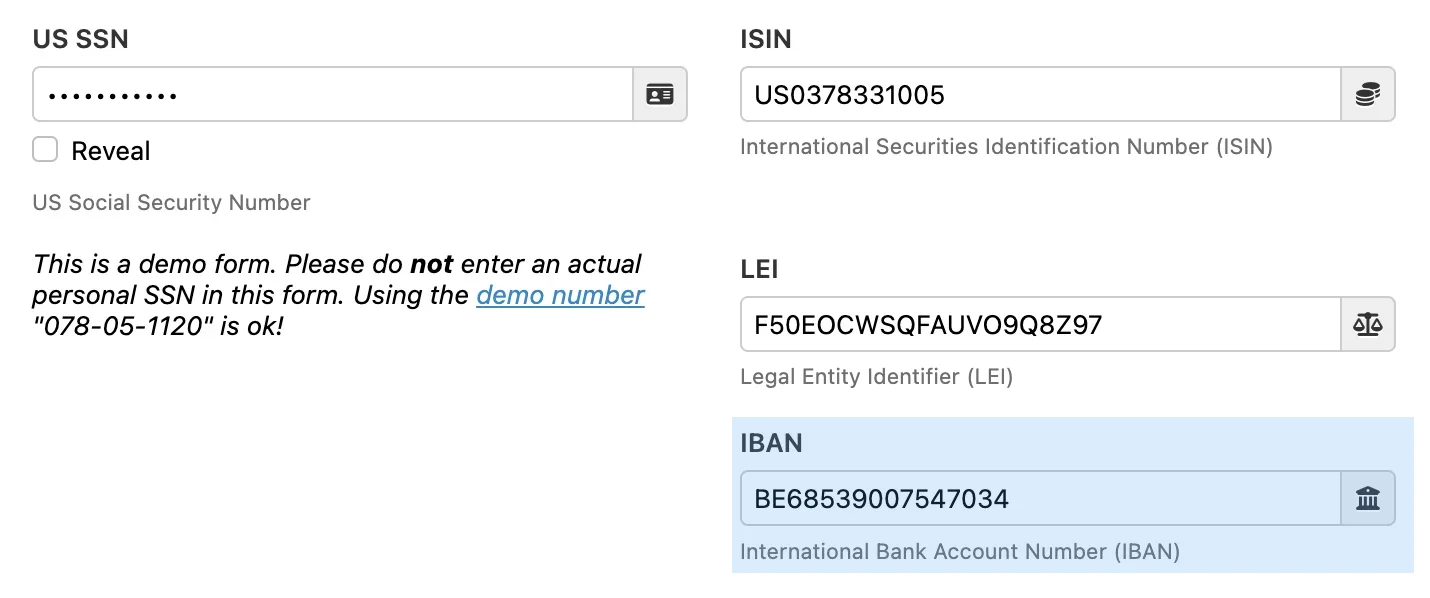
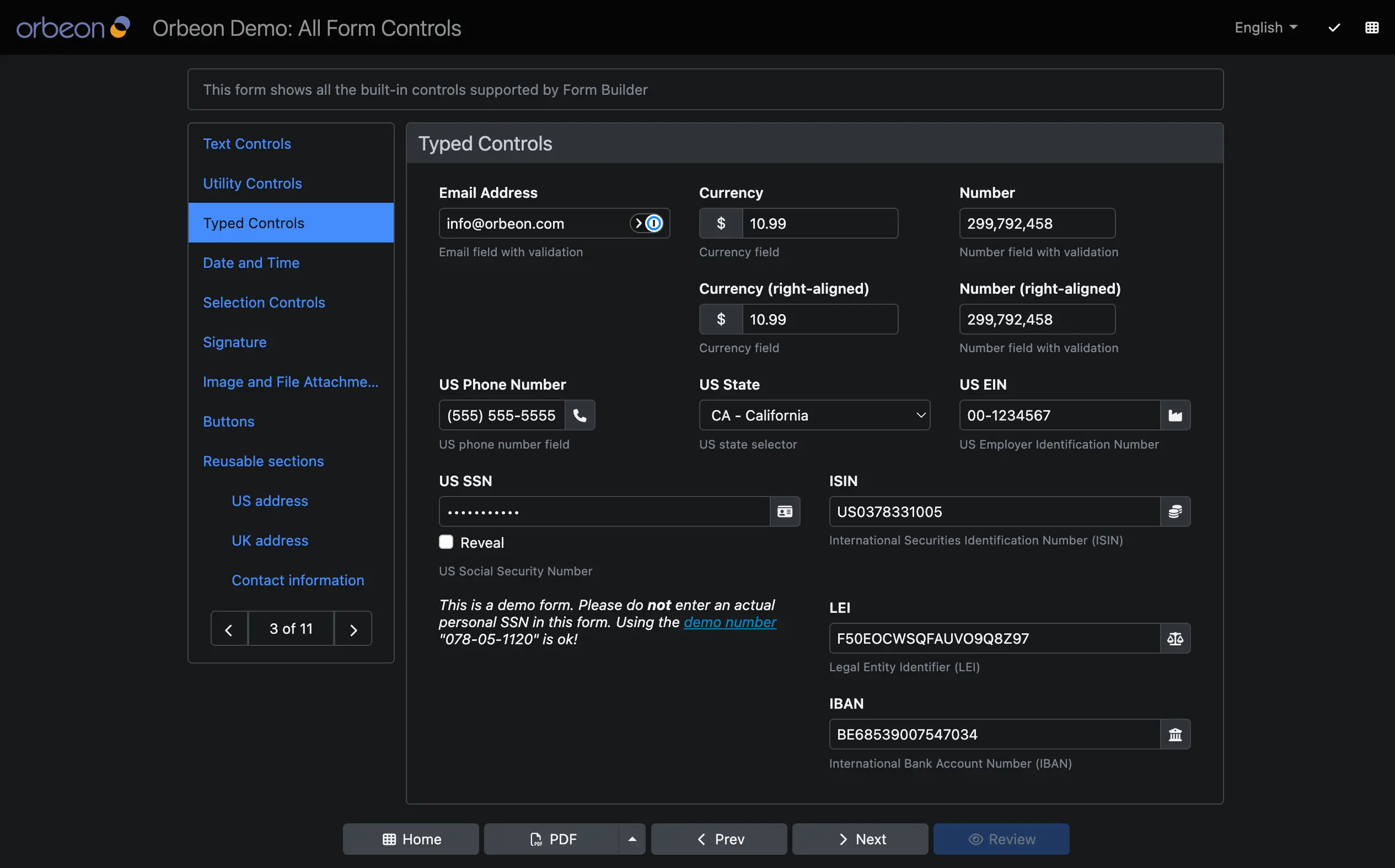
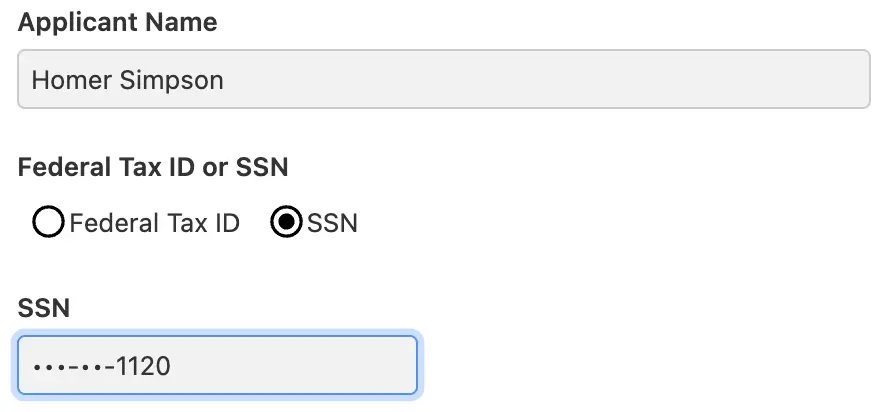
<p>The <em>IBAN</em> control allows users to enter an International Bank Account Number (IBAN). This control includes validation to ensure that the entered IBAN is valid.</p>

<p>This adds to other form controls such as the International Securities Identification Number (ISIN), the Legal Entity Identifier (LEI), and the Social Security Number (SSN) controls.</p>

<figure class="">
  <img src="/assets/posts/xbl-validated-components.webp" alt="Validated form controls, including IBAN" />
  <figcaption>Validated form controls, including IBAN</figcaption>
</figure>

<p>Both form controls show in the standard Form Builder toolbox.</p>

<p>For more details, see the respective documentation for the <a href="https://doc.orbeon.com/form-runner/component/timestamp">Timestamp control</a> and the <a href="https://doc.orbeon.com/form-runner/component/iban">IBAN control</a>.</p>

<p>We hope you will enjoy this feature of <a href="https://doc.orbeon.com/release-notes/orbeon-forms-2025.1.1">Orbeon Forms 2025.1.1</a>!</p>]]></content><author><name></name></author><category term="Feature" /><summary type="html"><![CDATA[With Orbeon Forms 2025.1.1, we have included two new form controls:]]></summary></entry><entry><title type="html">User interface dark mode</title><link href="https://www.orbeon.com/2026/05/dark-mode" rel="alternate" type="text/html" title="User interface dark mode" /><published>2026-05-07T04:05:00+00:00</published><updated>2026-05-07T04:05:00+00:00</updated><id>https://www.orbeon.com/2026/05/dark-mode</id><content type="html" xml:base="https://www.orbeon.com/2026/05/dark-mode"><![CDATA[<p>Orbeon Forms 2025.1 includes a new <em>dark mode</em> for the user interface. This covers the following pages:</p>

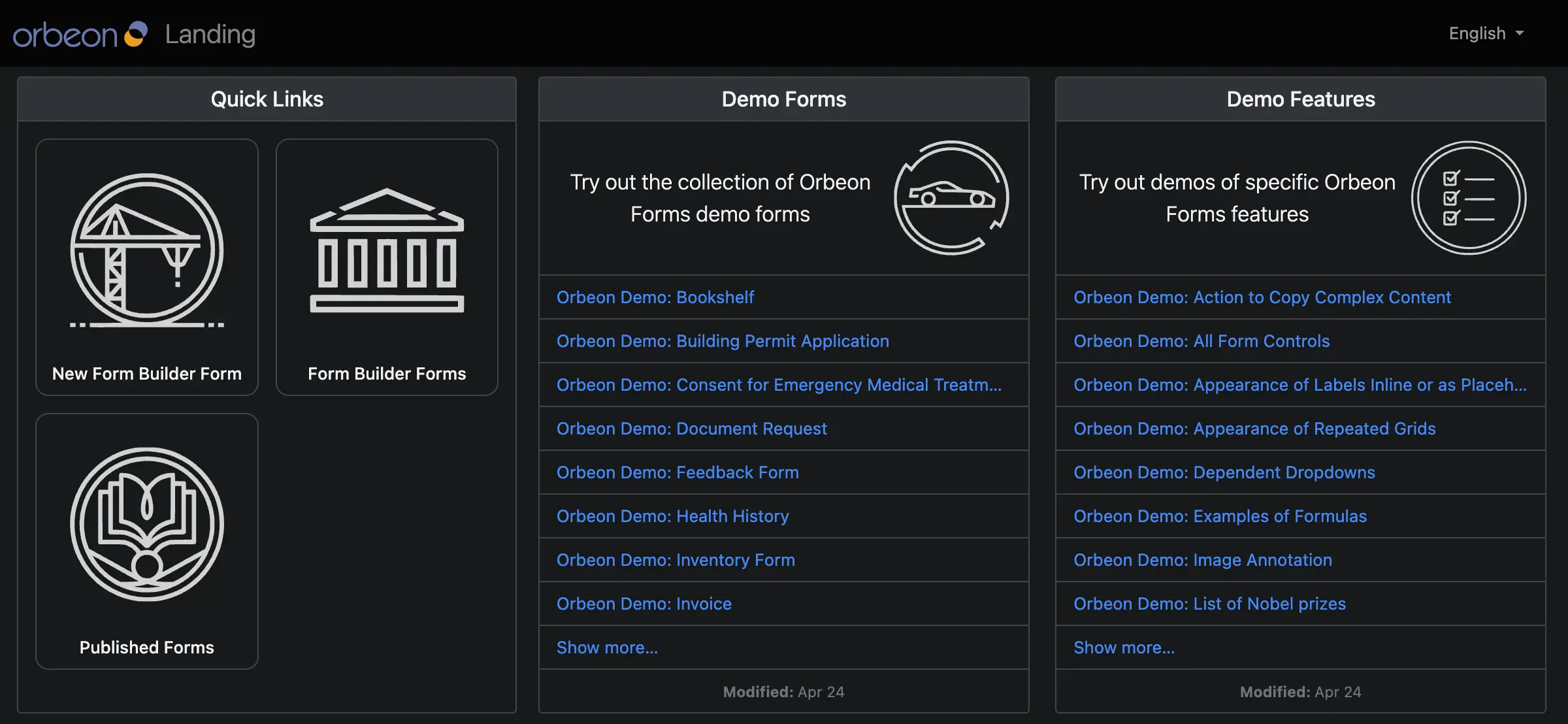
<figure class="">
  <img src="/assets/posts/dark-mode-landing.webp" alt="Landing page" />
  <figcaption>Landing page</figcaption>
</figure>

<figure class="">
  <img src="/assets/posts/dark-mode-summary.webp" alt="Summary page" />
  <figcaption>Summary page</figcaption>
</figure>

<figure class="">
  <img src="/assets/posts/dark-mode-detail.webp" alt="Detail page" />
  <figcaption>Detail page</figcaption>
</figure>

<p>In addition, the Forms Admin and Published Forms pages are also available in dark mode.</p>

<p>You can enable the dark mode by default, or follow the user’s browser or system preference. For more, see the <a href="https://doc.orbeon.com/configuration/properties/form-runner/form-runner-detail-page#color-scheme">documentation</a>.</p>

<p>We hope you will enjoy this feature of Orbeon Forms 2025.1!</p>]]></content><author><name></name></author><category term="Feature" /><summary type="html"><![CDATA[Orbeon Forms 2025.1 includes a new dark mode for the user interface. This covers the following pages:]]></summary></entry><entry><title type="html">Orbeon Forms 2025.1.1 PE</title><link href="https://www.orbeon.com/2026/04/orbeon-forms-202511-pe" rel="alternate" type="text/html" title="Orbeon Forms 2025.1.1 PE" /><published>2026-04-27T18:50:00+00:00</published><updated>2026-04-27T18:50:00+00:00</updated><id>https://www.orbeon.com/2026/04/orbeon-forms-202511-pe</id><content type="html" xml:base="https://www.orbeon.com/2026/04/orbeon-forms-202511-pe"><![CDATA[<p>We just published the Orbeon Forms 2025.1.1 PE maintenance release!</p>

<p>For details, see the <a href="https://doc.orbeon.com/release-notes/orbeon-forms-2025.1.1">release notes</a>.</p>

<p>You can download the latest version of Orbeon Forms from the <a href="https://www.orbeon.com/download">downloads</a> page.</p>

<p>We hope you enjoy this release!</p>]]></content><author><name>Erik Bruchez</name></author><category term="Release" /><category term="Supported" /><summary type="html"><![CDATA[We just published the Orbeon Forms 2025.1.1 PE maintenance release!]]></summary></entry><entry><title type="html">Page load performance enhancements</title><link href="https://www.orbeon.com/2026/04/page-load-performance" rel="alternate" type="text/html" title="Page load performance enhancements" /><published>2026-04-16T02:45:00+00:00</published><updated>2026-04-16T02:45:00+00:00</updated><id>https://www.orbeon.com/2026/04/page-load-performance</id><content type="html" xml:base="https://www.orbeon.com/2026/04/page-load-performance"><![CDATA[<p>With Orbeon Forms 2025.1.1, we are introducing some significant improvements to page load performance, especially for forms with a large number of fields.</p>

<p>Whenever a user hits a form URL, the form definition is loaded from the database and processed, and the form is then rendered in the browser. This process can take a significant amount of time for forms with many fields. Because of this, Orbeon Forms always had a sophisticated cache mechanism so that a cached, pre-processed (compiled) form definition can be used for subsequent requests. This significantly reduces the time to load the form.</p>

<p>With Orbeon Forms 2025.1.1, we have made some improvements to the cache mechanism. With this, after the first load of a form, subsequent loading times for very large forms (with thousands of fields) can be significantly reduced compared to previous versions. An additional effect of this enhancement is reduced server memory use during that process.</p>

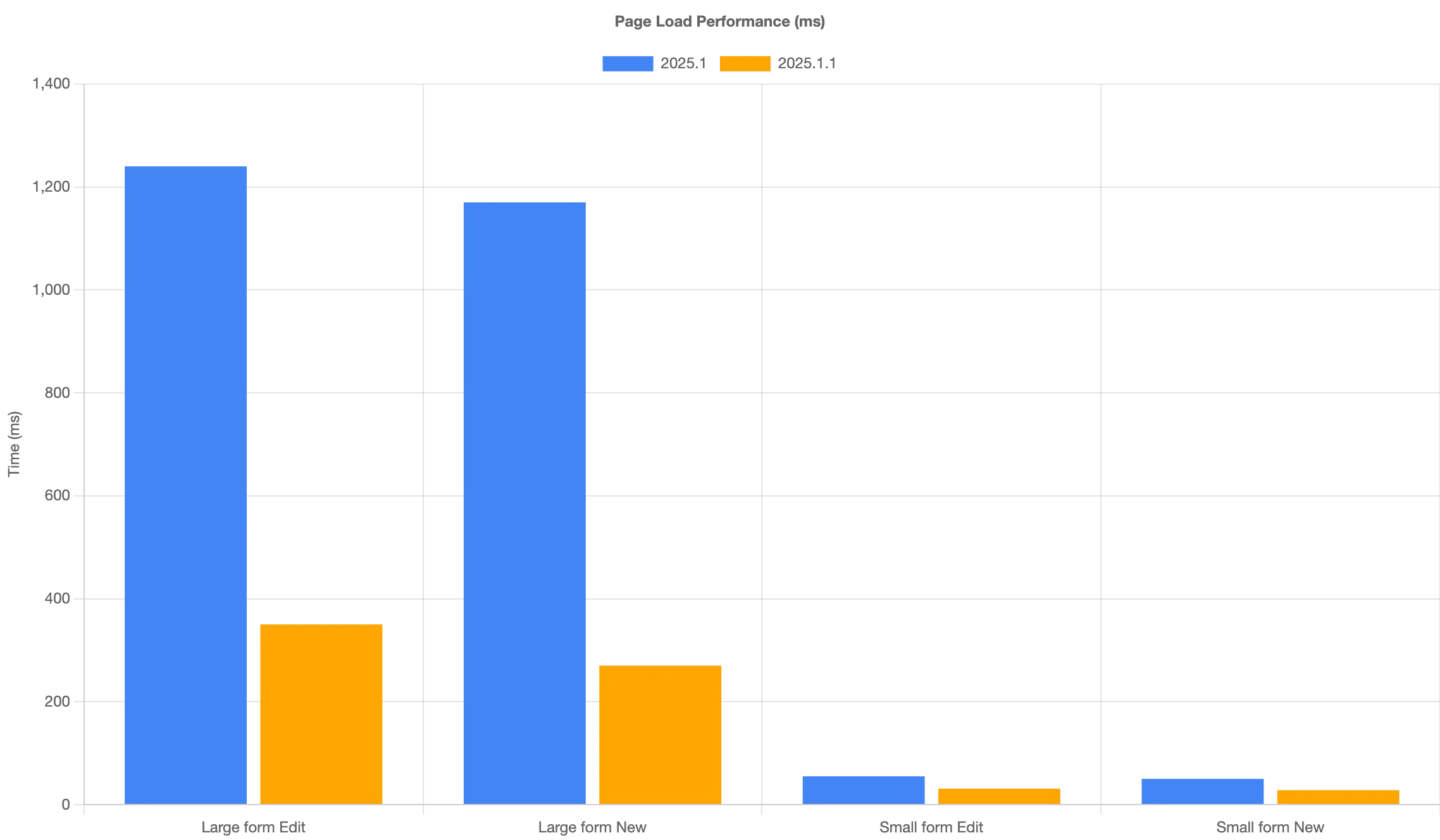
<p>Here are some numbers for a very large form as well as a small form:</p>

<table>
  <thead>
    <tr>
      <th>Version</th>
      <th style="text-align: right">Large form Edit</th>
      <th style="text-align: right">Large form New</th>
      <th style="text-align: right">Small form Edit</th>
      <th style="text-align: right">Small form New</th>
    </tr>
  </thead>
  <tbody>
    <tr>
      <td>2025.1</td>
      <td style="text-align: right">1240 ms</td>
      <td style="text-align: right">1170 ms</td>
      <td style="text-align: right">55 ms</td>
      <td style="text-align: right">50 ms</td>
    </tr>
    <tr>
      <td>2025.1.1</td>
      <td style="text-align: right">350 ms</td>
      <td style="text-align: right">270 ms</td>
      <td style="text-align: right">31 ms</td>
      <td style="text-align: right">28 ms</td>
    </tr>
  </tbody>
</table>

<p><img src="/assets/posts/performance-graph.webp" alt="" /></p>

<p>This enhancement adds to the <a href="https://doc.orbeon.com/release-notes/orbeon-forms-2024.1#page-load-and-service-performance">Page load and service performance</a> improvements we introduced in Orbeon Forms 2024.1.</p>

<p>We hope you will like this feature of Orbeon Forms 2025.1.1!</p>]]></content><author><name></name></author><category term="Feature" /><summary type="html"><![CDATA[Orbeon Forms 2025\.1\.1 improves page load performance with cache enhancements for large forms and reduced server memory usage\.]]></summary></entry><entry><title type="html">Orbeon Forms 2024.1.5 PE</title><link href="https://www.orbeon.com/2026/04/orbeon-forms-202415-pe" rel="alternate" type="text/html" title="Orbeon Forms 2024.1.5 PE" /><published>2026-04-09T01:35:00+00:00</published><updated>2026-04-09T01:35:00+00:00</updated><id>https://www.orbeon.com/2026/04/orbeon-forms-202415-pe</id><content type="html" xml:base="https://www.orbeon.com/2026/04/orbeon-forms-202415-pe"><![CDATA[<p>We just published the Orbeon Forms 2024.1.5 PE maintenance release!</p>

<p>For details, see the <a href="https://doc.orbeon.com/release-notes/orbeon-forms-2024.1.5">release notes</a>.</p>

<p>You can download the latest version of Orbeon Forms from the <a href="https://www.orbeon.com/download">downloads</a> page.</p>

<p>We hope you enjoy this release!</p>]]></content><author><name>Erik Bruchez</name></author><category term="Release" /><category term="Supported" /><summary type="html"><![CDATA[We just published the Orbeon Forms 2024.1.5 PE maintenance release!]]></summary></entry><entry><title type="html">Non-persisted control values</title><link href="https://www.orbeon.com/2026/03/non-persisted-control-values" rel="alternate" type="text/html" title="Non-persisted control values" /><published>2026-03-11T23:03:00+00:00</published><updated>2026-03-11T23:03:00+00:00</updated><id>https://www.orbeon.com/2026/03/non-persisted-control-values</id><content type="html" xml:base="https://www.orbeon.com/2026/03/non-persisted-control-values"><![CDATA[<p>Form controls such as input fields and dropdowns have associated data that needs to be saved or submitted. With Orbeon Forms, this data is, by default, stored into elements in an XML document. However, there are form controls which never<sup id="fnref:never-data" role="doc-noteref"><a href="#fn:never-data" class="footnote" rel="footnote">1</a></sup> have associated data, specifically the following:</p>

<ul>
  <li><strong>Explanatory Text:</strong> This form control presents an explanatory text to the user.</li>
  <li><strong>Button:</strong> This form control is used to trigger actions.</li>
</ul>

<p>Until now, Orbeon Forms didn’t give you an option to omit the associated XML elements when saving form data, which means that these form controls had an associated XML element in the database, even if it didn’t make much sense.</p>

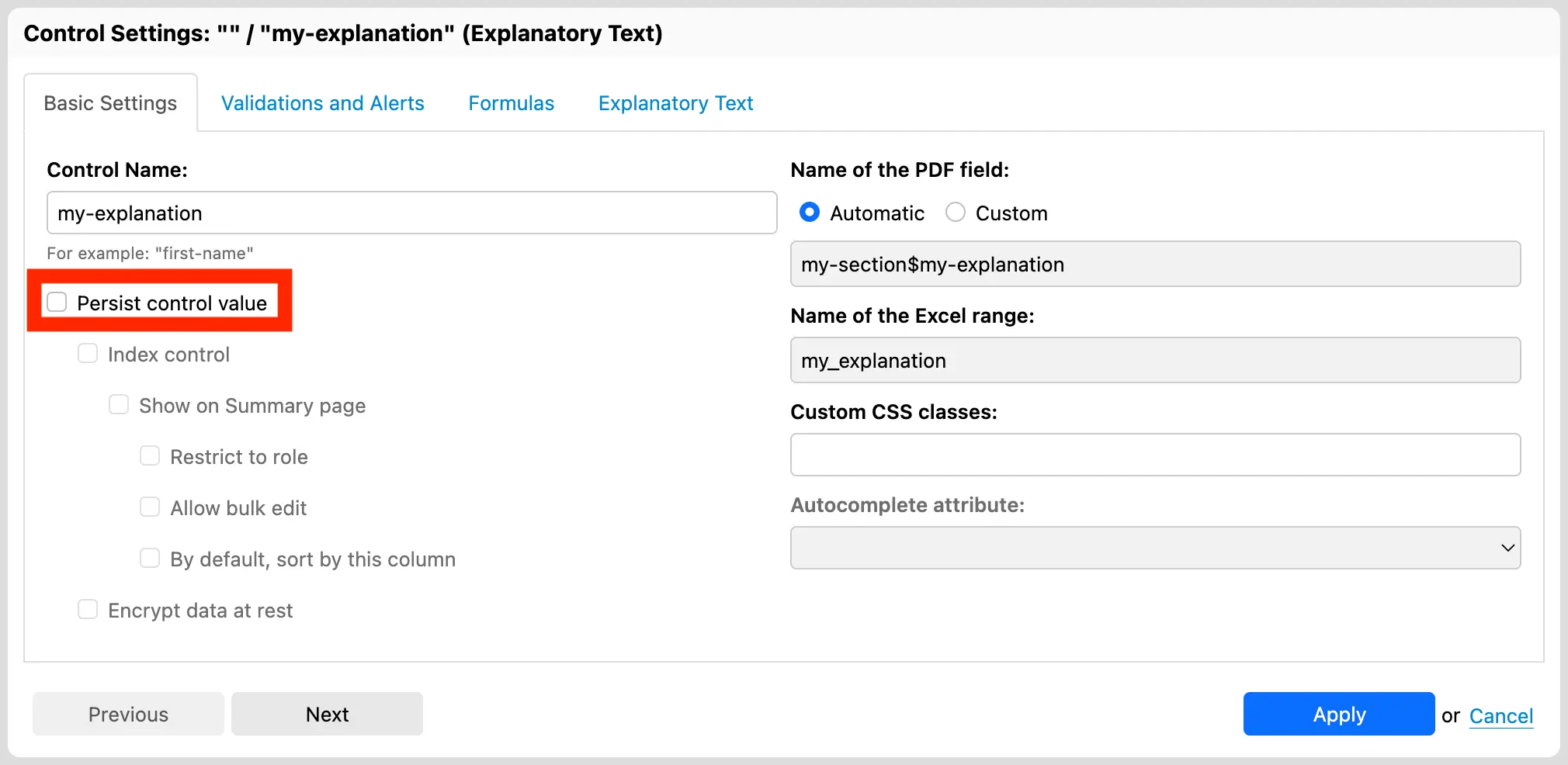
<p>But with Orbeon Forms 2025.1.1, you can now mark any form control as non-persisted, which means that their associated data, if any, will not be saved or submitted. This is done easily in Form Builder, in the Control Settings dialog, by deselecting the “Persist control value” checkbox.</p>

<figure class="">
  <img src="/assets/posts/fb-persist-control-value-deselected.webp" alt="Non-persisted control setting" />
  <figcaption>Non-persisted control setting</figcaption>
</figure>

<p>Newly-created Explanatory Text and Button controls now default to be non-persisted, as it generally makes sense. You can change this default behavior in the Control Settings dialog if you wish so.</p>

<p>For other form controls, you need to  explicitly mark them as non-persisted if you want to avoid saving their associated data. Common use cases include:</p>

<ul>
  <li><strong>Calculated Value:</strong> This form control presents a readonly value typically calculated from other form controls.</li>
  <li><strong>Hidden:</strong> This form control is not visible to the user, but can be used to store data that is not meant to be edited by the user.</li>
</ul>

<p>In both cases, whether the associated values are persisted or not depends on the use case. For example:</p>

<ul>
  <li><strong>Easily Recalculated Value:</strong> A form controls which stores the sum of two other values can easily be recalculated when the form is loaded.</li>
  <li><strong>Transient Value for PDF Output:</strong> A transient calculated value can be useful to extract or combine other form control values to insert them into a PDF template.</li>
  <li><strong>Time-dependent Calculation:</strong> Some calculations are performed only once, or depend on the specific moment of their evaluation and need to remain constant after that. In such cases, the value must be persisted.</li>
  <li><strong>Data-at-rest Visibility:</strong> It can also just be useful to have access to such values directly in the data at rest.</li>
</ul>

<p>When a form control is marked as non-persisted, it cannot be encrypted or indexed, as these features depend on the data being persisted. The Form Builder user interface reflects this by making sure the options are consistent.</p>

<p>We hope you will like this feature of <a href="https://doc.orbeon.com/release-notes/orbeon-forms-2025.1.1">Orbeon Forms 2025.1.1</a>!</p>

<hr />

<div class="footnotes" role="doc-endnotes">
  <ol>
    <li id="fn:never-data" role="doc-endnote">
      <p>Although you could associate data with these form controls using Calculated Value formulas, a user can never enter data into them directly. <a href="#fnref:never-data" class="reversefootnote" role="doc-backlink">&#8617;</a></p>
    </li>
  </ol>
</div>]]></content><author><name></name></author><category term="Feature" /><summary type="html"><![CDATA[Form controls such as input fields and dropdowns have associated data that needs to be saved or submitted. With Orbeon Forms, this data is, by default, stored into elements in an XML document. However, there are form controls which never1 have associated data, specifically the following: Although you could associate data with these form controls using Calculated Value formulas, a user can never enter data into them directly. &#8617;]]></summary></entry><entry><title type="html">Built-In Confirmation Page</title><link href="https://www.orbeon.com/2026/02/confirmation-page" rel="alternate" type="text/html" title="Built-In Confirmation Page" /><published>2026-02-11T16:30:00+00:00</published><updated>2026-02-11T16:30:00+00:00</updated><id>https://www.orbeon.com/2026/02/confirmation-page</id><content type="html" xml:base="https://www.orbeon.com/2026/02/confirmation-page"><![CDATA[<p>A confirmation page is simply a page which shows after a form submission has completed. We have wanted to have a built-in confirmation page in Orbeon Forms for a long time, and with <a href="https://doc.orbeon.com/release-notes/orbeon-forms-2025.1">Orbeon Forms 2025.1</a>, this is now available.<sup id="fnref:custom-modes" role="doc-noteref"><a href="#fn:custom-modes" class="footnote" rel="footnote">1</a></sup></p>

<p>We had two requirements for this feature:</p>

<ol>
  <li>We wanted it to be easy to set up, without deep technical knowledge. In particular, we wanted to avoid requiring creating a custom page with HTML.</li>
  <li>But we also wanted it to have some flexibility, for example to be able to show a custom message, with values from the form.</li>
</ol>

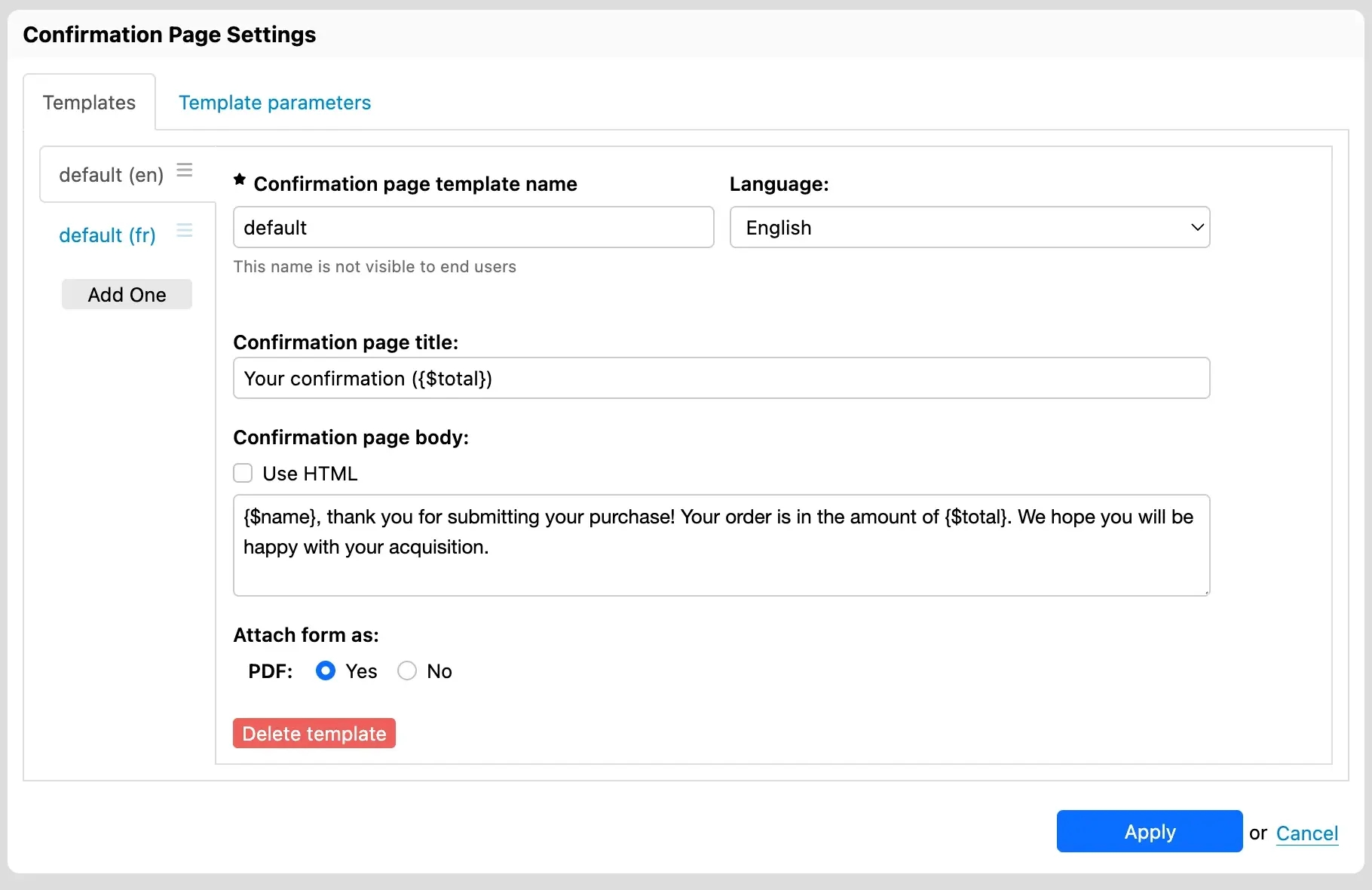
<p>You configure the Orbeon Forms Confirmation page directly through a user interface in Form Builder. Here, you specify what message to show and whether a PDF download is also available. You can use templates to include values from the form, for example to show a personalized message with the name of the person who submitted the form. The message can, as usual in Form Builder, be localized by language.</p>

<figure class="">
  <img src="/assets/posts/fr-confirmation-page-dialog.webp" alt="Confirmation Page Settings" />
  <figcaption>Confirmation Page Settings</figcaption>
</figure>

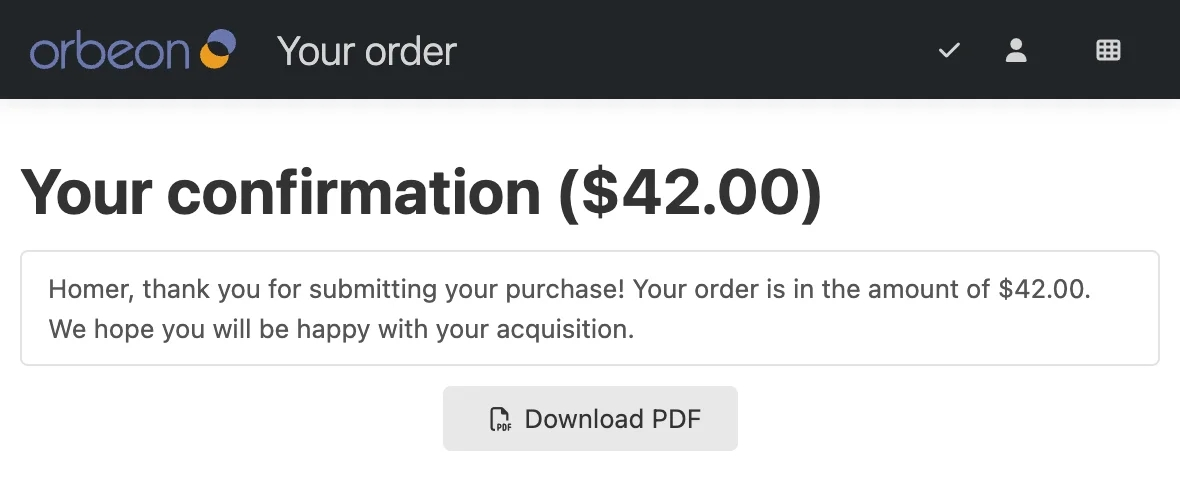
<p>You configure access to the confirmation page through a process button. For example, you can have a “Submit” button which submits the form and then shows the confirmation page. Here is an example of a confirmation page which shows after form submission:</p>

<figure class="orbeon-rounded">
  <img src="/assets/posts/fr-confirmation-page-example.webp" alt="Confirmation Page Example" />
  <figcaption>Confirmation Page Example</figcaption>
</figure>

<p>Not all forms need to have a confirmation page, and forms which have one can have different ones. As usual with Orbeon Forms, you can choose to enable this feature on a per-form basis.</p>

<p>For details, see the <a href="https://doc.orbeon.com/form-runner/form-runner-pages/confirmation-page">documentation on the Form Runner confirmation page</a>.</p>

<p>We hope you will like this feature of <a href="https://doc.orbeon.com/release-notes/orbeon-forms-2025.1">Orbeon Forms 2025.1</a>!</p>

<hr />

<div class="footnotes" role="doc-endnotes">
  <ol>
    <li id="fn:custom-modes" role="doc-endnote">
      <p>Interestingly, from a technical point of view, this feature is based on the new <a href="/2025/12/custom-modes">custom modes</a> capability also introduced in <a href="https://doc.orbeon.com/release-notes/orbeon-forms-2025.1">Orbeon Forms 2025.1</a>! <a href="#fnref:custom-modes" class="reversefootnote" role="doc-backlink">&#8617;</a></p>
    </li>
  </ol>
</div>]]></content><author><name></name></author><category term="Feature" /><summary type="html"><![CDATA[A confirmation page is simply a page which shows after a form submission has completed. We have wanted to have a built-in confirmation page in Orbeon Forms for a long time, and with Orbeon Forms 2025.1, this is now available.1 Interestingly, from a technical point of view, this feature is based on the new custom modes capability also introduced in Orbeon Forms 2025.1! &#8617;]]></summary></entry><entry><title type="html">Orbeon Forms 2024.1.4 PE</title><link href="https://www.orbeon.com/2026/02/orbeon-forms-202414-pe" rel="alternate" type="text/html" title="Orbeon Forms 2024.1.4 PE" /><published>2026-02-02T18:40:00+00:00</published><updated>2026-02-02T18:40:00+00:00</updated><id>https://www.orbeon.com/2026/02/orbeon-forms-202414-pe</id><content type="html" xml:base="https://www.orbeon.com/2026/02/orbeon-forms-202414-pe"><![CDATA[<p>We just published the Orbeon Forms 2024.1.4 PE maintenance release!</p>

<p>For details, see the <a href="https://doc.orbeon.com/release-notes/orbeon-forms-2024.1.4">release notes</a>.</p>

<p>You can download the latest version of Orbeon Forms from the <a href="https://www.orbeon.com/download">downloads</a> page.</p>

<p>We hope you enjoy this release!</p>]]></content><author><name>Erik Bruchez</name></author><category term="Release" /><summary type="html"><![CDATA[We just published the Orbeon Forms 2024.1.4 PE maintenance release!]]></summary></entry><entry><title type="html">Orbeon Forms 2023.1.8 PE</title><link href="https://www.orbeon.com/2026/01/orbeon-forms-202318-pe" rel="alternate" type="text/html" title="Orbeon Forms 2023.1.8 PE" /><published>2026-01-29T17:00:00+00:00</published><updated>2026-01-29T17:00:00+00:00</updated><id>https://www.orbeon.com/2026/01/orbeon-forms-202318-pe</id><content type="html" xml:base="https://www.orbeon.com/2026/01/orbeon-forms-202318-pe"><![CDATA[<p>We just published the Orbeon Forms 2023.1.8 PE maintenance release!</p>

<p>For details, see the <a href="https://doc.orbeon.com/release-notes/orbeon-forms-2023.1.8">release notes</a>.</p>

<p>You can download the latest version of Orbeon Forms from the <a href="https://www.orbeon.com/download">downloads</a> page.</p>

<p>We hope you enjoy this release!</p>]]></content><author><name>Erik Bruchez</name></author><category term="Release" /><category term="Supported" /><summary type="html"><![CDATA[We just published the Orbeon Forms 2023.1.8 PE maintenance release!]]></summary></entry><entry><title type="html">Orbeon Forms 2025.1 PE and CE</title><link href="https://www.orbeon.com/2025/12/orbeon-forms-20251" rel="alternate" type="text/html" title="Orbeon Forms 2025.1 PE and CE" /><published>2025-12-31T04:00:00+00:00</published><updated>2025-12-31T04:00:00+00:00</updated><id>https://www.orbeon.com/2025/12/orbeon-forms-20251</id><content type="html" xml:base="https://www.orbeon.com/2025/12/orbeon-forms-20251"><![CDATA[<p>Today we released Orbeon Forms 2025.1 PE and Orbeon Forms 2025.1 CE!</p>

<p>For details, see the <a href="https://doc.orbeon.com/release-notes/orbeon-forms-2025.1">release notes</a>.</p>

<p>You can download the latest version of Orbeon Forms from the <a href="https://www.orbeon.com/download">downloads</a> page.</p>

<p>We hope you enjoy this release!</p>]]></content><author><name>Erik Bruchez</name></author><category term="Release" /><summary type="html"><![CDATA[Today we released Orbeon Forms 2025.1 PE and Orbeon Forms 2025.1 CE!]]></summary></entry><entry><title type="html">Custom Form Runner modes</title><link href="https://www.orbeon.com/2025/12/custom-modes" rel="alternate" type="text/html" title="Custom Form Runner modes" /><published>2025-12-04T21:45:00+00:00</published><updated>2025-12-04T21:45:00+00:00</updated><id>https://www.orbeon.com/2025/12/custom-modes</id><content type="html" xml:base="https://www.orbeon.com/2025/12/custom-modes"><![CDATA[<p>With Orbeon Forms, form data is presented in one of several <em>modes</em>, the main ones being:</p>

<ul>
  <li><strong>New mode:</strong> For creating new form data.</li>
  <li><strong>Edit mode:</strong> For editing existing form data.</li>
  <li><strong>View mode:</strong> For viewing form data in a read-only HTML format.</li>
  <li><strong>PDF mode:</strong> For viewing form data as a PDF document.</li>
</ul>

<p>With Orbeon Forms 2025.1, we are introducing <em>custom modes</em>. This enables two new different features for integrators:</p>

<ul>
  <li><strong>Custom Views:</strong> Showing existing form data in custom ways, for example showing a subset of the form data for confirmation.</li>
  <li><strong>External Navigation:</strong> Navigating away from and back to Orbeon Forms, for example for calling external services such as payment and signature providers.</li>
</ul>

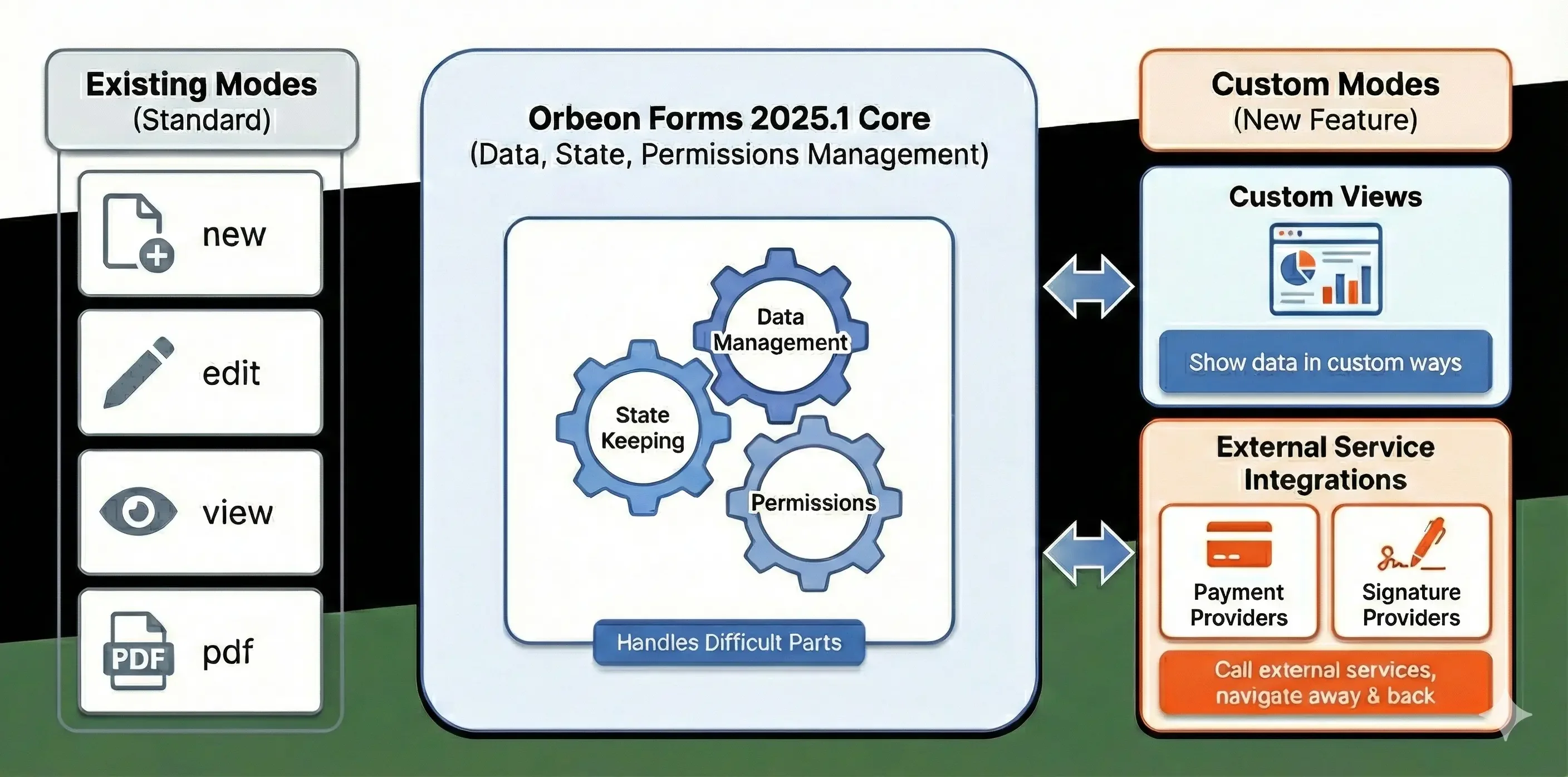
<p>The good news is that Orbeon Forms handles for you the difficult parts: data management, state keeping, and permissions, in particular, while you can concentrate on your custom mode logic. The following diagram summarizes the overall flow:</p>

<figure class="">
  <img src="/assets/posts/fr-custom-modes.webp" alt="Form Runner custom modes" />
  <figcaption>Form Runner custom modes</figcaption>
</figure>

<p>For details, see the <a href="https://doc.orbeon.com/form-runner/features/custom-modes">documentation on Form Runner custom modes</a>.</p>

<p>We hope you will like this feature of Orbeon Forms 2025.1!</p>]]></content><author><name></name></author><category term="Feature" /><summary type="html"><![CDATA[With Orbeon Forms, form data is presented in one of several modes, the main ones being:]]></summary></entry><entry><title type="html">Orbeon Forms 2024.1.3 PE</title><link href="https://www.orbeon.com/2025/10/orbeon-forms-202413-pe" rel="alternate" type="text/html" title="Orbeon Forms 2024.1.3 PE" /><published>2025-10-22T19:29:00+00:00</published><updated>2025-10-22T19:29:00+00:00</updated><id>https://www.orbeon.com/2025/10/orbeon-forms-202413-pe</id><content type="html" xml:base="https://www.orbeon.com/2025/10/orbeon-forms-202413-pe"><![CDATA[<p>We just published the Orbeon Forms 2024.1.3 PE maintenance release! It contains more than 80 bug-fixes and some new features.</p>

<p>For details, see the <a href="https://doc.orbeon.com/release-notes/orbeon-forms-2024.1.3">release notes</a>.</p>

<p>You can download the latest version of Orbeon Forms from the <a href="https://www.orbeon.com/download">downloads</a> page, or use our Docker images.</p>

<p>We hope you enjoy this release!</p>]]></content><author><name>Erik Bruchez</name></author><category term="Release" /><summary type="html"><![CDATA[We just published the Orbeon Forms 2024.1.3 PE maintenance release! It contains more than 80 bug-fixes and some new features.]]></summary></entry><entry><title type="html">Keyboard Shortcut Improvements in Form Builder</title><link href="https://www.orbeon.com/2025/10/keyboard-shortcut-improvements" rel="alternate" type="text/html" title="Keyboard Shortcut Improvements in Form Builder" /><published>2025-10-13T17:00:00+00:00</published><updated>2025-10-13T17:00:00+00:00</updated><id>https://www.orbeon.com/2025/10/keyboard-shortcut-improvements</id><content type="html" xml:base="https://www.orbeon.com/2025/10/keyboard-shortcut-improvements"><![CDATA[<p>We’ve continued to expand our support for keyboard shortcuts in Form Builder. Here’s a summary of the enhancements we’ve made so far this year.</p>

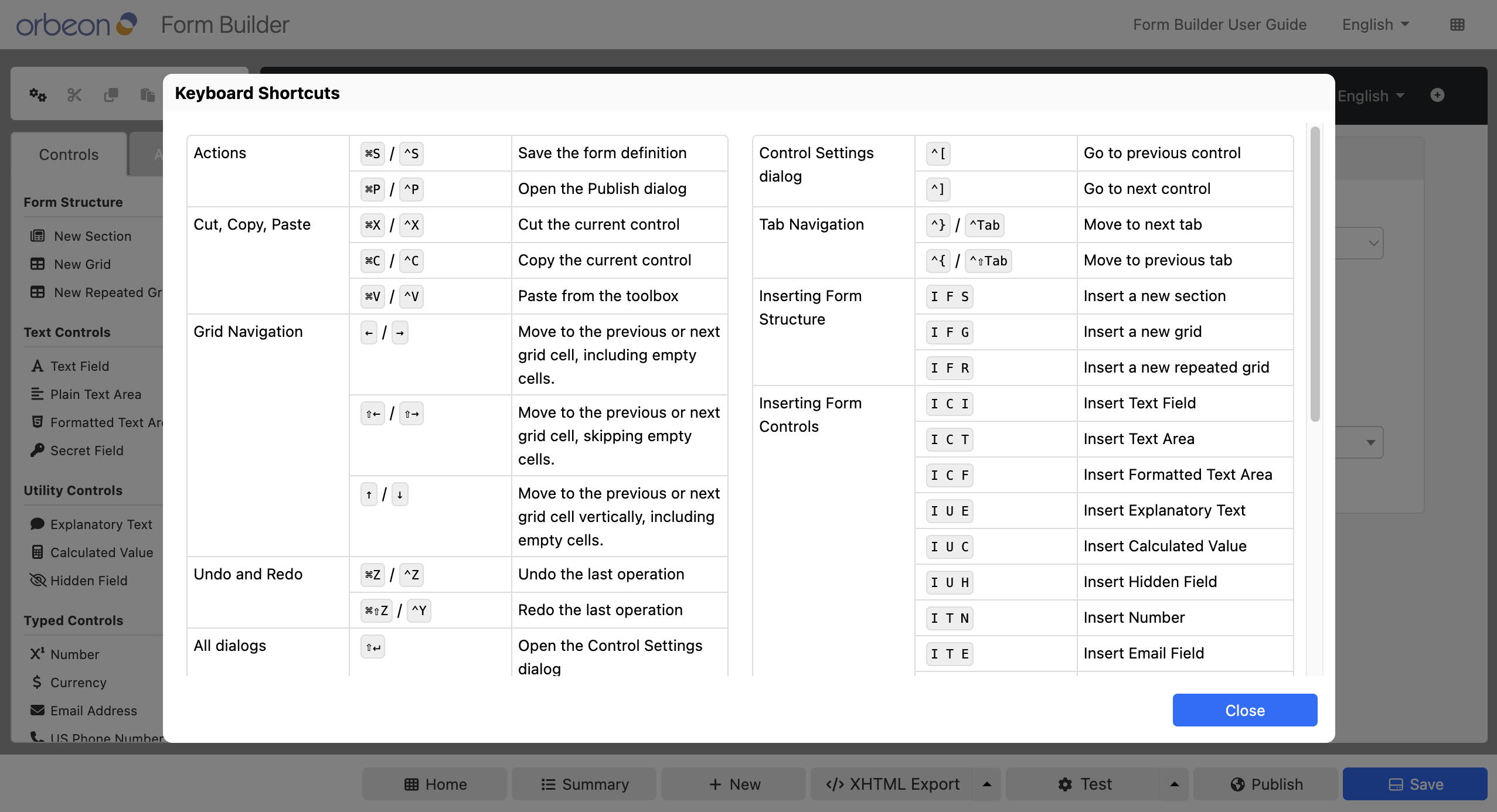
<h2 id="discoverability">Discoverability</h2>

<ul>
  <li>We’ve updated the <a href="https://doc.orbeon.com/form-builder/form-editor/keyboard-shortcuts">Keyboard Shortcuts</a> page to display all shortcuts in one place, along with the version in which each shortcut was introduced.</li>
  <li>In dialogs, hovering your mouse over a tab that can be accessed with a keyboard shortcut now shows hints with the relevant shortcuts as an alternative to clicking the tab (available since 2024.1.1).</li>
  <li>
    <p>Form Builder now includes a dedicated Keyboard Shortcuts dialog that lists all available shortcuts, allowing you to discover them without leaving the app (available since 2025.1).</p>

    <figure>
      <img src="/assets/posts/form-builder-keyboard-shortcuts-dialog.png" alt="Form Builder Keyboard Shortcuts dialog" />
      <figcaption>Form Builder Keyboard Shortcuts dialog</figcaption>
    </figure>
  </li>
</ul>

<h2 id="tabs-and-dialogs">Tabs and dialogs</h2>

<ul>
  <li>You can use keyboard shortcuts to switch between tabs in dialogs. Outside of dialogs, the same shortcuts let you switch between the Controls and Advanced tabs in the left sidebar (available since 2024.1.2).</li>
  <li>In the Control Settings dialog, you can now use shortcuts to navigate to the previous or next control, instead of clicking the Previous/Next buttons or closing and reopening the dialog (available since 2024.1.3).</li>
</ul>

<h2 id="cells-and-editing">Cells and editing</h2>

<ul>
  <li>Navigating between cells with the left and right arrow keys has been supported since 2020.1, and Form Builder now also allows navigation with the up and down arrow keys (available since 2024.1.1).</li>
  <li>We’ve added the ability to move the current grid line up or down (available since 2024.1.3).</li>
</ul>]]></content><author><name></name></author><category term="Feature" /><summary type="html"><![CDATA[We’ve continued to expand our support for keyboard shortcuts in Form Builder. Here’s a summary of the enhancements we’ve made so far this year.]]></summary></entry><entry><title type="html">Duplicate browser tab detection</title><link href="https://www.orbeon.com/2025/09/tab-duplication-detection" rel="alternate" type="text/html" title="Duplicate browser tab detection" /><published>2025-09-22T19:27:00+00:00</published><updated>2025-09-22T19:27:00+00:00</updated><id>https://www.orbeon.com/2025/09/tab-duplication-detection</id><content type="html" xml:base="https://www.orbeon.com/2025/09/tab-duplication-detection"><![CDATA[<h3 id="introduction">Introduction</h3>

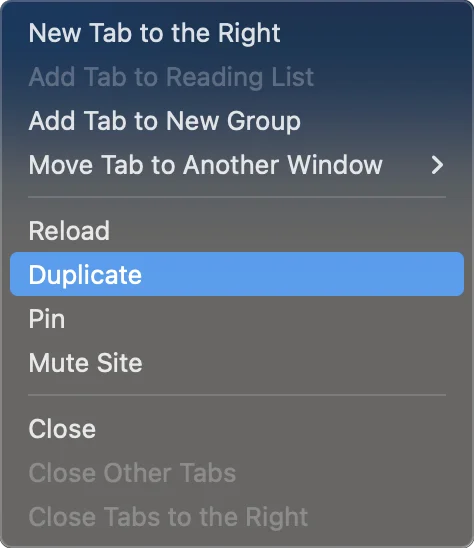
<p>A little-known feature of web browsers is their ability to <em>duplicate a tab</em>. Say you have navigated through a few pages, but would like to branch off: this allows you to copy the tab, and navigate to different pages in each tab. Each tab has a copy of the navigation history so far.</p>

<figure>
  <img src="/assets/posts/duplicate-tab-menu.webp" alt="Duplicate Tab browser menu entry" style="max-width: 237px; width: 100%;" />
  <figcaption>Duplicate Tab browser menu entry</figcaption>
</figure>

<p>However, this feature can cause issues with web <em>applications</em>, which keep much more complex state compared with simple web pages. In the case of Orbeon Forms, it usually does not make sense to be able to duplicate the state of a form. For example, if you are following a simple workflow to fill out form data, branching off in the middle of the workflow and saving two different versions of the completed form is very likely to be incompatible with the business logic.</p>

<h3 id="introducing-a-warning-message">Introducing a warning message</h3>

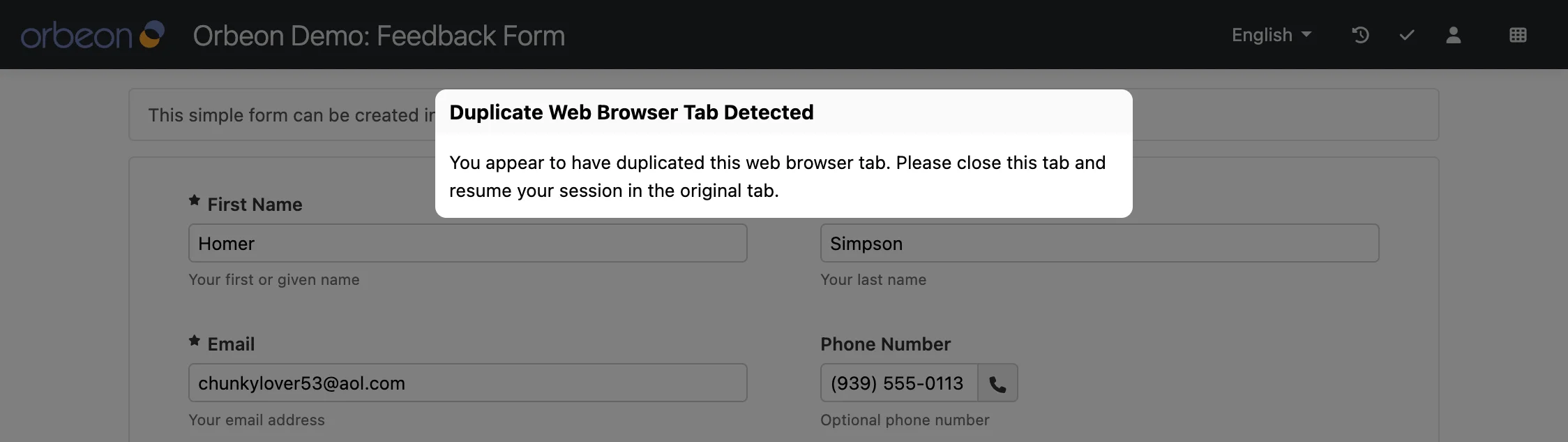
<p>Until now, Orbeon Forms would let you duplicate the tab, but you would get an error after using the copied tab. With Orbeon Forms 2024.1.3, we have added duplicate tab detection, which will warn you if you try to duplicate a tab.</p>

<p>While it is not possible to prevent the browser from trying to duplicate the tab, but we can detect the situation once the new tab is open, and tell the user that the new tab will not be usable. In fact, we make sure that the new tab is only able to show the user a message, and we disable the form’s functionality.</p>

<figure>
  <img src="/assets/posts/duplicate-tab-warning.webp" alt="Duplicate Tab warning" />
  <figcaption>Duplicate Tab warning</figcaption>
</figure>

<p>We hope you will like this new feature of Orbeon Forms 2024.1.3!</p>]]></content><author><name>Erik Bruchez</name></author><category term="Feature" /><summary type="html"><![CDATA[Introduction]]></summary></entry><entry><title type="html">Making your form data safer by preventing overwrites</title><link href="https://www.orbeon.com/2025/08/prevent-form-data-overwrites" rel="alternate" type="text/html" title="Making your form data safer by preventing overwrites" /><published>2025-08-28T17:00:00+00:00</published><updated>2025-08-28T17:00:00+00:00</updated><id>https://www.orbeon.com/2025/08/prevent-form-data-overwrites</id><content type="html" xml:base="https://www.orbeon.com/2025/08/prevent-form-data-overwrites"><![CDATA[<p>Users invest significant time and effort in filling out forms, so losing any data ranges from mildly annoying to catastrophic. As engineers, we often focus on technical failures that can cause data loss. What if a server running Orbeon Forms goes down? (Solution: <a href="https://doc.orbeon.com/configuration/advanced/clustering">clustering</a>.) What if users experience intermittent connectivity with the server? (Solution: <a href="https://doc.orbeon.com/configuration/properties/xforms#retry-mechanism-for-ajax-requests">retries</a>.)</p>

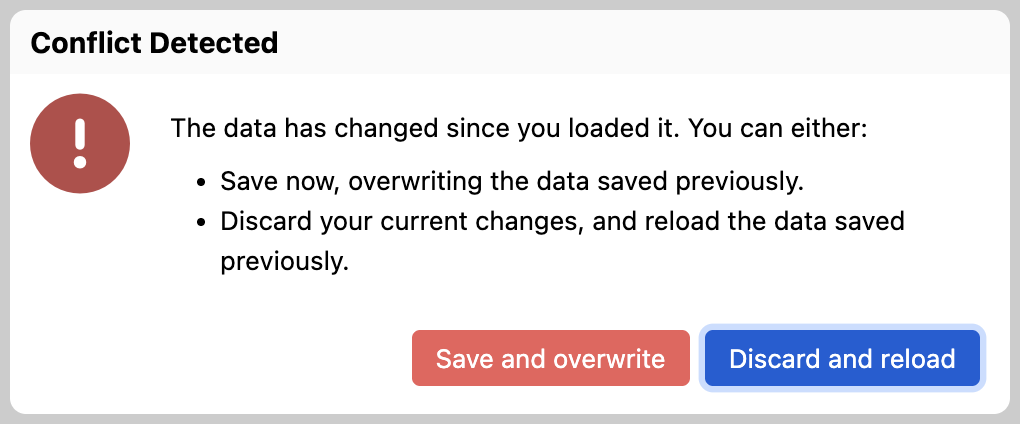
<p>Often, however, data loss results from human behavior rather than technical failure. A common case is overwriting data by mistake. For example, a user might open the same form in two browser tabs and unknowingly save in one tab, overwriting changes made in the other. A similar situation can occur when two users unknowingly edit the same data. To address this, we’ve added <a href="https://doc.orbeon.com/configuration/properties/form-runner/form-runner-detail-page#warning-the-user-when-data-has-changed-since-initially-loaded">automatic conflict detection</a>: Orbeon Forms warns you before you overwrite data that has changed since you last loaded it.</p>

<figure>
  <img src="/assets/posts/conflict-detected.png" alt="Conflict detected dialog" style="max-width: 510px; width: 100%;" />
  <figcaption>Conflict detected dialog</figcaption>
</figure>

<p>This complements other safeguards that help prevent data loss, such as background <a href="https://doc.orbeon.com/form-runner/persistence/autosave">autosave</a>, granting users a <a href="https://doc.orbeon.com/form-runner/features/lease">lease</a> on specific form data to prevent concurrent edits, and warnings when closing a tab or navigating away from a form with <a href="https://doc.orbeon.com/configuration/properties/form-runner/form-runner-detail-page#warning-the-user-when-data-is-unsafe">unsaved changes</a>. This feature will ship with Orbeon Forms 2025.1, which we plan to release at the end of this year.</p>]]></content><author><name>Alex Vernet</name></author><category term="Feature" /><summary type="html"><![CDATA[Users invest significant time and effort in filling out forms, so losing any data ranges from mildly annoying to catastrophic. As engineers, we often focus on technical failures that can cause data loss. What if a server running Orbeon Forms goes down? (Solution: clustering.) What if users experience intermittent connectivity with the server? (Solution: retries.)]]></summary></entry><entry><title type="html">Orbeon Forms 2024.1.2 PE</title><link href="https://www.orbeon.com/2025/06/orbeon-forms-202412-pe" rel="alternate" type="text/html" title="Orbeon Forms 2024.1.2 PE" /><published>2025-06-21T03:14:00+00:00</published><updated>2025-06-21T03:14:00+00:00</updated><id>https://www.orbeon.com/2025/06/orbeon-forms-202412-pe</id><content type="html" xml:base="https://www.orbeon.com/2025/06/orbeon-forms-202412-pe"><![CDATA[<p>We just published the Orbeon Forms 2024.1.2 PE maintenance release! It contains more than a hundred bug-fixes and some new features.</p>

<p>For details, see the <a href="https://doc.orbeon.com/release-notes/orbeon-forms-2024.1.2">release notes</a>.</p>

<p>You can download the latest version of Orbeon Forms from the <a href="https://www.orbeon.com/download">downloads</a> page.</p>

<p>We hope you enjoy this release!</p>]]></content><author><name>Erik Bruchez</name></author><category term="Release" /><summary type="html"><![CDATA[We just published the Orbeon Forms 2024.1.2 PE maintenance release! It contains more than a hundred bug-fixes and some new features.]]></summary></entry><entry><title type="html">ISIN and LEI Form Controls</title><link href="https://www.orbeon.com/2025/06/isin-and-lei-form-controls" rel="alternate" type="text/html" title="ISIN and LEI Form Controls" /><published>2025-06-12T19:11:00+00:00</published><updated>2025-06-12T19:11:00+00:00</updated><id>https://www.orbeon.com/2025/06/isin-and-lei-form-controls</id><content type="html" xml:base="https://www.orbeon.com/2025/06/isin-and-lei-form-controls"><![CDATA[<h3 id="introduction">Introduction</h3>

<p>Following up on the new SSN and EIN form controls <a href="ssn-and-ein-form-controls">discussed in our previous post</a>, we are now introducing two additional form controls for ISIN (International Securities Identification Number) and LEI (Legal Entity Identifier) in Orbeon Forms 2024.1.2. These will be very useful for government forms and enterprise forms, and in the financial sector.</p>

<h3 id="international-securities-identification-number">International Securities Identification Number</h3>

<p>Here is how the ISIN form control looks like in a form:</p>

<figure>
  <img src="/assets/posts/xbl-isin-edit.webp" alt="International Securities Identification Number (ISIN)" style="max-width: 338px; width: 100%;" />
  <figcaption>International Securities Identification Number (ISIN)</figcaption>
</figure>

<p>This form control automatically validates the ISIN format, including its length and its check digit.</p>

<h3 id="legal-entity-identifier">Legal Entity Identifier</h3>

<p>Here is how the LEI form control looks like in a form:</p>

<figure>
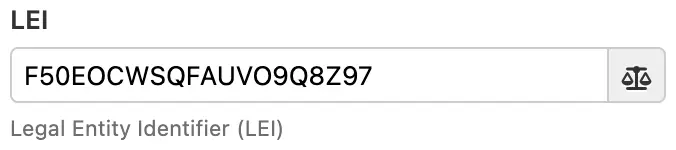
  <img src="/assets/posts/xbl-lei-edit.webp" alt="Legal Entity Identifier (LEI)" style="max-width: 338px; width: 100%;" />
  <figcaption>Legal Entity Identifier (LEI)</figcaption>
</figure>

<p>This form control automatically validates the LEI format, including its length and its checksum digits.</p>

<h3 id="orbeon-forms-component-system">Orbeon Forms component system</h3>

<p>Like for the SSN and EIN form controls, these ISIN and LEI form controls are implemented using the Orbeon Forms component system, which allows for the creation of reusable form controls, including builtin validations.</p>

<h3 id="see-also">See also</h3>

<p>For more information, see the documentation:</p>

<ul>
  <li><a href="https://doc.orbeon.com/form-runner/component/isin">International Securities Identification Number (ISIN)</a></li>
  <li><a href="https://doc.orbeon.com/form-runner/component/lei">Legal Entity Identifier (LEI)</a></li>
  <li><a href="https://doc.orbeon.com/form-runner/component/us-ssn">US Social Security Number (SSN)</a></li>
  <li><a href="https://doc.orbeon.com/form-runner/component/us-ein">US Employer Identification Number (EIN)</a></li>
</ul>

<p>We hope you will like this new feature of Orbeon Forms 2024.1.2!</p>]]></content><author><name>Erik Bruchez</name></author><category term="Feature" /><summary type="html"><![CDATA[Introduction]]></summary></entry><entry><title type="html">SSN and EIN Form Controls</title><link href="https://www.orbeon.com/2025/06/ssn-and-ein-form-controls" rel="alternate" type="text/html" title="SSN and EIN Form Controls" /><published>2025-06-04T22:00:00+00:00</published><updated>2025-06-04T22:00:00+00:00</updated><id>https://www.orbeon.com/2025/06/ssn-and-ein-form-controls</id><content type="html" xml:base="https://www.orbeon.com/2025/06/ssn-and-ein-form-controls"><![CDATA[<h3 id="introduction">Introduction</h3>

<p>For government forms and enterprise forms in particular, having form controls for US Social Security Numbers (SSN) and US Employer Identification Numbers (EIN) is often a requirement.</p>

<p>While you could create your own field with custom validation before, with Orbeon Forms 2024.1.2, we are introducing built-in new form controls specifically for these use cases. They will just show up in the Form Builder toolbox, and you can drag and drop them into your forms.</p>

<h3 id="us-social-security-number-ssn-form-control">US Social Security Number (SSN) Form Control</h3>

<figure>
  <img src="/assets/posts/xbl-us-ssn-edit-obscured.webp" alt="SSN form control with obscured value" style="max-width: 220px; width: 100%;" />
  <figcaption>SSN form control with obscured value</figcaption>
</figure>

<p>With the SSN form control, in particular, we made it easy to obscure the value, which is a common requirement for sensitive information. The SSN control also allows you to reveal the value when needed, using a checkbox when editing form data:</p>

<figure>
  <img src="/assets/posts/xbl-us-ssn-edit-revealed.webp" alt="SSN form control with revealed value" style="max-width: 220px; width: 100%;" />
  <figcaption>SSN form control with revealed value</figcaption>
</figure>

<p>Or by showing only the last four digits in readonly modes such as the View and PDF modes:</p>

<figure>
  <img src="/assets/posts/xbl-us-ssn-view-partial.webp" alt="SSN form control with partially-revealed value" style="max-width: 440px; width: 100%;" />
  <figcaption>SSN form control with partially-revealed value</figcaption>
</figure>

<p>The exact behavior of the SSN form control can be configured in Form Builder or using configuration properties, and it is possible to set the following options:</p>

<figure>
  <img src="/assets/posts/xbl-us-ssn-settings.webp" alt="SSN form control settings" style="max-width: 486px; width: 100%;" />
  <figcaption>SSN form control settings</figcaption>
</figure>

<h3 id="security-and-gdpr">Security and GDPR</h3>

<p>Because the SSN is a sensitive piece of information, we recommend that you handle this data in the following ways:</p>

<ul>
  <li>Consider not requesting this information from users unless absolutely necessary.</li>
  <li>If you request it, consider making only transient use of it, such as calling a verification service, without storing it in your database.</li>
  <li>If you do store it, consider encrypting it in your database, and ensure that you comply with data protection regulations such as GDPR. Orbeon Forms <a href="https://doc.orbeon.com/form-builder/advanced/field-level-encryption">supports encryption at rest</a>, which satisfies this requirement.</li>
</ul>

<h3 id="us-employer-identification-number-ein-form-control">US Employer Identification Number (EIN) Form Control</h3>

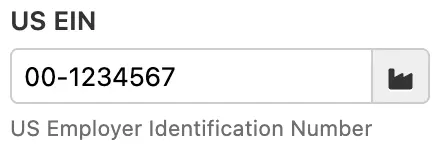
<p>The US Employer Identification Number (EIN) form control is also available, which allows you to enter an EIN in the format <code class="language-plaintext highlighter-rouge">12-3456789</code>. The EIN control does not have options for obscuring or revealing the value, as it is considered less sensitive than a Social Security Number.</p>

<figure>
  <img src="/assets/posts/xbl-us-ein-edit.webp" alt="EIN form control" style="max-width: 220px; width: 100%;" />
  <figcaption>EIN form control</figcaption>
</figure>

<h3 id="orbeon-forms-component-system">Orbeon Forms component system</h3>

<p>These components are implemented using the Orbeon Forms component system, which is a powerful way to create reusable form controls. We made some improvements to the component system to make it easier to create and use such components, so more components like those can be created in the future.</p>

<p>We have also prepared a brand-new form template which showcases these form controls, and we have updated existing templates which used SSN and/or EIN fields.</p>

<h3 id="see-also">See also</h3>

<p>For more information, see the documentation:</p>

<ul>
  <li><a href="https://doc.orbeon.com/form-runner/component/us-ssn">US Social Security Number (SSN)</a></li>
  <li><a href="https://doc.orbeon.com/form-runner/component/us-ein">US Employer Identification Number (EIN)</a></li>
  <li><a href="https://doc.orbeon.com/form-builder/advanced/field-level-encryption">Field-level encryption</a></li>
</ul>

<p>We hope you will like this new feature of Orbeon Forms 2024.1.2!</p>]]></content><author><name>Erik Bruchez</name></author><category term="Feature" /><summary type="html"><![CDATA[Introduction]]></summary></entry><entry><title type="html">Custom PDF template field names</title><link href="https://www.orbeon.com/2025/05/custom-pdf-templates-field-names" rel="alternate" type="text/html" title="Custom PDF template field names" /><published>2025-05-28T21:00:00+00:00</published><updated>2025-05-28T21:00:00+00:00</updated><id>https://www.orbeon.com/2025/05/custom-pdf-templates-field-names</id><content type="html" xml:base="https://www.orbeon.com/2025/05/custom-pdf-templates-field-names"><![CDATA[<p>Orbeon Forms supports <a href="https://doc.orbeon.com/form-runner/features/pdf-production/pdf-templates">PDF templates</a>. This feature requires mapping form fields to PDF fields. To achieve this, until now, you had to name the fields in the PDF to match the Form Runner fields.</p>

<p>With Orbeon Forms 2024.1.2, the “Control Settings” dialog is enhanced to let you set a custom PDF field name for each form field. This makes it easier to manage the mapping between form fields and PDF fields. If at least one PDF template already attached to the form, Form Builder will let you know if the field is not present in the PDF templates.</p>

<figure>
  <img src="/assets/posts/pdf-template-field-input.webp" alt="Custom PDF field name" style="max-width: 481px; width: 100%;" />
  <figcaption>Custom PDF field name</figcaption>
</figure>

<p>In addition, if there is at least one PDF template already attached to the form, you can directly pick a field name from the list instead of having to type it in.</p>

<figure>
  <img src="/assets/posts/pdf-template-field-dropdown.webp" alt="Custom PDF field name from the dropdown" style="max-width: 481px; width: 100%;" />
  <figcaption>Custom PDF field name from the dropdown</figcaption>
</figure>

<p>See also:</p>

<ul>
  <li><a href="https://doc.orbeon.com/form-runner/features/pdf-production/pdf-templates">PDF templates documentation</a></li>
  <li>our recent post on <a href="https://www.orbeon.com/2025/02/pdf-production">PDF production</a></li>
</ul>

<p>We hope you will like this new feature of Orbeon Forms 2024.1.2!</p>]]></content><author><name>Erik Bruchez</name></author><category term="Feature" /><summary type="html"><![CDATA[Orbeon Forms supports PDF templates. This feature requires mapping form fields to PDF fields. To achieve this, until now, you had to name the fields in the PDF to match the Form Runner fields.]]></summary></entry><entry><title type="html">2024.1 Performance improvements</title><link href="https://www.orbeon.com/2025/05/performance-improvements" rel="alternate" type="text/html" title="2024.1 Performance improvements" /><published>2025-05-14T21:50:00+00:00</published><updated>2025-05-14T21:50:00+00:00</updated><id>https://www.orbeon.com/2025/05/performance-improvements</id><content type="html" xml:base="https://www.orbeon.com/2025/05/performance-improvements"><![CDATA[<figure>
  <img src="/assets/posts/performance-improvements.webp" alt="" style="max-width: 300px; width: 100%;" />
  <figcaption></figcaption>
</figure>

<p>We are regularly profiling and optimizing Orbeon Forms. With Orbeon Forms 2024.1, in particular, we:</p>

<ul>
  <li>improved page loading times by removing overhead in our internal page router (<a href="https://github.com/orbeon/orbeon-forms/issues/6547">#6547</a>)</li>
  <li>added database indexes to speed up form publishing and other operations (<a href="https://github.com/orbeon/orbeon-forms/issues/5689">#5689</a>)</li>
  <li>added paging support for the form metadata API, which improves the performance of the Forms and Admin pages (<a href="https://github.com/orbeon/orbeon-forms/issues/5493">#5493</a>)</li>
</ul>

<p>With Orbeon Forms 2024.1.1, we continued with the following:</p>

<ul>
  <li>improved performance of data reindexing (<a href="https://github.com/orbeon/orbeon-forms/issues/6731">#6731</a>/<a href="https://github.com/orbeon/orbeon-forms/issues/6773">#6773</a>)</li>
  <li>improved compilation times for formulas that refer to many form controls (<a href="https://github.com/orbeon/orbeon-forms/issues/5948">#5948</a>)</li>
</ul>

<p>And now, for the upcoming 2024.1.2 release, we have already made the following improvements:</p>

<ul>
  <li>improved the response of form updates when the user interacts with large forms by around 25% (<a href="https://github.com/orbeon/orbeon-forms/issues/6981">#6981</a>/<a href="https://github.com/orbeon/orbeon-forms/issues/6995">#6995</a>/<a href="https://github.com/orbeon/orbeon-forms/issues/6998">#6998</a>/<a href="https://github.com/orbeon/orbeon-forms/issues/6999">#6999</a>)</li>
  <li>made the Form Builder “Control Settings” dialog faster (<a href="https://github.com/orbeon/orbeon-forms/issues/6972">#6972</a>)</li>
</ul>

<p>We hope that you will like these Orbeon Forms enhancements!</p>]]></content><author><name>Erik Bruchez</name></author><category term="Feature" /><summary type="html"><![CDATA[]]></summary></entry><entry><title type="html">Orbeon Forms 2022.1.9 PE</title><link href="https://www.orbeon.com/2025/04/orbeon-forms-202219-pe" rel="alternate" type="text/html" title="Orbeon Forms 2022.1.9 PE" /><published>2025-04-09T21:55:00+00:00</published><updated>2025-04-09T21:55:00+00:00</updated><id>https://www.orbeon.com/2025/04/orbeon-forms-202219-pe</id><content type="html" xml:base="https://www.orbeon.com/2025/04/orbeon-forms-202219-pe"><![CDATA[<p>We just published the Orbeon Forms 2022.1.9 PE maintenance release!</p>

<p>For details, see the <a href="https://doc.orbeon.com/release-notes/orbeon-forms-2022.1.9">release notes</a>.</p>

<p>You can download the latest version of Orbeon Forms from the <a href="https://www.orbeon.com/download">downloads</a> page.</p>

<p>We hope you enjoy this release!</p>]]></content><author><name>Erik Bruchez</name></author><category term="Release" /><summary type="html"><![CDATA[We just published the Orbeon Forms 2022.1.9 PE maintenance release!]]></summary></entry><entry><title type="html">Up/Down Form Builder grid navigation</title><link href="https://www.orbeon.com/2025/04/up-down-navigation" rel="alternate" type="text/html" title="Up/Down Form Builder grid navigation" /><published>2025-04-08T02:40:00+00:00</published><updated>2025-04-08T02:40:00+00:00</updated><id>https://www.orbeon.com/2025/04/up-down-navigation</id><content type="html" xml:base="https://www.orbeon.com/2025/04/up-down-navigation"><![CDATA[<h2 id="keyboard-navigation-in-form-builder">Keyboard navigation in Form Builder</h2>

<p>We have been regularly adding keyboard shortcuts to Form Builder. Keyboard shortcuts are very useful for power users, as they allow you to keep your hands on the keyboard to create, edit, and navigate a form under construction. For all the details, see <a href="https://doc.orbeon.com/form-builder/form-editor/keyboard-shortcuts">Keyboard shortcuts</a>.</p>

<h2 id="updown-navigation-in-form-builder-grids">Up/Down navigation in Form Builder grids</h2>

<p>With Orbeon Forms 2024.1.1, we just added support for the <em>Up</em> and <em>Down</em> cursor keys to move up and down in the form, including going across grid and section boundaries. The following video show this in action, as well as the <em>Left</em> and <em>Right</em> keys to move left and right in a grid:</p>

<video src="/assets/posts/grid-keyboard-navigation.mov" width="100%" autoplay="" loop="" muted="" controls=""></video>

<p>This is very easy to use: select a cell, and then use the keyboard’s cursor keys to navigate between grid cells!<sup id="fnref:trick" role="doc-noteref"><a href="#fn:trick" class="footnote" rel="footnote">1</a></sup> The selected cell moves to the next location, and, if needed, the form area scrolls.</p>

<p>We hope that you will like this new feature of Orbeon Forms!</p>

<hr />

<div class="footnotes" role="doc-endnotes">
  <ol>
    <li id="fn:trick" role="doc-endnote">
      <p>A little trick we had to work on was not to lose the vertical position when moving up and down grid cells. The effect is similar to what you have in (good) text editors or word processors, when moving your cursor up and down across text lines. <a href="#fnref:trick" class="reversefootnote" role="doc-backlink">&#8617;</a></p>
    </li>
  </ol>
</div>]]></content><author><name>Erik Bruchez</name></author><category term="Feature" /><summary type="html"><![CDATA[Keyboard navigation in Form Builder]]></summary></entry><entry><title type="html">Orbeon Forms 2024.1.1 PE</title><link href="https://www.orbeon.com/2025/03/orbeon-forms-202411-pe" rel="alternate" type="text/html" title="Orbeon Forms 2024.1.1 PE" /><published>2025-03-28T01:30:00+00:00</published><updated>2025-03-28T01:30:00+00:00</updated><id>https://www.orbeon.com/2025/03/orbeon-forms-202411-pe</id><content type="html" xml:base="https://www.orbeon.com/2025/03/orbeon-forms-202411-pe"><![CDATA[<p>We just published the Orbeon Forms 2024.1.1 PE maintenance release!</p>

<p>For details, see the <a href="https://doc.orbeon.com/release-notes/orbeon-forms-2024.1.1">release notes</a>.</p>

<p>You can download the latest version of Orbeon Forms from the <a href="https://www.orbeon.com/download">downloads</a> page.</p>

<p>We hope you enjoy this release!</p>]]></content><author><name>Erik Bruchez</name></author><category term="Release" /><summary type="html"><![CDATA[We just published the Orbeon Forms 2024.1.1 PE maintenance release!]]></summary></entry><entry><title type="html">Workflow Stage Improvements</title><link href="https://www.orbeon.com/2025/03/workflow-stage-improvements" rel="alternate" type="text/html" title="Workflow Stage Improvements" /><published>2025-03-13T22:15:00+00:00</published><updated>2025-03-13T22:15:00+00:00</updated><id>https://www.orbeon.com/2025/03/workflow-stage-improvements</id><content type="html" xml:base="https://www.orbeon.com/2025/03/workflow-stage-improvements"><![CDATA[<h2 id="workflow-stage">Workflow stage</h2>

<p>Orbeon Forms supports the notion of a <a href="https://doc.orbeon.com/form-runner/features/workflow-stage">workflow stage</a>, which allows you to track the progress of a form through a multistep workflow. Workflow stages might be “submitted”, “approved”, “rejected”, and so on.</p>

<p>Orbeon Forms 2024.1 introduces some new features related to the workflow stage.</p>

<h2 id="searching-by-workflow-stage-in-the-summary-page">Searching by workflow stage in the Summary page</h2>

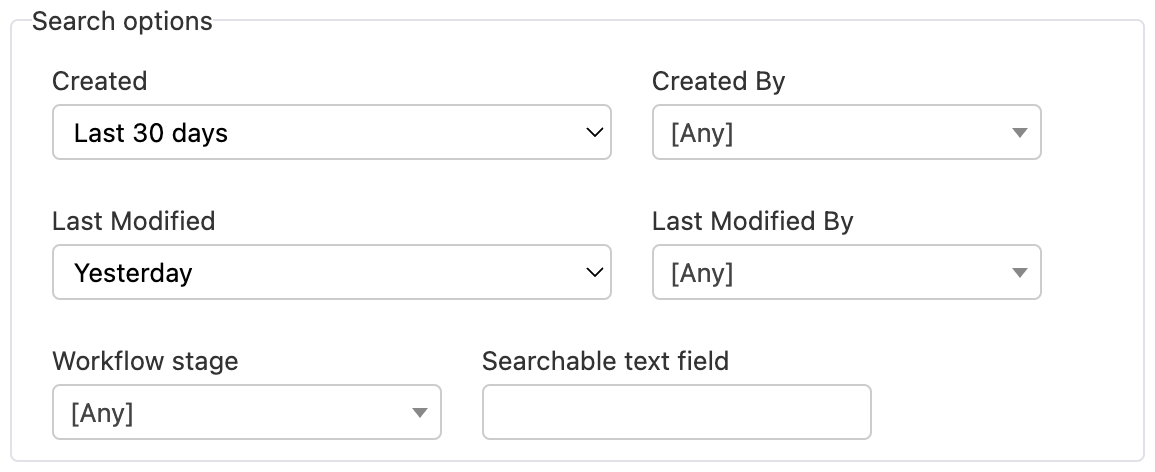
<p>The Summary page always offered the option to show the workflow stage associated with form data. Since Orbeon Forms 2024.1 you can also <em>search</em> by workflow stage. This is useful to quickly find all the forms in a given workflow stage.</p>

<figure>
  <img src="/assets/posts/summary-search-created-last-modified.png" alt="Searching by workflow stage in the Summary page" />
  <figcaption>Searching by workflow stage in the Summary page</figcaption>
</figure>

<h2 id="workflow-stage-in-the-navbar">Workflow stage in the Navbar</h2>

<p>Since Orbeon Forms 2024.1.1, you can enable showing the workflow stage in the navigation bar. This gives users of a form a quick way to see the current workflow stage of the form they are working on. Since this is only useful for some scenarios of workflow stages, this is disabled by default, but you can enable the feature for specific forms, apps, or globally.</p>

<figure>
  <img src="/assets/posts/workflow-stage-navbar.png" alt="Workflow stage in the navigation bar" />
  <figcaption>Workflow stage in the navigation bar</figcaption>
</figure>

<p>We hope that you like these new workflow features in Orbeon Forms! For more details, see also:</p>

<ul>
  <li><a href="https://doc.orbeon.com/form-runner/features/workflow-stage">Workflow stage documentation</a></li>
  <li><a href="/2021/01/new-workflow-capabilities-in-orbeon.html">New workflow capabilities in Orbeon Forms 2020.1</a></li>
</ul>]]></content><author><name>Erik Bruchez</name></author><category term="Feature" /><summary type="html"><![CDATA[Workflow stage]]></summary></entry><entry><title type="html">Orbeon Forms 2023.1.7 PE</title><link href="https://www.orbeon.com/2025/02/orbeon-forms-202317-pe" rel="alternate" type="text/html" title="Orbeon Forms 2023.1.7 PE" /><published>2025-02-13T17:00:00+00:00</published><updated>2025-02-13T17:00:00+00:00</updated><id>https://www.orbeon.com/2025/02/orbeon-forms-202317-pe</id><content type="html" xml:base="https://www.orbeon.com/2025/02/orbeon-forms-202317-pe"><![CDATA[<p>We just published the Orbeon Forms 2023.1.7 PE maintenance release!</p>

<p>For details, see the <a href="https://doc.orbeon.com/release-notes/orbeon-forms-2023.1.7">release notes</a>.</p>

<p>You can download the latest version of Orbeon Forms from the <a href="https://www.orbeon.com/download">downloads</a> page.</p>

<p>We hope you enjoy this release!</p>]]></content><author><name>Erik Bruchez</name></author><category term="Release" /><summary type="html"><![CDATA[We just published the Orbeon Forms 2023.1.7 PE maintenance release!]]></summary></entry><entry><title type="html">PDF Production</title><link href="https://www.orbeon.com/2025/02/pdf-production" rel="alternate" type="text/html" title="PDF Production" /><published>2025-02-13T00:15:00+00:00</published><updated>2025-02-13T00:15:00+00:00</updated><id>https://www.orbeon.com/2025/02/pdf-production</id><content type="html" xml:base="https://www.orbeon.com/2025/02/pdf-production"><![CDATA[<p>Orbeon Forms features many PDF-related features. In this post, we go over the different options available to produce and use PDF files with Orbeon Forms.</p>

<figure>
  <img src="/img/pages/pdf-examples.png" alt="Examples of PDF files" style="max-width: 500px; width: 100%;" />
  <figcaption>Examples of PDF files</figcaption>
</figure>

<h2 id="automatic-pdf">Automatic PDF</h2>

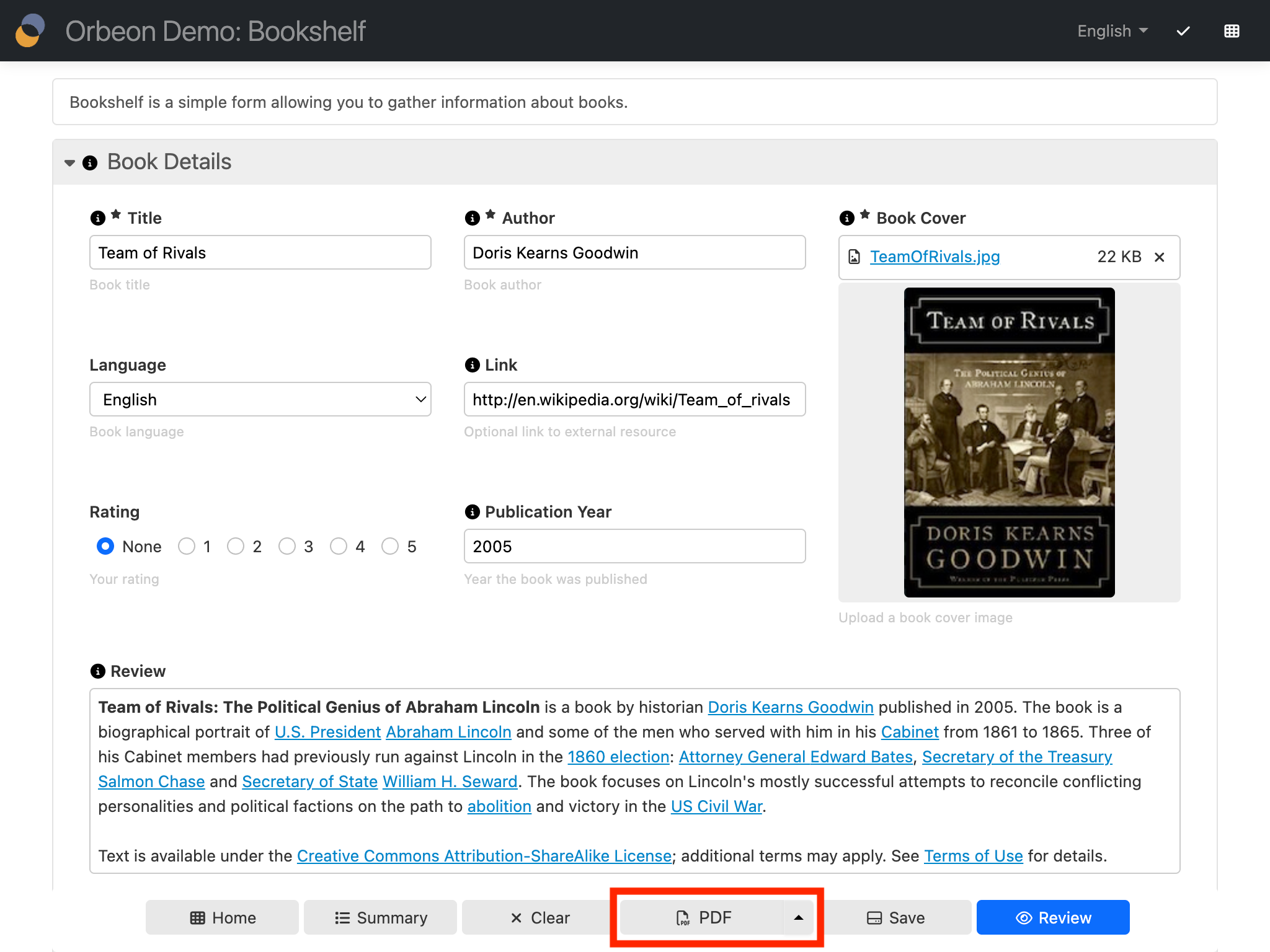
<p>The automatic PDF generation is built-in: you don’t have to do anything to activate it. In general, the end-user can
download the PDF with a button on the form’s Summary page or Detail page. These buttons are present by default, but you
can configure them away if you wish.</p>

<figure>
  <img src="/assets/posts/pdf-button.png" alt="PDF button" style="max-width: 800px; width: 100%;" />
  <figcaption>PDF button</figcaption>
</figure>

<p>Automatic PDF files contain a PDF table of contents based on the hierarchy of sections present in your form.</p>

<figure>
  <img src="/assets/posts/pdf-bookmarks.png" alt="PDF table of contents" style="max-width: 800px; width: 100%;" />
  <figcaption>PDF table of contents</figcaption>
</figure>

<p>Automatic PDF files also support a comprehensive configuration of the header and footer. By default, this is what’s included:</p>

<ul>
  <li><strong>In the header:</strong> Orbeon logo and form title.</li>
  <li><strong>In the footer:</strong> Form title, page number, and page count.</li>
</ul>

<p>You can configure each of the fix header and footer locations (header/footer, left/center/right) separately, including:</p>

<ul>
  <li>that it should remain blank</li>
  <li>that it should use the default</li>
  <li>that it should be customized</li>
</ul>

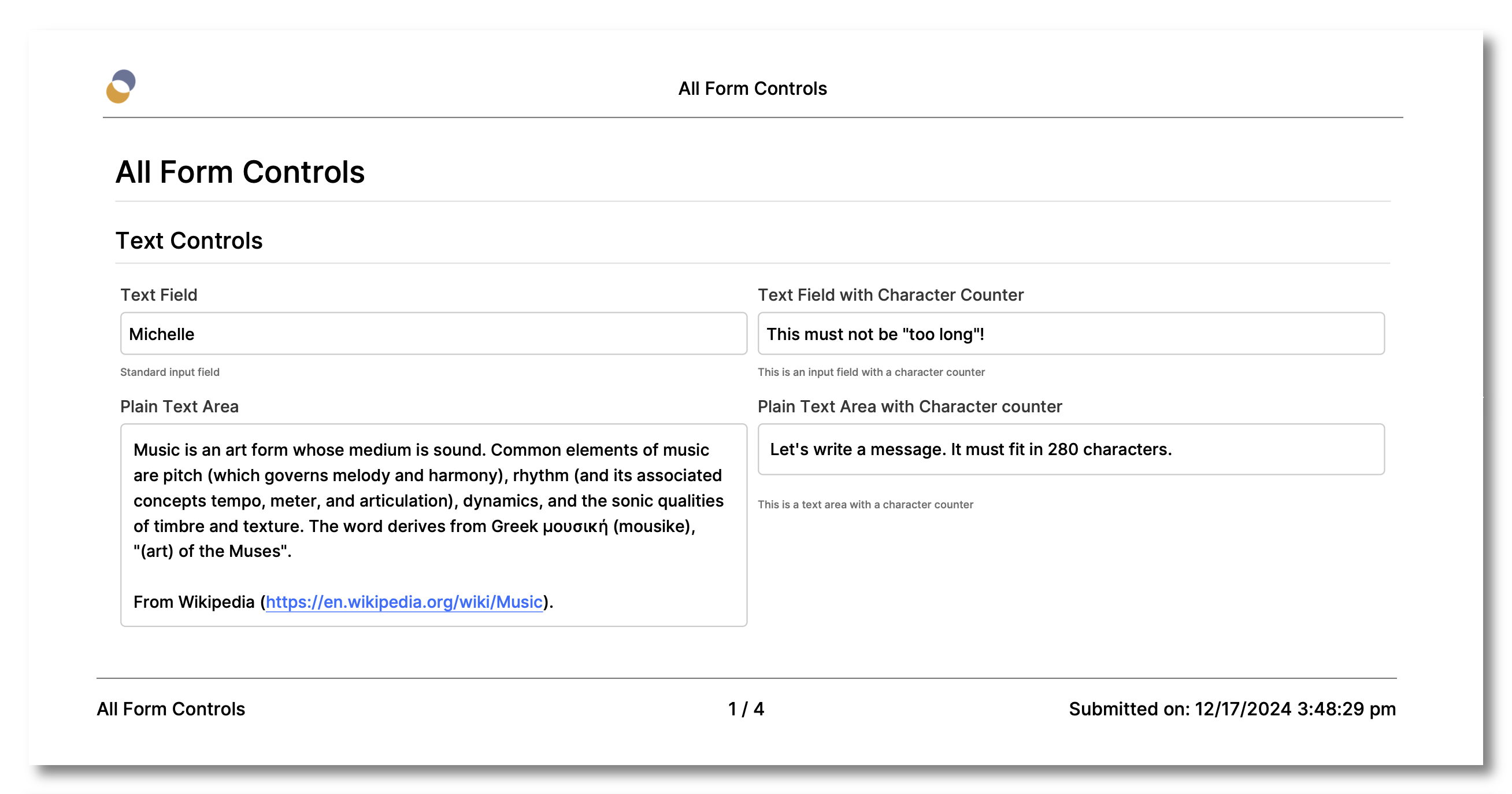
<p>In addition, this can be done for all, first, odd, and even pages separately! The various parts can be shown or hidden with formulas, contain values coming from the form, and more. All, in all, the
header and footer configuration is quite flexible. The following screenshot shows, for example, the automatic inclusion of a submission date in the PDF footer.</p>

<figure>
  <img src="/assets/posts/pdf-header-footer-submitted.png" alt="PDF header and footer example" style="max-width: 800px; width: 100%;" />
  <figcaption>PDF header and footer example</figcaption>
</figure>

<p>For more on headers and footers, see <a href="https://doc.orbeon.com/form-runner/features/pdf-production/pdf-automatic-header-footer">Automatic PDF header and footer configuration</a>.</p>

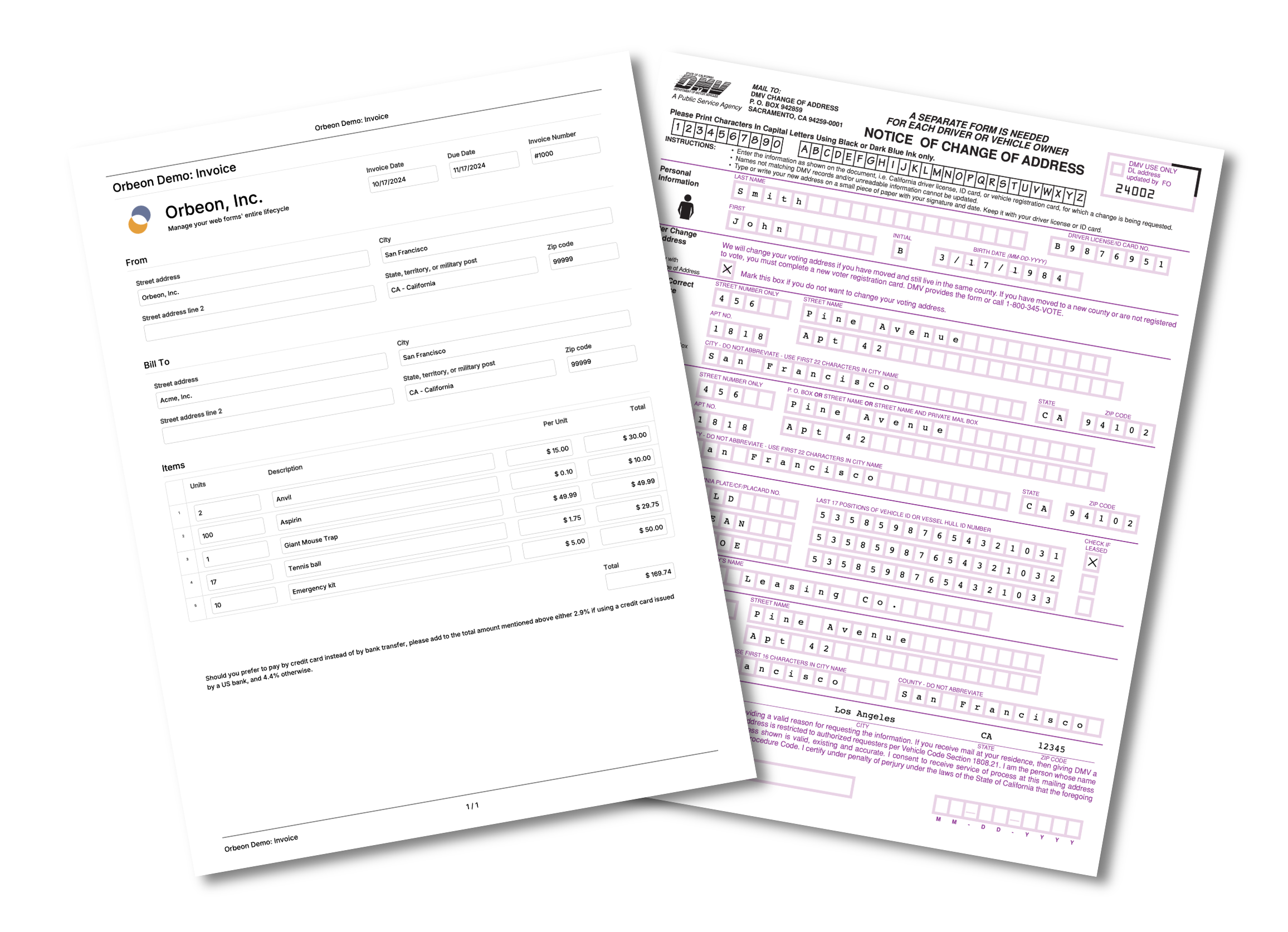
<h2 id="pdf-templates">PDF templates</h2>

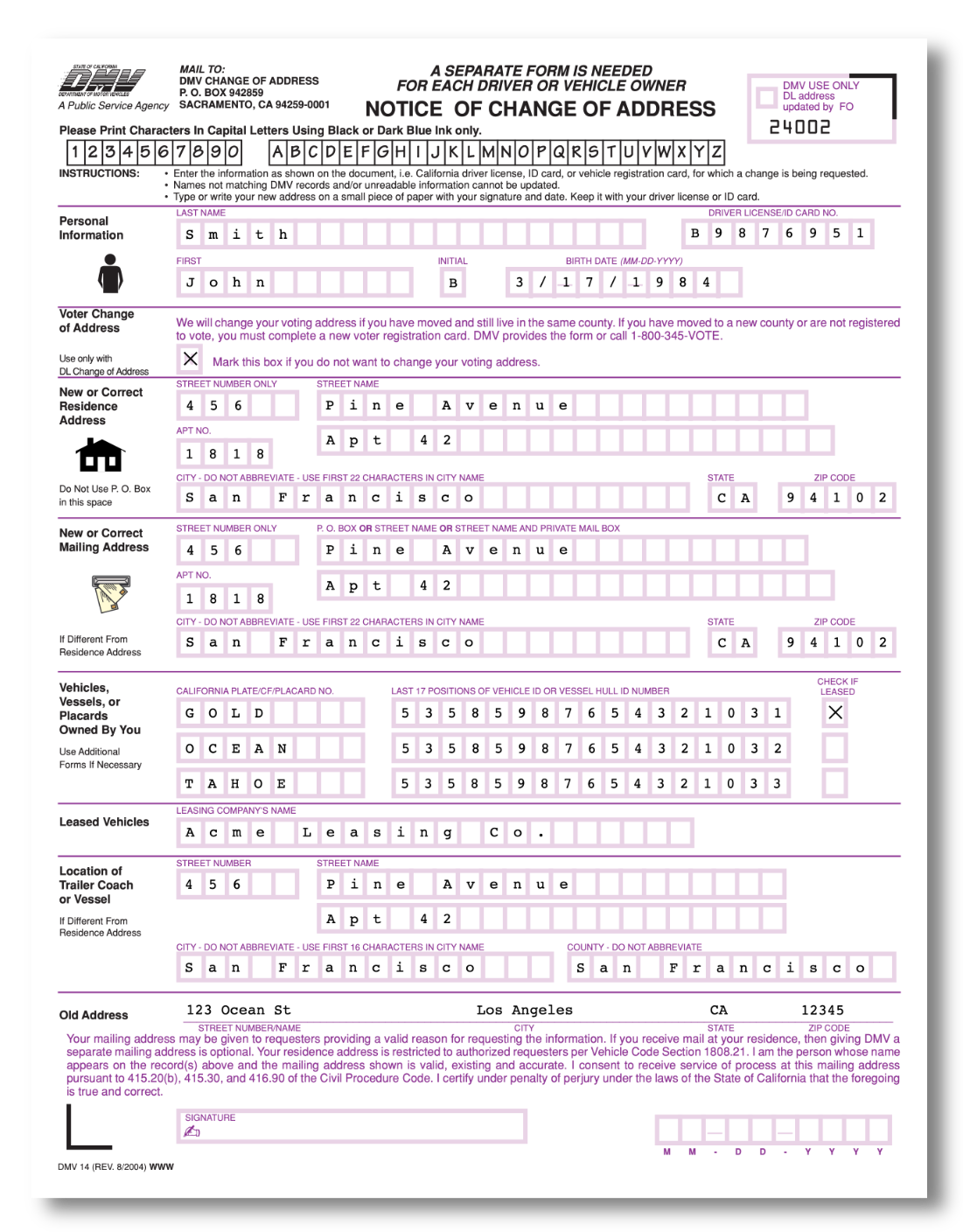
<p>PDF templates use a completely different approach compared with automatic PDF generation. The idea is that you already have a PDF, and that Orbeon Forms will
fill out markers in the PDF (expressed with PDF form fields) with data from the form. In order to do so, your form must
make sure that field names match the names of the PDF form fields.</p>

<figure>
  <img src="/assets/posts/pdf-dmv14-shadow.png" alt="Example of filled PDF template" style="max-width: 500px; width: 100%;" />
  <figcaption>Example of filled PDF template</figcaption>
</figure>

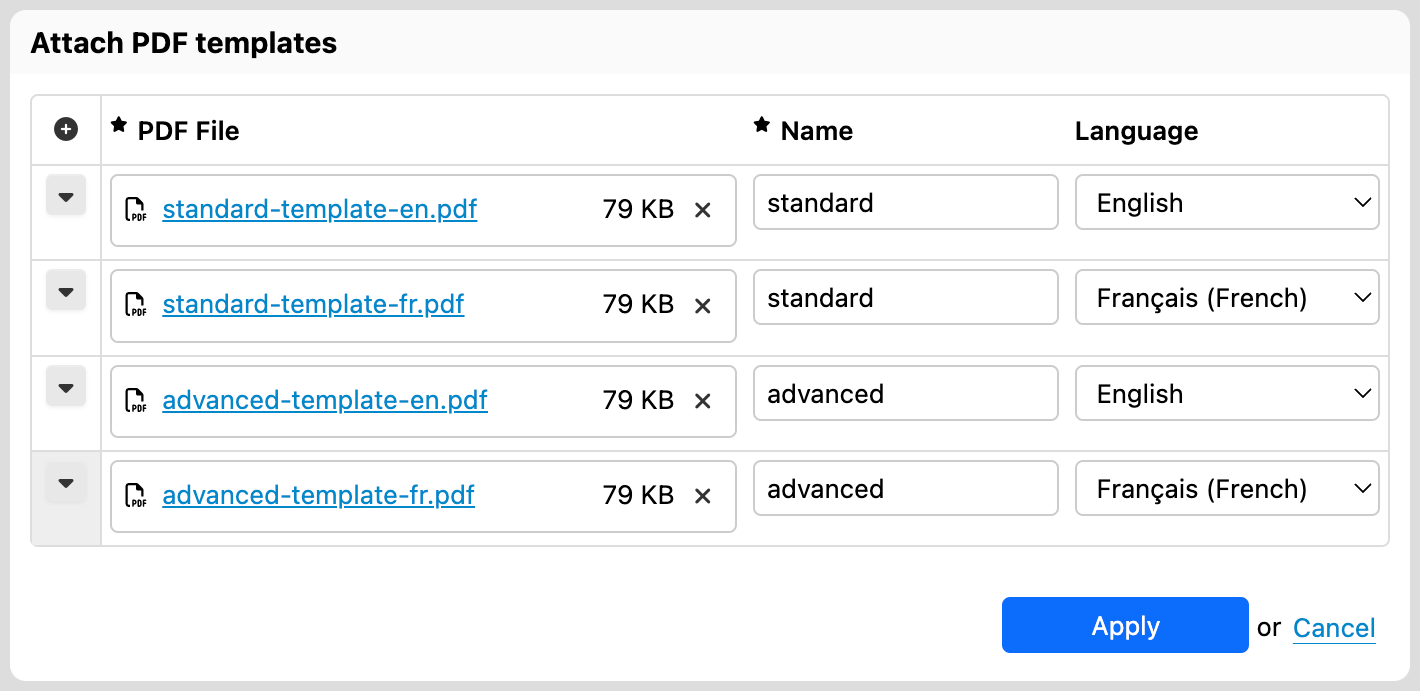
<p>You can configure one or more PDF templates in Form Builder. When multiple templates are present, Orbeon Forms chooses one based on name and language.</p>

<figure>
  <img src="/assets/posts/pdf-templates-dialog.png" alt="PDF Templates Dialog" style="max-width: 600px; width: 100%;" />
  <figcaption>PDF Templates Dialog</figcaption>
</figure>

<p>For more, see <a href="https://doc.orbeon.com/form-runner/features/pdf-production/pdf-templates">PDF Templates</a>.</p>

<h2 id="more-pdf-uses">More PDF uses</h2>

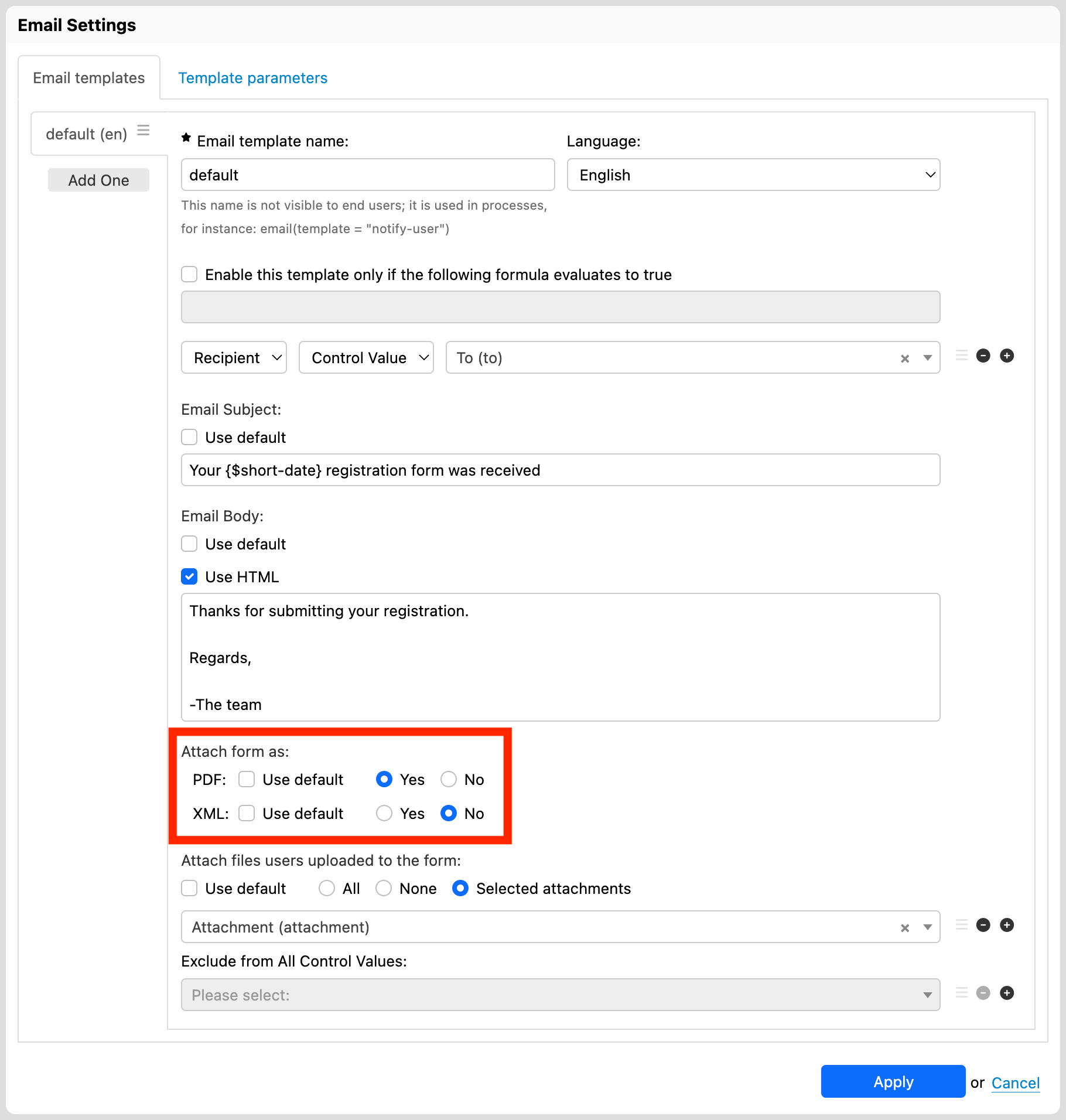
<p>In addition to just let the user download a PDF, you can also send a PDF as an <a href="https://doc.orbeon.com/form-runner/advanced/buttons-and-processes/actions-form-runner/actions-form-runner-email">attachment to an email</a>, or <a href="https://doc.orbeon.com/form-runner/advanced/buttons-and-processes/actions-form-runner/actions-form-runner-send">send it to a service endpoint</a>. The following screenshot shows how you can configure a PDF attachment to an email in the “Email Settings” dialog.</p>

<figure>
  <img src="/assets/posts/pdf-email-settings.png" alt="Email Settings" style="max-width: 800px; width: 100%;" />
  <figcaption>Email Settings</figcaption>
</figure>

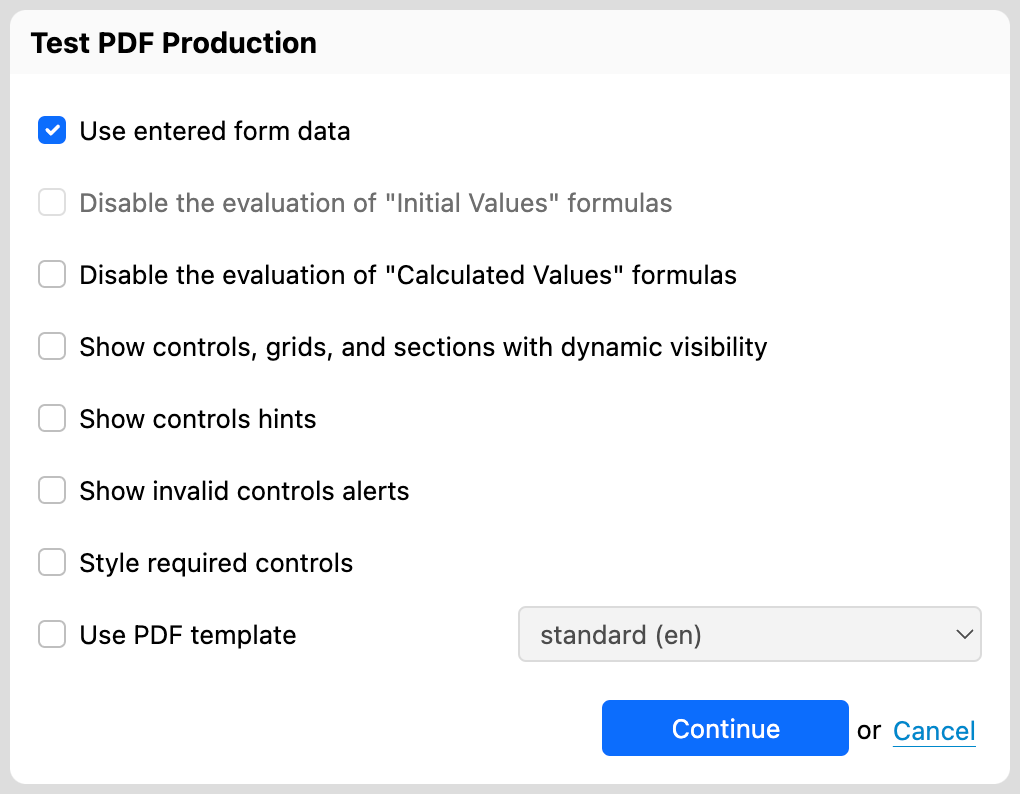
<h2 id="testing-pdf-output">Testing PDF output</h2>

<p>You can test automatic PDF generation, including PDF templates, directly from Form Builder. We covered this feature in a previous post, <a href="2021-11-11-testing-pdf-production-in-form-builder.md">“Testing PDF production in Form Builder”</a>.</p>

<figure>
  <img src="/assets/posts/test-pdf-use-data.png" alt="PDF Test Dialog" style="max-width: 440px; width: 100%;" />
  <figcaption>PDF Test Dialog</figcaption>
</figure>

<p>We hope that you like the PDF features in Orbeon Forms! For more, see the <a href="https://doc.orbeon.com/form-runner/features/pdf-production">documentation</a>.</p>]]></content><author><name>Erik Bruchez</name></author><category term="Feature" /><summary type="html"><![CDATA[Orbeon Forms features many PDF-related features. In this post, we go over the different options available to produce and use PDF files with Orbeon Forms.]]></summary></entry><entry><title type="html">Form Templates</title><link href="https://www.orbeon.com/2025/01/form-templates" rel="alternate" type="text/html" title="Form Templates" /><published>2025-01-08T20:06:00+00:00</published><updated>2025-01-08T20:06:00+00:00</updated><id>https://www.orbeon.com/2025/01/form-templates</id><content type="html" xml:base="https://www.orbeon.com/2025/01/form-templates"><![CDATA[<p>With Orbeon Forms 2024.1, we are introducing a new feature: form templates! This includes:</p>

<ul>
  <li>the ability to create <em>form templates</em> in Form Builder;</li>
  <li>the ability to create a new form in Form Builder from one of the available templates.</li>
</ul>

<p>The “New Form” dialog now starts by presenting a grid of form templates that you can choose from.</p>

<p>A form template is simply a useful starting point for a new form. The following can be a common scenario:</p>

<ol>
  <li>Select a template, for example the “Feedback” or “Invoice” form template.</li>
  <li>Update the form’s title, add and remove fields, in short, make it your own.</li>
  <li>Test and publish your new form!</li>
</ol>

<p>Two of the form templates are predefined (“Blank Form” and “Wizard Form”), and the others are, out of the box, example templates.</p>

<figure>
    <picture>
        <img src="/assets/posts/new-form-dialog-templates.png" />
    </picture>
    <figcaption>New Form dialog with templates</figcaption>
</figure>

<p>You can mark any form that you create as a template, and that form will then show in the list of available templates. Templates are searched within in-progress Form Builder forms, as opposed to published forms. This means that you can create a form, mark it as a template, save it (without publishing) and then use it as a template for other forms right away. End users of forms will not see these templates - only Form Builder users.</p>

<figure>
    <picture>
        <img src="/assets/posts/form-settings-allow-use-as-form-template.png" />
    </picture>
    <figcaption>Marking a form as available as a template</figcaption>
</figure>

<p>When a Form Builder user is restricted to creating forms in a particular <a href="https://doc.orbeon.com/form-runner/overview/terminology#application-name-and-form-name">Orbeon Forms application</a>, only the templates that the user has access to will be shown in the New Form dialog. For example, if you can create forms in the <code class="language-plaintext highlighter-rouge">acme</code> application, only the <code class="language-plaintext highlighter-rouge">acme</code> templates will show.</p>

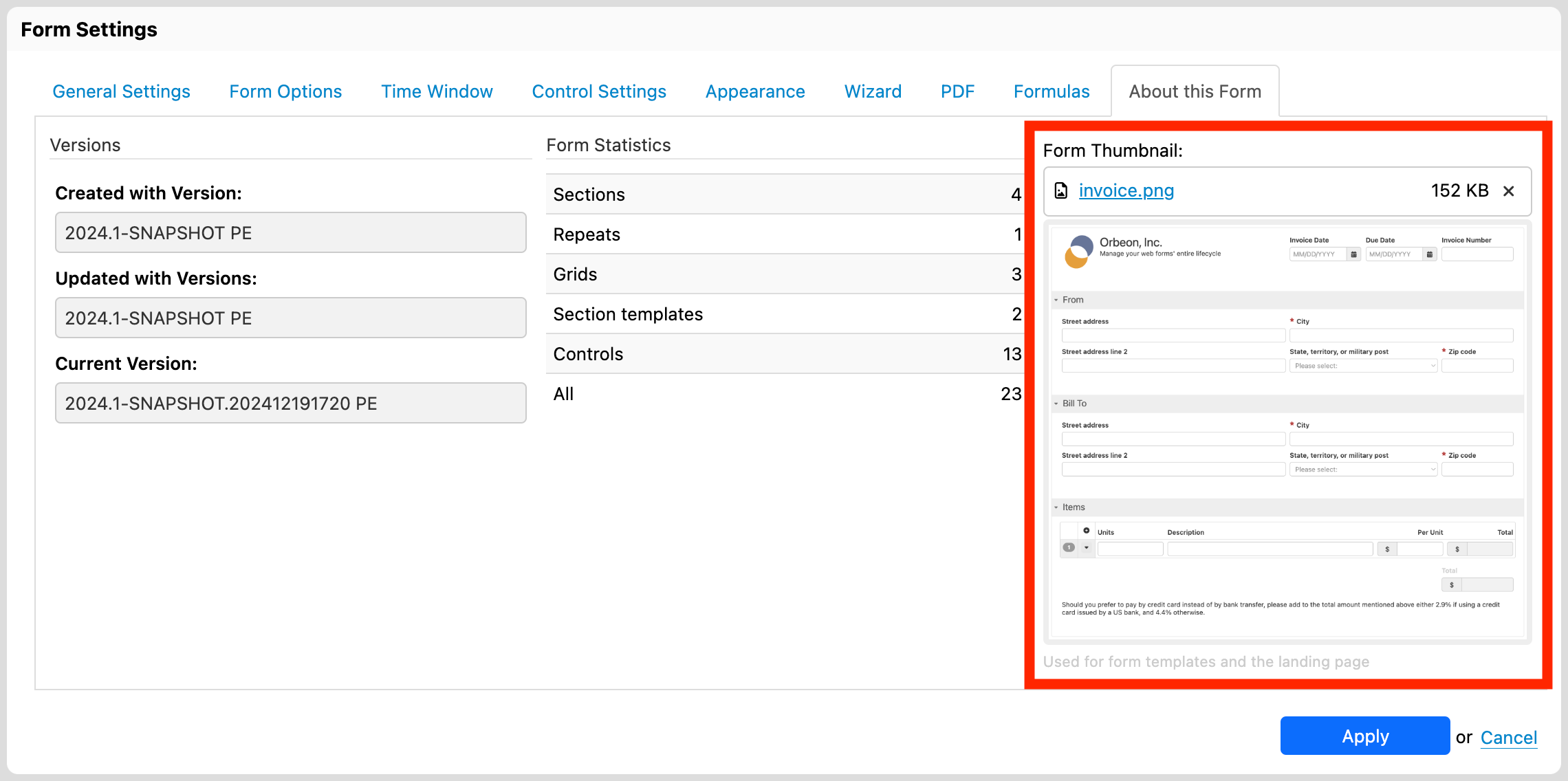
<p>You can associate a <em>thumbnail</em> with each form, which will be used in the Form Builder New page as well as on the Landing page. That thumbnail can be a screenshot of the form, or any other visual you choose.</p>

<figure>
    <picture>
        <img src="/assets/posts/form-settings-thumbnail.png" />
    </picture>
    <figcaption>Setting a thumbnail for a form</figcaption>
</figure>

<p>Finally, note that form templates are different form <a href="https://doc.orbeon.com/form-builder/advanced/section-templates">section templates</a>, which are a way to create reusable form <em>sections</em>. For more on section templates, see the <a href="https://doc.orbeon.com/form-builder/advanced/section-templates">documentation</a>.</p>

<p>We hope that you will like this new feature of <a href="https://doc.orbeon.com/release-notes/orbeon-forms-2024.1">Orbeon Forms 2024.1</a>!</p>]]></content><author><name>Erik Bruchez</name></author><category term="Feature" /><summary type="html"><![CDATA[With Orbeon Forms 2024.1, we are introducing a new feature: form templates! This includes:]]></summary></entry><entry><title type="html">Orbeon Forms 2024.1 PE and CE</title><link href="https://www.orbeon.com/2024/12/orbeon-forms-20241" rel="alternate" type="text/html" title="Orbeon Forms 2024.1 PE and CE" /><published>2024-12-31T21:35:00+00:00</published><updated>2024-12-31T21:35:00+00:00</updated><id>https://www.orbeon.com/2024/12/orbeon-forms-20241</id><content type="html" xml:base="https://www.orbeon.com/2024/12/orbeon-forms-20241"><![CDATA[<p>Today we released Orbeon Forms 2024.1 PE and Orbeon Forms 2024.1 CE!</p>

<p>For details, see the <a href="https://doc.orbeon.com/release-notes/orbeon-forms-2024.1">release notes</a>.</p>

<p>You can download the latest version of Orbeon Forms from the <a href="https://www.orbeon.com/download">downloads</a> page.</p>

<p>We hope you enjoy this release!</p>]]></content><author><name>Erik Bruchez</name></author><category term="Release" /><summary type="html"><![CDATA[Today we released Orbeon Forms 2024.1 PE and Orbeon Forms 2024.1 CE!]]></summary></entry><entry><title type="html">Orbeon Forms 2023.1.6 PE</title><link href="https://www.orbeon.com/2024/12/orbeon-forms-202316-pe" rel="alternate" type="text/html" title="Orbeon Forms 2023.1.6 PE" /><published>2024-12-16T04:30:00+00:00</published><updated>2024-12-16T04:30:00+00:00</updated><id>https://www.orbeon.com/2024/12/orbeon-forms-202316-pe</id><content type="html" xml:base="https://www.orbeon.com/2024/12/orbeon-forms-202316-pe"><![CDATA[<p>We just published the Orbeon Forms 2023.1.6 PE maintenance release!</p>

<p>For details, see the <a href="https://doc.orbeon.com/release-notes/orbeon-forms-2023.1.6">release notes</a>.</p>

<p>You can download the latest version of Orbeon Forms from the <a href="https://www.orbeon.com/download">downloads</a> page.</p>

<p>We hope you enjoy this release!</p>]]></content><author><name>Erik Bruchez</name></author><category term="Release" /><summary type="html"><![CDATA[We just published the Orbeon Forms 2023.1.6 PE maintenance release!]]></summary></entry><entry><title type="html">Variable Completion in Formulas</title><link href="https://www.orbeon.com/2024/12/variable-completion-formulas" rel="alternate" type="text/html" title="Variable Completion in Formulas" /><published>2024-12-04T01:50:00+00:00</published><updated>2024-12-04T01:50:00+00:00</updated><id>https://www.orbeon.com/2024/12/variable-completion-formulas</id><content type="html" xml:base="https://www.orbeon.com/2024/12/variable-completion-formulas"><![CDATA[<p>Formulas appear in many places in Orbeon Forms, including:</p>

<ul>
  <li>for initial and calculated values</li>
  <li>for showing and hiding form controls</li>
  <li>for validating form controls</li>
  <li>and more!</li>
</ul>

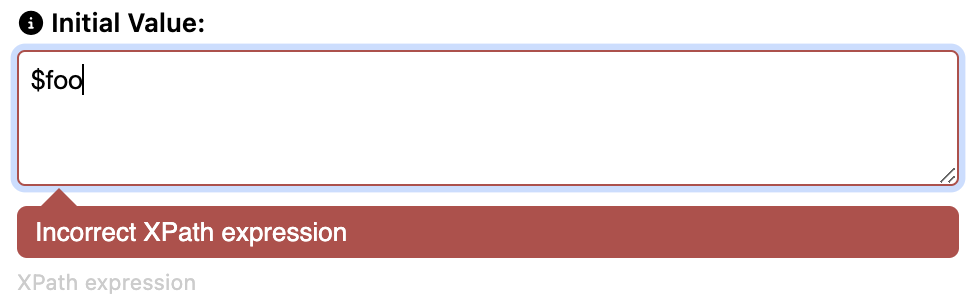
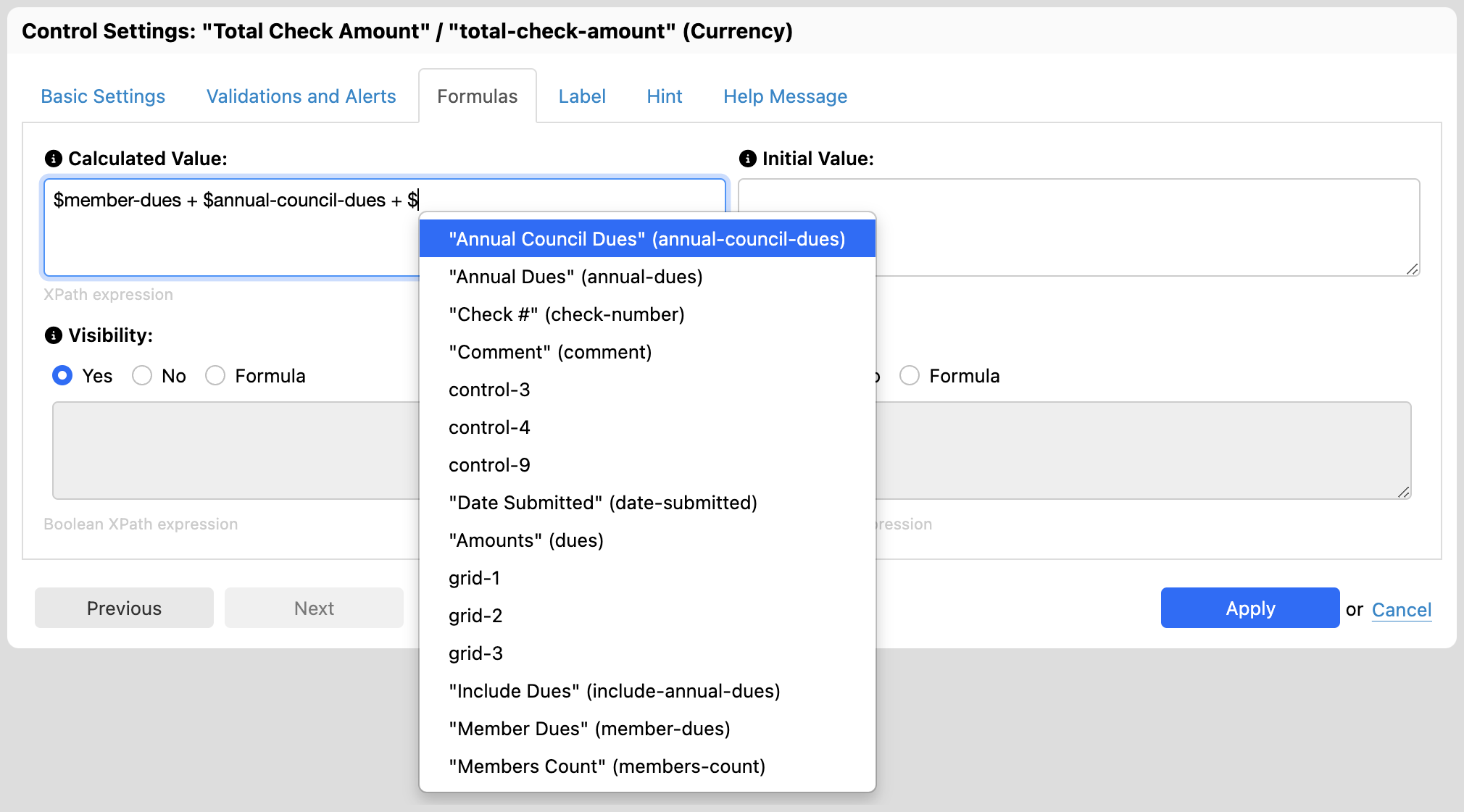
<p>Like in a spreadsheet, a formula often references other form control values. With Orbeon Forms, this is done with a “variable” notation using the symbol <code class="language-plaintext highlighter-rouge">$</code>. For example, if you have a field named <code class="language-plaintext highlighter-rouge">price</code>, you can reference its value in a formula with <code class="language-plaintext highlighter-rouge">$price</code>.</p>

<p>One issue is that it is not easy to remember all the field names. Form Builder shows an error if you reference a field that doesn’t exist, but it doesn’t help you with the field names themselves.</p>

<figure>
  <img src="/assets/posts/variable-error.png" alt="Variable error" style="max-width: 500px; width: 100%;" />
  <figcaption>Variable error</figcaption>
</figure>

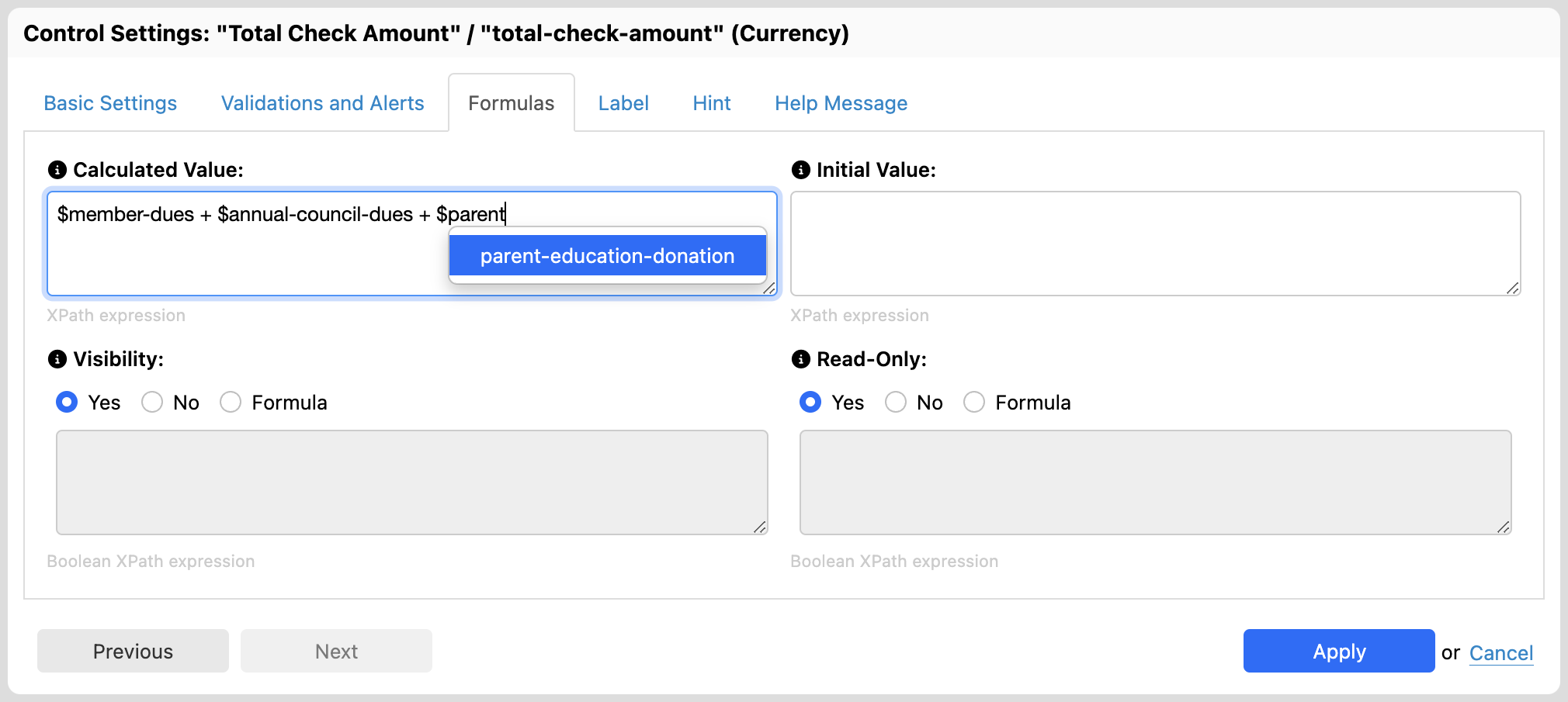
<p>With Orbeon Forms 2024.1, we are improving this by adding completion of variable names everywhere a formula can appear. Simply type the <code class="language-plaintext highlighter-rouge">$</code> character, and a completion menu appears. It shows not only the name of the field, but also its label.</p>

<figure>
  <img src="/assets/posts/variable-completion-menu-open.png" alt="Variable completion menu" />
  <figcaption>Variable completion menu</figcaption>
</figure>

<p>As you type, the search narrows.</p>

<figure>
  <img src="/assets/posts/variable-completion-menu-entry.png" alt="Variable completion menu narrowed" />
  <figcaption>Variable completion menu narrowed</figcaption>
</figure>

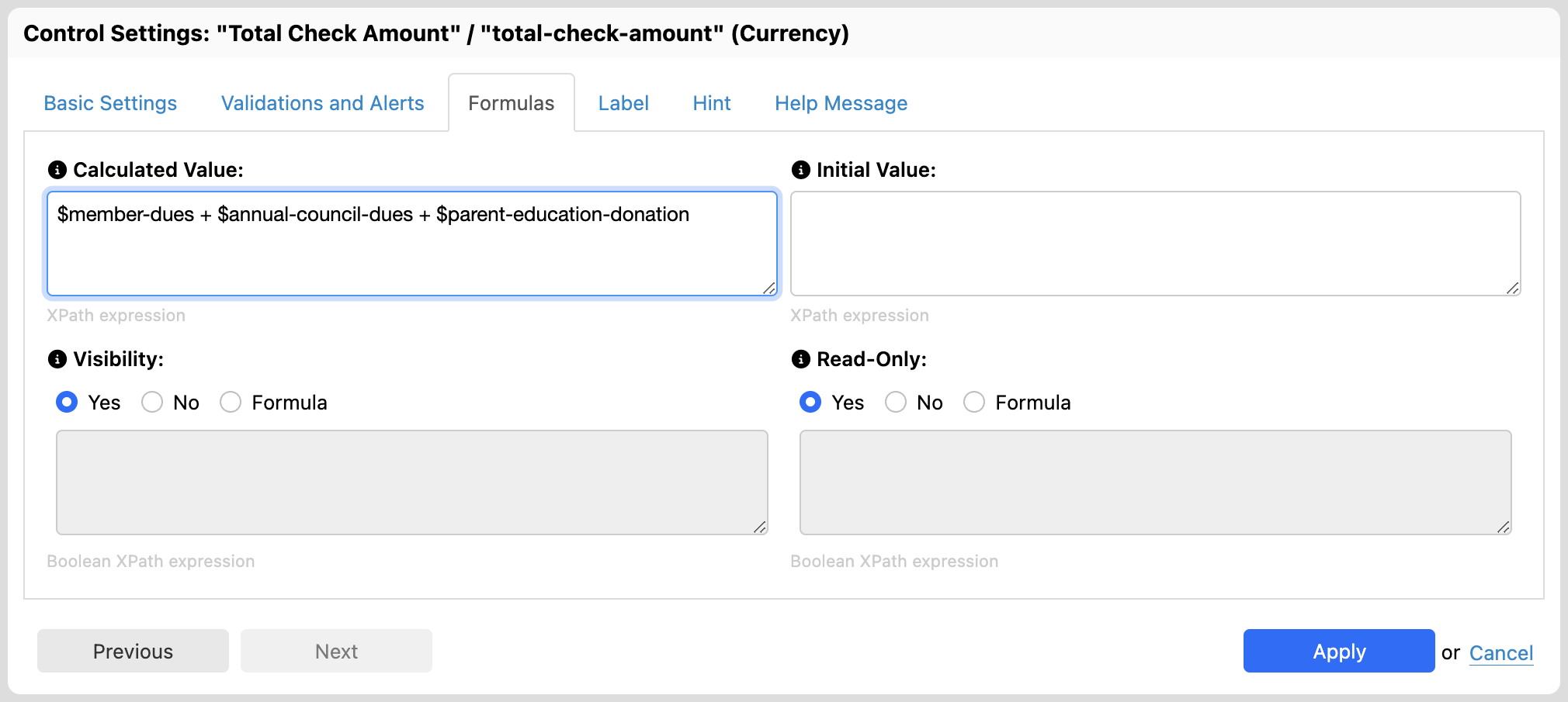
<p>Finally, the value is inserted in the formula.</p>

<figure>
  <img src="/assets/posts/variable-completion-menu-done.png" alt="Variable completion menu inserted" />
  <figcaption>Variable completion menu inserted</figcaption>
</figure>

<p>For more, see the <a href="https://doc.orbeon.com/form-builder/formulas/">Formulas documentation</a>.</p>

<p>We hope that you will like this new feature of Orbeon Forms 2024.1!</p>]]></content><author><name>Erik Bruchez</name></author><category term="Feature" /><summary type="html"><![CDATA[Formulas appear in many places in Orbeon Forms, including:]]></summary></entry><entry><title type="html">Form Density Setting</title><link href="https://www.orbeon.com/2024/11/form-density" rel="alternate" type="text/html" title="Form Density Setting" /><published>2024-11-21T03:50:00+00:00</published><updated>2024-11-21T03:50:00+00:00</updated><id>https://www.orbeon.com/2024/11/form-density</id><content type="html" xml:base="https://www.orbeon.com/2024/11/form-density"><![CDATA[<p>By default, Orbeon Forms places form controls fairly close to each other: the reason for this behavior is that Orbeon Forms is designed to handle large forms, and placing controls close to each other allows you to fit more controls on a single page.</p>

<p>However, there are cases where you’d like form controls to be less dense, for example when you have a form with a small number of controls, or when you want to make the form more readable.</p>

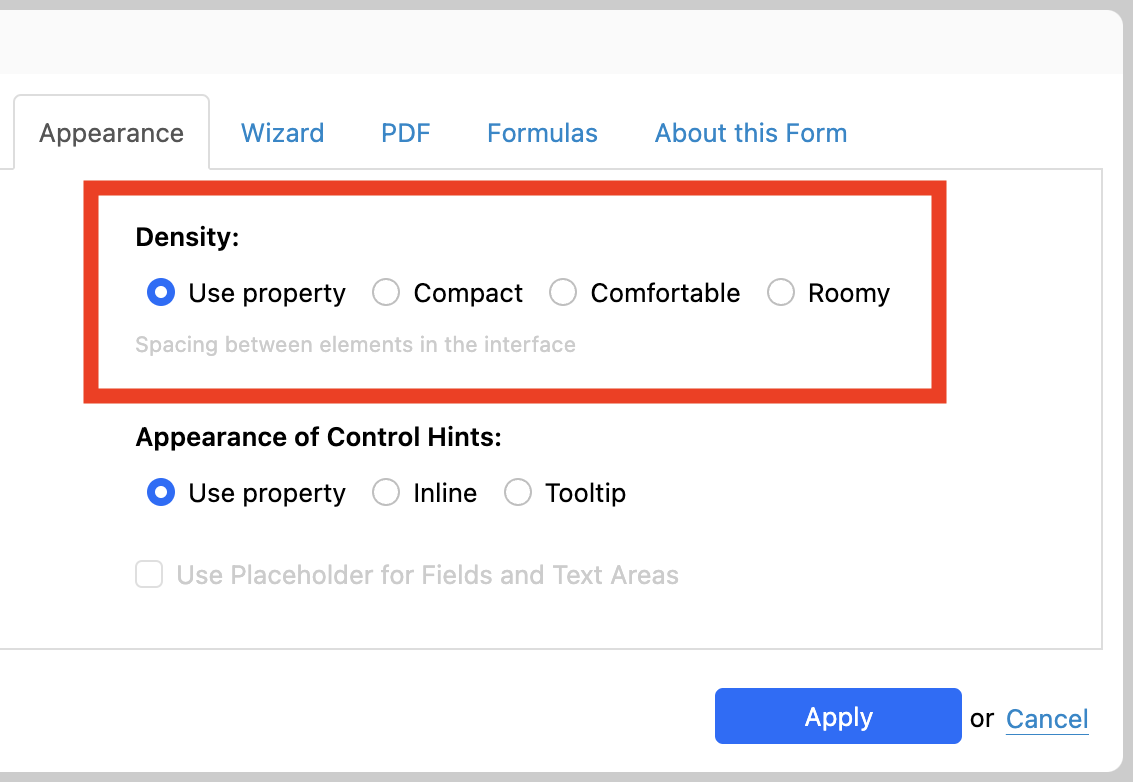
<p>Until now, this was only possible using custom CSS. But with Orbeon Forms 2024.1, Orbeon Forms introduces a new setting: “Form Density”. This setting is available in Form Builder, in the “Form Settings” dialog, under the “Appearance” tab:</p>

<figure>
  <img src="/assets/posts/form-density-settings.png" alt="Form Density Settings" style="max-width: 500px; width: 100%;" />
  <figcaption>Form Density Settings</figcaption>
</figure>

<p>There are three form density options, in order of increasing spacing between controls:</p>

<ul>
  <li><strong>Compact:</strong> This is the current default with Orbeon Forms until 2023.1.</li>
  <li><strong>Comfortable:</strong> This is the default for forms created with Orbeon Forms 2024.1 and later.</li>
  <li><strong>Roomy:</strong> Choose this for even more spacing between controls.</li>
</ul>

<p>Here is how the same form layout looks with the three different form density settings. First, the default “Compact” setting:</p>

<figure>
  <img src="/assets/posts/form-density-compact.png" alt="Compact" style="box-shadow: 0 0 10px rgba(0, 0, 0, 0.15);" />
  <figcaption>Compact</figcaption>
</figure>

<p>Second, the “Comfortable” setting. Notice how the controls are spaced out more:</p>

<figure>
  <img src="/assets/posts/form-density-comfortable.png" alt="Comfortable" style="box-shadow: 0 0 10px rgba(0, 0, 0, 0.15);" />
  <figcaption>Comfortable</figcaption>
</figure>

<p>Finally, the “Roomy” setting:</p>

<figure>
  <img src="/assets/posts/form-density-roomy.png" alt="Roomy" style="box-shadow: 0 0 10px rgba(0, 0, 0, 0.15);" />
  <figcaption>Roomy</figcaption>
</figure>

<p>In addition, you can use configuration properties to change the default globally, per app, or for a specific form.</p>

<p>For more, see:</p>

<ul>
  <li><a href="https://doc.orbeon.com/form-builder/form-settings#form-density">Form Builder documentation</a></li>
  <li><a href="https://doc.orbeon.com/configuration/properties/form-runner/form-runner-detail-page#density">Configuration properties</a></li>
</ul>

<p>We hope you will enjoy this feature of Orbeon Forms 2024.1!</p>]]></content><author><name>Erik Bruchez</name></author><category term="Feature" /><summary type="html"><![CDATA[By default, Orbeon Forms places form controls fairly close to each other: the reason for this behavior is that Orbeon Forms is designed to handle large forms, and placing controls close to each other allows you to fit more controls on a single page.]]></summary></entry><entry><title type="html">Playable Video Attachments</title><link href="https://www.orbeon.com/2024/11/playable-video-attachments" rel="alternate" type="text/html" title="Playable Video Attachments" /><published>2024-11-08T00:00:00+00:00</published><updated>2024-11-08T00:00:00+00:00</updated><id>https://www.orbeon.com/2024/11/playable-video-attachments</id><content type="html" xml:base="https://www.orbeon.com/2024/11/playable-video-attachments"><![CDATA[<figure>
  <img src="/assets/posts/attachment-video.jpg" alt="" style="max-width: 400px; width: 100%" />
  <figcaption></figcaption>
</figure>

<h2 id="file-attachments-in-orbeon-forms">File attachments in Orbeon Forms</h2>

<p>As a quick review, Orbeon Forms supports the following file attachment form controls, available in the Form Builder toolbox:</p>

<table>
  <thead>
    <tr>
      <th>Attachment Type</th>
      <th>Description</th>
    </tr>
  </thead>
  <tbody>
    <tr>
      <td><strong>Static Image</strong></td>
      <td>image attachment set by the form author</td>
    </tr>
    <tr>
      <td><strong>Image Attachment</strong> <sup id="fnref:image-features" role="doc-noteref"><a href="#fn:image-features" class="footnote" rel="footnote">1</a></sup></td>
      <td>image attachment that can be uploaded and downloaded by the form user</td>
    </tr>
    <tr>
      <td><strong>Single File Attachment</strong></td>
      <td>a single file attachment that can be uploaded and downloaded by the form user</td>
    </tr>
    <tr>
      <td><strong>Multiple File Attachments</strong></td>
      <td>multiple file attachments that can be uploaded and downloaded by the form user</td>
    </tr>
  </tbody>
</table>

<p>For example, here is how file attachments look at runtime:</p>

<figure>
  <img src="/assets/posts/attachment-single-multiple.png" alt="Single and multiple file attachment controls" style="max-width: 90%; width: 100%" />
  <figcaption>Single and multiple file attachment controls</figcaption>
</figure>

<h2 id="video-attachments">Video attachments</h2>

<p>With <a href="https://doc.orbeon.com/release-notes/orbeon-forms-2023.1">Orbeon Forms 2023.1</a>, we introduced a new type of attachment: <strong>video attachments</strong>. Like for images, there are two separate form controls:</p>

<table>
  <thead>
    <tr>
      <th>Attachment Type</th>
      <th>Description</th>
    </tr>
  </thead>
  <tbody>
    <tr>
      <td><strong>Static Video</strong> <sup id="fnref:static-videos" role="doc-noteref"><a href="#fn:static-videos" class="footnote" rel="footnote">2</a></sup></td>
      <td>video attachment set by the form author</td>
    </tr>
    <tr>
      <td><strong>Video Attachments</strong></td>
      <td>video attachment that can be uploaded and downloaded by the form user</td>
    </tr>
  </tbody>
</table>

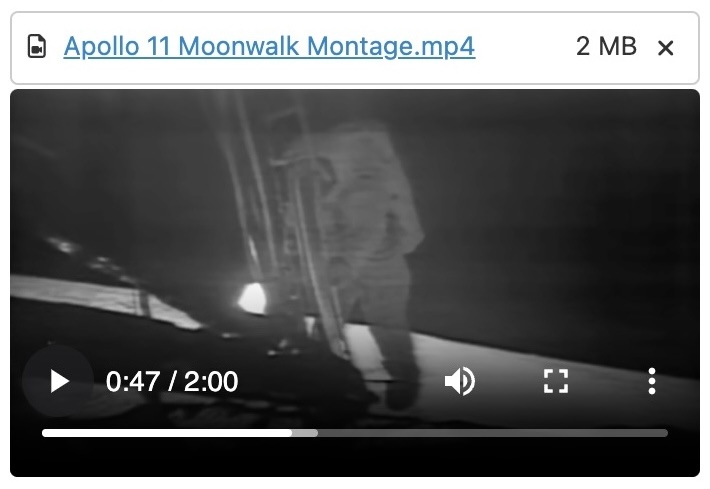
<p>As the name implies, this new attachment type allows you to attach videos to your forms. In addition, you can play them directly in the web browser.<sup id="fnref:byte-ranges" role="doc-noteref"><a href="#fn:byte-ranges" class="footnote" rel="footnote">3</a></sup></p>

<figure>
  <img src="/assets/posts/attachment-apollo-video.jpg" alt="" style="max-width: 400px; width: 100%" />
  <figcaption></figcaption>
</figure>

<h2 id="storage-options">Storage options</h2>

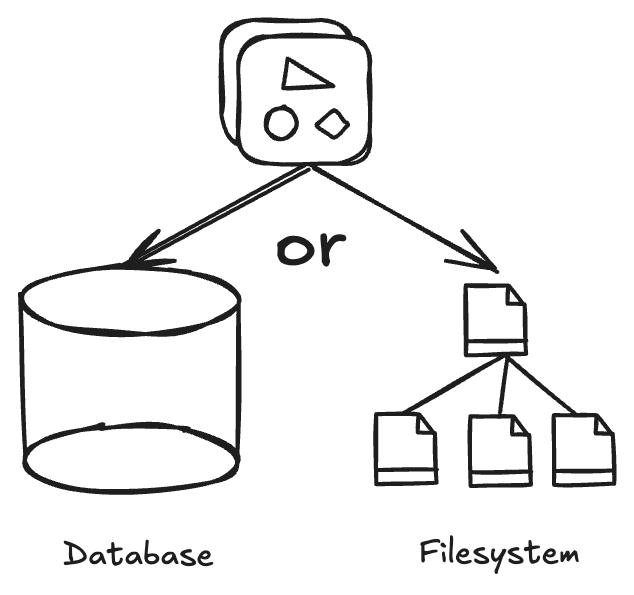
<p>Orbeon Forms now supports storing attachments on disk, instead of the relational database.</p>

<figure>
  <img src="/assets/posts/attachment-storage-options.png" alt="Storage options for attachments" style="max-width: 300px; width: 100%" />
  <figcaption>Storage options for attachments</figcaption>
</figure>

<p>If you handle large and/or a large number of attachments, this can improve performance and reduce the size of the database. This is a simple configuration setting away (see <a href="https://doc.orbeon.com/configuration/properties/form-runner/persistence#attachments">the documentation</a>).</p>

<h2 id="use-of-attachments">Use of attachments</h2>

<p>Attachments can be used in many ways. They can be:</p>

<ul>
  <li>stored in the database or on disk for further editing and viewing in forms (default);</li>
  <li>attached to emails sent by the form;</li>
  <li>sent to service endpoints;</li>
  <li>included in PDFs generated by the form (images).</li>
</ul>

<h2 id="see-also">See also</h2>

<ul>
  <li><a href="https://doc.orbeon.com/form-runner/component/video">Video component</a></li>
  <li><a href="https://doc.orbeon.com/form-runner/component/video-attachment">Video Attachment component</a></li>
  <li><a href="https://doc.orbeon.com/form-runner/component/attachment">Attachment component</a></li>
  <li><a href="https://doc.orbeon.com/form-builder/form-editor/toolbox#attachment-controls">Attachment controls</a></li>
</ul>

<p>We hope you will enjoy this feature of Orbeon Forms 2023.1!</p>

<hr />

<div class="footnotes" role="doc-endnotes">
  <ol>
    <li id="fn:image-features" role="doc-endnote">
      <p>Image attachments optionally allow downloads, as well as resizing and recompression of the image upon upload. <a href="#fnref:image-features" class="reversefootnote" role="doc-backlink">&#8617;</a></p>
    </li>
    <li id="fn:static-videos" role="doc-endnote">
      <p>Static videos are useful, for example, for explanations and tutorials. <a href="#fnref:static-videos" class="reversefootnote" role="doc-backlink">&#8617;</a></p>
    </li>
    <li id="fn:byte-ranges" role="doc-endnote">
      <p>Handling videos required modifying the Orbeon Forms backend to support so-called <em>byte ranges</em>, so that you can not only serve the video, but efficiently seek within the video. <a href="#fnref:byte-ranges" class="reversefootnote" role="doc-backlink">&#8617;</a></p>
    </li>
  </ol>
</div>]]></content><author><name>Erik Bruchez</name></author><category term="Feature" /><summary type="html"><![CDATA[]]></summary></entry><entry><title type="html">The Form Builder Formulas Console</title><link href="https://www.orbeon.com/2024/10/formulas-console" rel="alternate" type="text/html" title="The Form Builder Formulas Console" /><published>2024-10-16T21:00:00+00:00</published><updated>2024-10-16T21:00:00+00:00</updated><id>https://www.orbeon.com/2024/10/formulas-console</id><content type="html" xml:base="https://www.orbeon.com/2024/10/formulas-console"><![CDATA[<p>Forms that you create with Form Builder can use <em>formulas</em>. Most formulas are currently written “by hand” (not unlike Excel formulas). This means that they can, unfortunately, contain some errors. Some are caught by Form Builder when you write them, but some can only appear when you run the form.</p>

<p>In the past, it was hard to figure out such errors. But Form Builder, since <a href="https://doc.orbeon.com/release-notes/orbeon-forms-2023.1">version 2023.1</a>, features a <em>Formulas console</em> which is available when you test a form using the “Test Form” function.</p>

<figure>
  <img src="/assets/posts/fb-formulas-console.png" alt="The Formulas console" />
  <figcaption>The Formulas console</figcaption>
</figure>

<p>The console lists every individual error with details about each. If an error occurs while testing the form, you can quickly go back to Form Builder by closing the Form Preview dialog and modifying the problematic formula.</p>

<p>See also <a href="https://doc.orbeon.com/form-builder/formulas/formulas-console">the documentation</a>.</p>

<p>We hope you will enjoy this feature of Orbeon Forms 2023.1!</p>]]></content><author><name>Erik Bruchez</name></author><category term="Feature" /><summary type="html"><![CDATA[Forms that you create with Form Builder can use formulas. Most formulas are currently written “by hand” (not unlike Excel formulas). This means that they can, unfortunately, contain some errors. Some are caught by Form Builder when you write them, but some can only appear when you run the form.]]></summary></entry><entry><title type="html">Orbeon Forms Docker Images</title><link href="https://www.orbeon.com/2024/10/orbeon-forms-docker-images" rel="alternate" type="text/html" title="Orbeon Forms Docker Images" /><published>2024-10-10T00:30:00+00:00</published><updated>2024-10-10T00:30:00+00:00</updated><id>https://www.orbeon.com/2024/10/orbeon-forms-docker-images</id><content type="html" xml:base="https://www.orbeon.com/2024/10/orbeon-forms-docker-images"><![CDATA[<p>Behind the scene, on the server, Orbeon Forms is built as a Java web application. In order to install it on your own server, local or in the cloud, however, requires some fluency in technologies such as Java, Tomcat, and possibly relational databases. We have been wanting to make things easier for a long time, with the use of <a href="https://en.wikipedia.org/wiki/Containerization_(computing)"><em>containers</em></a>.</p>

<p>The good news is that earlier this year, we have started to provide Docker images for Orbeon Forms for the 2023.1 maintenance releases. This means that you can now run Orbeon Forms without having to install Java or Tomcat! You just need to have <a href="https://www.docker.com/">Docker</a> installed, and you can download and run Orbeon Forms with a single command.</p>

<figure>
  <img src="/assets/posts/docker-logo-blue.svg" alt="" style="max-width: 500px; width: 100%" />
  <figcaption></figcaption>
</figure>

<p>While using Docker works great for just testing or evaluating Orbeon Forms, it can also be used for running Orbeon Forms in production, especially if you are already using Docker for other parts of your infrastructure.</p>

<p>For steps, see:</p>

<ul>
  <li>The <a href="https://www.orbeon.com/try">Try</a> page for a quick start.</li>
  <li>The <a href="https://doc.orbeon.com/installation/docker">detailed instructions</a>, including steps to compose Orbeon Forms with the PostgreSQL database.</li>
</ul>

<p>We are working on making it even easier to do so in the future.</p>

<p>We hope you’ll like this new feature of Orbeon Forms!</p>

<hr />]]></content><author><name>Erik Bruchez</name></author><category term="Feature" /><summary type="html"><![CDATA[Behind the scene, on the server, Orbeon Forms is built as a Java web application. In order to install it on your own server, local or in the cloud, however, requires some fluency in technologies such as Java, Tomcat, and possibly relational databases. We have been wanting to make things easier for a long time, with the use of containers.]]></summary></entry><entry><title type="html">Orbeon Forms 2023.1.5 PE</title><link href="https://www.orbeon.com/2024/10/orbeon-forms-202315-pe" rel="alternate" type="text/html" title="Orbeon Forms 2023.1.5 PE" /><published>2024-10-02T17:05:00+00:00</published><updated>2024-10-02T17:05:00+00:00</updated><id>https://www.orbeon.com/2024/10/orbeon-forms-202315-pe</id><content type="html" xml:base="https://www.orbeon.com/2024/10/orbeon-forms-202315-pe"><![CDATA[<p>We just published the Orbeon Forms 2023.1.5 PE maintenance release!</p>

<p>For details, see the <a href="https://doc.orbeon.com/release-notes/orbeon-forms-2023.1.5">release notes</a>.</p>

<p>You can download the latest version of Orbeon Forms from the <a href="https://www.orbeon.com/download">downloads</a> page.</p>

<p>We hope you enjoy this release!</p>]]></content><author><name>Erik Bruchez</name></author><category term="Release" /><summary type="html"><![CDATA[We just published the Orbeon Forms 2023.1.5 PE maintenance release!]]></summary></entry><entry><title type="html">Orbeon Forms 2021.1.11 PE</title><link href="https://www.orbeon.com/2024/09/orbeon-forms-2021111-pe" rel="alternate" type="text/html" title="Orbeon Forms 2021.1.11 PE" /><published>2024-09-13T18:47:00+00:00</published><updated>2024-09-13T18:47:00+00:00</updated><id>https://www.orbeon.com/2024/09/orbeon-forms-2021111-pe</id><content type="html" xml:base="https://www.orbeon.com/2024/09/orbeon-forms-2021111-pe"><![CDATA[<p>We just published the Orbeon Forms 2021.1.11 maintenance release!</p>

<p>For details, see the <a href="https://doc.orbeon.com/release-notes/orbeon-forms-2021.1.11">release notes</a>.</p>

<p>You can download the latest version of Orbeon Forms from the <a href="https://www.orbeon.com/download">downloads</a> page.</p>

<p>We hope you enjoy this release!</p>]]></content><author><name>Erik Bruchez</name></author><category term="Release" /><summary type="html"><![CDATA[We just published the Orbeon Forms 2021.1.11 maintenance release!]]></summary></entry><entry><title type="html">Making sense of Form Runner Actions</title><link href="https://www.orbeon.com/2024/09/making-sense-form-runner-actions" rel="alternate" type="text/html" title="Making sense of Form Runner Actions" /><published>2024-09-12T23:20:00+00:00</published><updated>2024-09-12T23:20:00+00:00</updated><id>https://www.orbeon.com/2024/09/making-sense-form-runner-actions</id><content type="html" xml:base="https://www.orbeon.com/2024/09/making-sense-form-runner-actions"><![CDATA[<h3 id="types-of-actions-and-processes">Types of actions and processes</h3>

<p>Orbeon Forms comes with a few powerful options to perform complex operations on or with forms. These fall into two main categories:</p>

<ul>
  <li><em>Actions:</em> They run within a form while the user is working with the form.</li>
  <li><em>Simple Processes:</em> They typically run in association with a form button, such as a “Submit” button.</li>
</ul>

<figure>
  <img src="/assets/posts/actions-processes-form.png" alt="Actions and processes" />
  <figcaption>Actions and processes</figcaption>
</figure>

<p>Actions themselves fall into two main categories:</p>

<ul>
  <li><em>Simple Actions:</em> You define these using a user interface in Form Builder.</li>
  <li><em>Action Syntax:</em> You can do everything simple actions can do and more, but use a special syntax.<sup id="fnref:xforms-actions" role="doc-noteref"><a href="#fn:xforms-actions" class="footnote" rel="footnote">1</a></sup></li>
</ul>

<h3 id="simple-actions">Simple Actions</h3>

<p><a href="https://doc.orbeon.com/form-builder/advanced/services-and-actions/actions">Simple Actions</a> are defined using a user interface in Form Builder. They are easy to use and cover many common use cases. They support:</p>

<ul>
  <li>reacting to form load, activation, or value changes</li>
  <li>running the action or not depending on a condition</li>
  <li>calling a service and passing values to it</li>
  <li>setting values and choices in form controls as a result of the service call</li>
  <li>writing to a dataset</li>
</ul>

<figure>
  <img src="/assets/posts/actions-general-settings.png" alt="The Simple Actions Editor" />
  <figcaption>The Simple Actions Editor</figcaption>
</figure>

<h3 id="the-action-syntax">The Action Syntax</h3>

<p>With the <a href="https://doc.orbeon.com/form-builder/advanced/services-and-actions/actions-syntax">Action Syntax</a>, you write sequences of actions, conditions, iterations, and more using an XML-based syntax.<sup id="fnref:declarative" role="doc-noteref"><a href="#fn:declarative" class="footnote" rel="footnote">2</a></sup> They support:</p>

<ul>
  <li>calling an action in response to multiple events</li>
  <li>conditionally running parts of an action</li>
  <li>repeatedly running parts of an action while iterating on data</li>
  <li>calling an arbitrary number of services, or none at all</li>
  <li>calling asynchronous services</li>
  <li>adding, removing, or clearing repetitions in a repeated grid or section</li>
  <li>setting or clearing form control values, including attachment control</li>
  <li>setting focus on or visit form controls</li>
  <li>copying form control content</li>
  <li>writing and clearing datasets</li>
  <li>calling processes</li>
</ul>

<p>As you can see, the list is longer than the list of features supported by simple actions!</p>

<p>We recently wrote a full working example of the action syntax, which you can find <a href="https://doc.orbeon.com/form-builder/advanced/services-and-actions/action-syntax-examples">here</a>. This example, “List of Nobel Prize winners”, shows how to:</p>

<ul>
  <li>call a service with a list of Nobel Prize winners in JSON</li>
  <li>iterate over the list of results</li>
  <li>set values in a repeated grid</li>
</ul>

<p>Here is a preview of the action documented in the example:</p>

<div class="language-xml highlighter-rouge"><div class="highlight"><pre class="highlight"><code><span class="nt">&lt;fr:listener</span> <span class="na">version=</span><span class="s">"2018.2"</span> <span class="na">events=</span><span class="s">"form-load-after-controls"</span> <span class="na">actions=</span><span class="s">"my-action"</span><span class="nt">/&gt;</span>

<span class="nt">&lt;fr:action</span> <span class="na">name=</span><span class="s">"my-action"</span> <span class="na">version=</span><span class="s">"2018.2"</span><span class="nt">&gt;</span>
    <span class="nt">&lt;fr:service-call</span> <span class="na">service=</span><span class="s">"get-nobel-prizes"</span><span class="nt">/&gt;</span>
    <span class="nt">&lt;fr:repeat-clear</span> <span class="na">repeat=</span><span class="s">"prizes"</span><span class="nt">/&gt;</span>
    <span class="nt">&lt;fr:data-iterate</span> <span class="na">ref=</span><span class="s">"/*/nobelPrizes/_"</span><span class="nt">&gt;</span>
        <span class="nt">&lt;fr:repeat-add-iteration</span> <span class="na">repeat=</span><span class="s">"prizes"</span> <span class="na">at=</span><span class="s">"end"</span><span class="nt">/&gt;</span>
        <span class="nt">&lt;fr:control-setvalue</span> <span class="na">value=</span><span class="s">"awardYear"</span> <span class="na">control=</span><span class="s">"year"</span> <span class="na">at=</span><span class="s">"end"</span><span class="nt">/&gt;</span>
        <span class="nt">&lt;fr:control-setvalue</span> <span class="na">value=</span><span class="s">"category/en"</span> <span class="na">control=</span><span class="s">"category"</span> <span class="na">at=</span><span class="s">"end"</span><span class="nt">/&gt;</span>
        <span class="nt">&lt;fr:repeat-clear</span> <span class="na">repeat=</span><span class="s">"laureates"</span><span class="nt">/&gt;</span>
        <span class="nt">&lt;fr:data-iterate</span> <span class="na">ref=</span><span class="s">"laureates/_"</span><span class="nt">&gt;</span>
            <span class="nt">&lt;fr:repeat-add-iteration</span> <span class="na">repeat=</span><span class="s">"laureates"</span><span class="nt">/&gt;</span>
            <span class="nt">&lt;fr:control-setvalue</span> <span class="na">value=</span><span class="s">"knownName"</span> <span class="na">control=</span><span class="s">"known-name"</span> <span class="na">at=</span><span class="s">"end"</span><span class="nt">/&gt;</span>
            <span class="nt">&lt;fr:control-setvalue</span> <span class="na">value=</span><span class="s">"motivation/en"</span> <span class="na">control=</span><span class="s">"motivation"</span> <span class="na">at=</span><span class="s">"end"</span><span class="nt">/&gt;</span>
        <span class="nt">&lt;/fr:data-iterate&gt;</span>
    <span class="nt">&lt;/fr:data-iterate&gt;</span>
<span class="nt">&lt;/fr:action&gt;</span>
</code></pre></div></div>

<h3 id="simple-processes">Simple Processes</h3>

<p><a href="https://doc.orbeon.com/form-runner/advanced/buttons-and-processes">Simple processes</a> were introduced to control what happens when a user activates a button at the bottom of the page. For example, a “Submit” button can do a number of things: validate the data, make sure errors are shown to the user, and then submit the data to a service or the database. Processes make all of this very configurable.</p>

<p>You configure simple processes in configuration properties. The expectation is that those are more likely to be shared amongst many or all forms.</p>

<p>Parts of a simple process are called process actions, and they included operations such as <code class="language-plaintext highlighter-rouge">save()</code>, <code class="language-plaintext highlighter-rouge">send()</code>, <code class="language-plaintext highlighter-rouge">email()</code>, <code class="language-plaintext highlighter-rouge">validate()</code>, and more.
Simple processes also support conditions and recovery actions.</p>

<p>Here is an example of a simple process:</p>

<div class="language-xml highlighter-rouge"><div class="highlight"><pre class="highlight"><code><span class="nt">&lt;property</span> <span class="na">as=</span><span class="s">"xs:string"</span> <span class="na">name=</span><span class="s">"oxf.fr.detail.process.send.acme.hr"</span><span class="nt">&gt;</span>
    require-valid
    then email
    then send("https://example.org/")
    then navigate("/success")
    recover navigate("/failure")
<span class="nt">&lt;/property&gt;</span>
</code></pre></div></div>

<h3 id="more">More</h3>

<p>We hope that this overview clarifies the types of actions you have in Orbeon Forms!<sup id="fnref:future" role="doc-noteref"><a href="#fn:future" class="footnote" rel="footnote">3</a></sup> For more, see the documentation:</p>

<ul>
  <li><a href="https://doc.orbeon.com/form-builder/advanced/services-and-actions/actions">Simple Actions</a></li>
  <li><a href="https://doc.orbeon.com/form-builder/advanced/services-and-actions/actions-syntax">Action Syntax</a></li>
  <li><a href="https://doc.orbeon.com/form-builder/advanced/services-and-actions/action-syntax-examples">Action Syntax Examples</a></li>
  <li><a href="https://doc.orbeon.com/form-runner/advanced/buttons-and-processes">Simple processes</a></li>
</ul>

<hr />

<div class="footnotes" role="doc-endnotes">
  <ol>
    <li id="fn:xforms-actions" role="doc-endnote">
      <p>For completeness, let’s mention that Orbeon Forms also supports lower-level XForms actions. XForms actions are much lower-level than Form Runner actions. They can iterate and have conditions, and set values, but they work at the level of XML data, not at the higher level of form controls, grid, sections, or services. Because they work at a much lower level than Form Runner actions, and that means that there are compatibility risks when upgrading to newer version of Orbeon Forms. Only when an action is not supported by the Form Runner action syntax should you consider using XForms actions. <a href="#fnref:xforms-actions" class="reversefootnote" role="doc-backlink">&#8617;</a></p>
    </li>
    <li id="fn:declarative" role="doc-endnote">
      <p>In Orbeon Forms, we always prefer <em>descriptive</em> or <em>declarative</em> ways to describe content and behavior: this approach allows fixing bugs, migrating formats, and more, without programmer intervention. If actions were, say, JavaScript code, this would not be possible (or would be very hard). <a href="#fnref:declarative" class="reversefootnote" role="doc-backlink">&#8617;</a></p>
    </li>
    <li id="fn:future" role="doc-endnote">
      <p>In the future, we hope to make both types of actions and, possibly, simple processes, converge. <a href="#fnref:future" class="reversefootnote" role="doc-backlink">&#8617;</a></p>
    </li>
  </ol>
</div>]]></content><author><name>Erik Bruchez</name></author><category term="Feature" /><summary type="html"><![CDATA[Types of actions and processes]]></summary></entry><entry><title type="html">Orbeon Forms 2022.1.8 PE</title><link href="https://www.orbeon.com/2024/09/orbeon-forms-202218-pe" rel="alternate" type="text/html" title="Orbeon Forms 2022.1.8 PE" /><published>2024-09-06T21:10:00+00:00</published><updated>2024-09-06T21:10:00+00:00</updated><id>https://www.orbeon.com/2024/09/orbeon-forms-202218-pe</id><content type="html" xml:base="https://www.orbeon.com/2024/09/orbeon-forms-202218-pe"><![CDATA[<p>We just published the Orbeon Forms 2022.1.8 PE maintenance release!</p>

<p>For details, see the <a href="https://doc.orbeon.com/release-notes/orbeon-forms-2022.1.8">release notes</a>.</p>

<p>You can download the latest version of Orbeon Forms from the <a href="https://www.orbeon.com/download">downloads</a> page.</p>

<p>We hope you enjoy this release!</p>]]></content><author><name>Erik Bruchez</name></author><category term="Release" /><summary type="html"><![CDATA[We just published the Orbeon Forms 2022.1.8 PE maintenance release!]]></summary></entry><entry><title type="html">Orbeon Forms 2023.1.4 PE</title><link href="https://www.orbeon.com/2024/08/orbeon-forms-202314-pe" rel="alternate" type="text/html" title="Orbeon Forms 2023.1.4 PE" /><published>2024-08-22T19:15:00+00:00</published><updated>2024-08-22T19:15:00+00:00</updated><id>https://www.orbeon.com/2024/08/orbeon-forms-202314-pe</id><content type="html" xml:base="https://www.orbeon.com/2024/08/orbeon-forms-202314-pe"><![CDATA[<p>We just published the Orbeon Forms 2023.1.4 PE maintenance release!</p>

<p>For details, see the <a href="https://doc.orbeon.com/release-notes/orbeon-forms-2023.1.4">release notes</a>.</p>

<p>You can download the latest version of Orbeon Forms from the <a href="https://www.orbeon.com/download">downloads</a> page.</p>

<p>We hope you enjoy this release!</p>]]></content><author><name>Erik Bruchez</name></author><category term="Release" /><summary type="html"><![CDATA[We just published the Orbeon Forms 2023.1.4 PE maintenance release!]]></summary></entry><entry><title type="html">Data Revision History</title><link href="https://www.orbeon.com/2024/08/revision-history" rel="alternate" type="text/html" title="Data Revision History" /><published>2024-08-06T22:30:00+00:00</published><updated>2024-08-06T22:30:00+00:00</updated><id>https://www.orbeon.com/2024/08/revision-history</id><content type="html" xml:base="https://www.orbeon.com/2024/08/revision-history"><![CDATA[<p>A little-known aspect of the design of the Orbeon Forms database schema<sup id="fnref:custom" role="doc-noteref"><a href="#fn:custom" class="footnote" rel="footnote">1</a></sup> is that writes to the database are non-destructive. In particular, Orbeon Forms keeps a history of the data associated with a form’s document id:</p>

<ul>
  <li>The latest entry is called <em>current data</em> or <em>current revision</em>.</li>
  <li>Earlier entries are called <em>historical data</em> or <em>historical revisions</em>.</li>
</ul>

<p>Together, all those entries make up the <em>revision history</em> of the form data associated with a given document id.</p>

<p>Before Orbeon Forms 2023.1, only the current revision was accessible from the Orbeon Forms user interface, and accessing historical revisions required direct database access. But since Orbeon Forms 2023.1, a user interface is available to access the revision history of form data.</p>

<p>The user interface is disabled by default. When enabled, it adds a “Revision History” icon to the navigation bar. Activating that icon opens a Revision History pane showing the list of revisions of the form data, each including:</p>

<ul>
  <li>a list of changes</li>
  <li>a link to access a readonly view of that revision history entry</li>
</ul>

<figure>
  <img src="/assets/posts/fr-revision-history-pane.png" alt="Revision History pane" />
  <figcaption>Revision History pane</figcaption>
</figure>

<p>For more, see the <a href="https://doc.orbeon.com/form-runner/features/revision-history">Revision History documentation</a>. A <a href="https://doc.orbeon.com/form-runner/api/persistence/revision-history">Revision History API</a> to access the revision history programmatically is also available.</p>

<p>We hope that you will like this Orbeon Forms 2023.1 feature!</p>

<hr />

<div class="footnotes" role="doc-endnotes">
  <ol>
    <li id="fn:custom" role="doc-endnote">
      <p>You can also configure Orbeon Forms to save form definitions and form data to a <a href="https://doc.orbeon.com/form-runner/api/persistence/custom-persistence-providers">Custom persistence providers</a>, which might not necessarily be backed by a relational database. However, the same concepts apply. <a href="#fnref:custom" class="reversefootnote" role="doc-backlink">&#8617;</a></p>
    </li>
  </ol>
</div>]]></content><author><name>Erik Bruchez</name></author><category term="Feature" /><summary type="html"><![CDATA[A little-known aspect of the design of the Orbeon Forms database schema1 is that writes to the database are non-destructive. In particular, Orbeon Forms keeps a history of the data associated with a form’s document id: You can also configure Orbeon Forms to save form definitions and form data to a Custom persistence providers, which might not necessarily be backed by a relational database. However, the same concepts apply. &#8617;]]></summary></entry><entry><title type="html">Summary page Excel export</title><link href="https://www.orbeon.com/2024/07/summary-page-excel-export" rel="alternate" type="text/html" title="Summary page Excel export" /><published>2024-07-23T13:30:00+00:00</published><updated>2024-07-23T13:30:00+00:00</updated><id>https://www.orbeon.com/2024/07/summary-page-excel-export</id><content type="html" xml:base="https://www.orbeon.com/2024/07/summary-page-excel-export"><![CDATA[<p>We usually don’t include new features in maintenance releases, but we couldn’t resist adding this one to <a href="https://doc.orbeon.com/release-notes/orbeon-forms-2023.1.3">Orbeon Forms 2023.1.3</a>: the ability to export the <a href="https://doc.orbeon.com/form-runner/pages/summary-page">Summary page</a> data to Excel!</p>

<p>The idea is simple: what you see in the Form Runner Summary page, including with sorting and filtering, and all the pages accessible using paging, can be exported to an Excel file with a couple of clicks.</p>

<p>Here is an example of Summary page. Notice the “Excel Export” button:</p>

<figure class="">
  <img src="/assets/posts/summary-excel-export.png" alt="Form data and Excel export button on the Summary page" />
  <figcaption>Form data and Excel export button on the Summary page</figcaption>
</figure>

<p>When you activate that button, you are presented with a dialog where you can choose from a few options:</p>

<figure class="">
  <img src="/assets/posts/fr-summary-excel-export-dialog.png" alt="Excel export options dialog" />
  <figcaption>Excel export options dialog</figcaption>
</figure>

<p>The result is an Excel file with the data you see in the Summary page, as shown here.</p>

<figure class="orbeon-rectangular-screenshot">
  <img src="/assets/posts/summary-excel-export-sheet.png" alt="Example of Excel export from the Summary page" />
  <figcaption>Example of Excel export from the Summary page</figcaption>
</figure>

<p>We hope you will find this feature useful! For more, See also  the <a href="https://doc.orbeon.com/form-runner/features/summary-page-export">documentation</a>.</p>]]></content><author><name>Erik Bruchez</name></author><category term="Feature" /><summary type="html"><![CDATA[We usually don’t include new features in maintenance releases, but we couldn’t resist adding this one to Orbeon Forms 2023.1.3: the ability to export the Summary page data to Excel!]]></summary></entry><entry><title type="html">Improved Keyboard Shortcuts</title><link href="https://www.orbeon.com/2024/07/keyboard-shortcuts" rel="alternate" type="text/html" title="Improved Keyboard Shortcuts" /><published>2024-07-02T22:00:00+00:00</published><updated>2024-07-02T22:00:00+00:00</updated><id>https://www.orbeon.com/2024/07/keyboard-shortcuts</id><content type="html" xml:base="https://www.orbeon.com/2024/07/keyboard-shortcuts"><![CDATA[<p>With <a href="https://doc.orbeon.com/release-notes/orbeon-forms-2023.1.3">Orbeon Forms 2023.1.3</a>, we have made some improvements to Form Builder keyboard shortcuts.</p>

<p>You might not know it, but Form Builder has had the following keyboard shortcuts for a while:</p>

<table>
  <thead>
    <tr>
      <th>Apple Shortcut</th>
      <th>Other Shortcut</th>
      <th>Action</th>
    </tr>
  </thead>
  <tbody>
    <tr>
      <td><kbd>⌘S</kbd></td>
      <td><kbd>⌃S</kbd></td>
      <td>save</td>
    </tr>
    <tr>
      <td><kbd>⌘X</kbd></td>
      <td><kbd>⌃X</kbd></td>
      <td><a href="https://doc.orbeon.com/form-builder/form-editor/cut-copy-paste">cut</a></td>
    </tr>
    <tr>
      <td><kbd>⌘C</kbd></td>
      <td><kbd>⌃C</kbd></td>
      <td><a href="https://doc.orbeon.com/form-builder/form-editor/cut-copy-paste">copy</a></td>
    </tr>
    <tr>
      <td><kbd>⌘V</kbd></td>
      <td><kbd>⌃V</kbd></td>
      <td><a href="https://doc.orbeon.com/form-builder/form-editor/cut-copy-paste">paste</a></td>
    </tr>
    <tr>
      <td><kbd>⌘Z</kbd></td>
      <td><kbd>⌃Z</kbd></td>
      <td><a href="https://doc.orbeon.com/form-builder/form-editor/undo-redo">undo</a></td>
    </tr>
    <tr>
      <td><kbd>⌘⇧Z</kbd></td>
      <td><kbd>⌃Y</kbd></td>
      <td><a href="https://doc.orbeon.com/form-builder/form-editor/undo-redo">redo</a></td>
    </tr>
    <tr>
      <td><kbd>⌘J</kbd></td>
      <td><kbd>⌃J</kbd></td>
      <td><a href="https://doc.orbeon.com/form-builder/form-editor/quick-control-search">open Quick control search</a></td>
    </tr>
    <tr>
      <td><kbd>⇧↵</kbd></td>
      <td><kbd>⇧↵</kbd></td>
      <td><a href="https://doc.orbeon.com/form-builder/form-editor/control-settings">open Control Settings</a></td>
    </tr>
    <tr>
      <td><kbd>←</kbd></td>
      <td><kbd>←</kbd></td>
      <td>navigate to the previous grid cell</td>
    </tr>
    <tr>
      <td><kbd>→</kbd></td>
      <td><kbd>→</kbd></td>
      <td>navigate to the next grid cell</td>
    </tr>
  </tbody>
</table>

<p>With Orbeon Forms 2023.3, we have added (or officialized in a couple of instances) a few more shortcuts. The shortcuts with multiple keys are entered in sequence.</p>

<p>Opening settings dialogs:</p>

<table>
  <thead>
    <tr>
      <th>Universal Shortcut</th>
      <th>Action</th>
    </tr>
  </thead>
  <tbody>
    <tr>
      <td><kbd>O F</kbd></td>
      <td><a href="https://doc.orbeon.com/form-builder/form-settings">open Form Settings</a></td>
    </tr>
    <tr>
      <td><kbd>O P</kbd></td>
      <td><a href="https://doc.orbeon.com/form-runner/access-control/deployed-forms">open Permissions</a></td>
    </tr>
    <tr>
      <td><kbd>O E</kbd></td>
      <td><a href="https://doc.orbeon.com/form-builder/advanced/email-settings">open Email Settings</a></td>
    </tr>
    <tr>
      <td><kbd>O M</kbd></td>
      <td><a href="https://doc.orbeon.com/form-builder/advanced/messages">open Messages</a></td>
    </tr>
    <tr>
      <td><kbd>O S</kbd></td>
      <td><a href="https://doc.orbeon.com/form-builder/advanced/edit-source">open Edit Source</a></td>
    </tr>
  </tbody>
</table>

<p>And also:</p>

<table>
  <thead>
    <tr>
      <th>Apple Shortcut</th>
      <th>Other Shortcut</th>
      <th>Action</th>
    </tr>
  </thead>
  <tbody>
    <tr>
      <td><kbd>⌘⇧R</kbd></td>
      <td><kbd>⌃⇧R</kbd></td>
      <td><a href="https://doc.orbeon.com/form-builder/form-editor/toolbox#reloading-the-toolbox">reload the toolbox</a></td>
    </tr>
  </tbody>
</table>

<figure>
  <img src="/assets/posts/shortcuts-dialogs.png" alt="Keyboard shortcuts hints for dialogs" style="max-width: 280px; width: 100%" />
  <figcaption>Keyboard shortcuts hints for dialogs</figcaption>
</figure>

<p>Inserting form structure:</p>

<table>
  <thead>
    <tr>
      <th>Universal Shortcut</th>
      <th>Action</th>
    </tr>
  </thead>
  <tbody>
    <tr>
      <td><kbd>I S S</kbd></td>
      <td><a href="https://doc.orbeon.com/form-builder/form-editor/toolbox">insert a new section</a></td>
    </tr>
    <tr>
      <td><kbd>I S G</kbd></td>
      <td><a href="https://doc.orbeon.com/form-builder/form-editor/toolbox">insert a new grid</a></td>
    </tr>
    <tr>
      <td><kbd>I S R</kbd></td>
      <td><a href="https://doc.orbeon.com/form-builder/form-editor/toolbox">insert a new repeated grid</a></td>
    </tr>
  </tbody>
</table>

<figure>
  <img src="/assets/posts/shortcuts-structure.png" alt="Keyboard shortcuts hints for form structure" style="max-width: 280px; width: 100%" />
  <figcaption>Keyboard shortcuts hints for form structure</figcaption>
</figure>

<p>Opening test dialogs:</p>

<table>
  <thead>
    <tr>
      <th>Universal Shortcut</th>
      <th>Action</th>
    </tr>
  </thead>
  <tbody>
    <tr>
      <td><kbd>T W</kbd></td>
      <td>test the web form</td>
    </tr>
    <tr>
      <td><kbd>T P</kbd></td>
      <td><a href="https://doc.orbeon.com/form-builder/advanced/pdf-test">test PDF production</a></td>
    </tr>
    <tr>
      <td><kbd>T O</kbd></td>
      <td>test <a href="https://doc.orbeon.com/form-builder/advanced/offline-test">the offline form</a></td>
    </tr>
    <tr>
      <td><kbd>T F</kbd></td>
      <td><a href="https://doc.orbeon.com/form-builder/formulas/formulas-inspector">inspect formulas</a></td>
    </tr>
  </tbody>
</table>

<p>And also:</p>

<table>
  <thead>
    <tr>
      <th>Apple Shortcut</th>
      <th>Other Shortcut</th>
      <th>Action</th>
    </tr>
  </thead>
  <tbody>
    <tr>
      <td><kbd>⌘P</kbd></td>
      <td><kbd>⌃P</kbd></td>
      <td><a href="https://doc.orbeon.com/form-builder/form-editor/publishing">open the Publish dialog</a></td>
    </tr>
  </tbody>
</table>

<p>We have also added shortcut hints on the relevant buttons. They show upon mouse hover on the buttons bar at the bottom of Form Builder, as well as on the Form Builder toolbox.</p>

<figure class="orbeon-rectangular-screenshot">
  <img src="/assets/posts/shortcuts-buttons.png" alt="Keyboard shortcuts hints at the bottom" style="max-width: 490px; width: 100%" />
  <figcaption>Keyboard shortcuts hints at the bottom</figcaption>
</figure>

<p>In the future, we plan to add even more shortcuts, and to apply more shortcuts to Form Builder dialogs as well. The goal is that, as a power user, you will be able to navigate and interact with Form Builder more efficiently.</p>

<p>See also the <a href="https://doc.orbeon.com/form-builder/form-editor/keyboard-shortcuts">documentation</a>.</p>]]></content><author><name>Erik Bruchez</name></author><category term="Feature" /><summary type="html"><![CDATA[With Orbeon Forms 2023.1.3, we have made some improvements to Form Builder keyboard shortcuts.]]></summary></entry><entry><title type="html">Orbeon Forms 2023.1.3 PE</title><link href="https://www.orbeon.com/2024/06/orbeon-forms-202313-pe" rel="alternate" type="text/html" title="Orbeon Forms 2023.1.3 PE" /><published>2024-06-13T23:00:00+00:00</published><updated>2024-06-13T23:00:00+00:00</updated><id>https://www.orbeon.com/2024/06/orbeon-forms-202313-pe</id><content type="html" xml:base="https://www.orbeon.com/2024/06/orbeon-forms-202313-pe"><![CDATA[<p>We just published the Orbeon Forms 2023.1.3 PE maintenance release!</p>

<p>For details, see the <a href="https://doc.orbeon.com/release-notes/orbeon-forms-2023.1.3">release notes</a>.</p>

<p>You can download the latest version of Orbeon Forms from the <a href="https://www.orbeon.com/download">downloads</a> page.</p>

<p>We hope you enjoy this release!</p>]]></content><author><name>Erik Bruchez</name></author><category term="Release" /><summary type="html"><![CDATA[We just published the Orbeon Forms 2023.1.3 PE maintenance release!]]></summary></entry><entry><title type="html">The Orbeon Forms Newsletter</title><link href="https://www.orbeon.com/2024/06/orbeon-forms-newsletter" rel="alternate" type="text/html" title="The Orbeon Forms Newsletter" /><published>2024-06-12T18:30:00+00:00</published><updated>2024-06-12T18:30:00+00:00</updated><id>https://www.orbeon.com/2024/06/orbeon-forms-newsletter</id><content type="html" xml:base="https://www.orbeon.com/2024/06/orbeon-forms-newsletter"><![CDATA[<p>We are happy to announce the launch of the Orbeon Forms Newsletter!</p>

<p>We recently realized that we didn’t have a great way to stay in touch with our users, evaluators, or people who are just curious about Orbeon Forms.</p>

<p>We plan to send an update on average once a month, and keep the content down to the essentials aspects of Orbeon Forms:</p>

<ul>
  <li>Security updates</li>
  <li>New features</li>
  <li>Tips and tricks</li>
  <li>New maintenance and major releases</li>
</ul>

<p>To register, simply enter your email address below and press the Subscribe button!</p>

<div id="mc_embed_shell" class="newsletter">
    <div id="mc_embed_signup">
        <form action="https://orbeon.us18.list-manage.com/subscribe/post?u=7339c26ec4cb193298107dd18&amp;id=1cc836737f&amp;f_id=00e034e1f0" method="post" id="mc-embedded-subscribe-form" name="mc-embedded-subscribe-form" class="validate" target="_blank">
            <div id="mc_embed_signup_scroll">
                <div class="newsletter-fields">
                    <label for="mce-EMAIL">Your Email Address</label>
                    <input type="email" name="EMAIL" class="required email" id="mce-EMAIL" required="" value="" placeholder="Your Email Address" />
                    <input type="submit" name="subscribe" id="mc-embedded-subscribe" class="button" value="Subscribe" />
                </div>
                <div id="mce-responses" class="clear">
                    <div class="response" id="mce-error-response" style="display: none;"></div>
                    <div class="response" id="mce-success-response" style="display: none;"></div>
                </div>
                <div aria-hidden="true" style="position: absolute; left: -5000px;">
                    <input type="text" name="b_7339c26ec4cb193298107dd18_1cc836737f" tabindex="-1" value="" />
                </div>
            </div>
        </form>
    </div>
    <script type="text/javascript" src="//s3.amazonaws.com/downloads.mailchimp.com/js/mc-validate.js"></script>
    <script type="text/javascript">(function ($) {
        window.fnames = new Array();
        window.ftypes = new Array();
        fnames[0] = 'EMAIL';
        ftypes[0] = 'email';
        fnames[1] = 'FNAME';
        ftypes[1] = 'text';
        fnames[2] = 'LNAME';
        ftypes[2] = 'text';
        fnames[3] = 'ADDRESS';
        ftypes[3] = 'address';
        fnames[4] = 'PHONE';
        ftypes[4] = 'phone';
        fnames[5] = 'BIRTHDAY';
        ftypes[5] = 'birthday';
    }(jQuery));
    var $mcj = jQuery.noConflict(true);</script>
</div>
<p />

<p>We hope you will like this new way to stay in touch with us!</p>

<p>See also:</p>

<ul>
  <li><a href="https://us18.campaign-archive.com/?u=7339c26ec4cb193298107dd18&amp;id=27a20807a2">Initial newsletter email</a></li>
  <li><a href="https://us18.campaign-archive.com/home/?u=7339c26ec4cb193298107dd18&amp;id=1cc836737f">Archives page</a></li>
</ul>]]></content><author><name>Erik Bruchez</name></author><category term="Announcement" /><summary type="html"><![CDATA[We are happy to announce the launch of the Orbeon Forms Newsletter!]]></summary></entry><entry><title type="html">Settings Dialogs Titles</title><link href="https://www.orbeon.com/2024/05/settings-dialogs-titles" rel="alternate" type="text/html" title="Settings Dialogs Titles" /><published>2024-05-28T14:30:00+00:00</published><updated>2024-05-28T14:30:00+00:00</updated><id>https://www.orbeon.com/2024/05/settings-dialogs-titles</id><content type="html" xml:base="https://www.orbeon.com/2024/05/settings-dialogs-titles"><![CDATA[<p>Continuing with the theme of improving the form authoring experience, we have made a number of improvements to the settings dialogs in Form Builder.</p>

<p>First, let’s review an existing feature: when focused in a form control cell in Form Builder, you can open its Control Settings with the Shift-Enter (<code class="language-plaintext highlighter-rouge">⇧↵</code>) keyboard shortcut. We have now added a tooltip to the Control Settings icon to make this feature more discoverable.</p>

<figure class="">
  <img src="/assets/posts/fb-control-settings-shortcut.png" alt="Control Settings Dialog Keyboard Shortcut" />
  <figcaption>Control Settings Dialog Keyboard Shortcut</figcaption>
</figure>

<p>Second, while the Control Settings dialog shows lots of information, it did not tell you what kind of control you were editing. We have now added the control label, name, and type to the dialog title, so that you can see at a glance what you are editing, no matter what part of the dialog you are working on. Notice, at the top of the dialog:</p>

<ul>
  <li>“Street Address” is the human-readable control label.</li>
  <li>“street-address” is the control name.</li>
  <li>“Text Field” is the control type.</li>
</ul>

<figure class="">
  <img src="/assets/posts/fb-control-settings-title.png" alt="Control Settings Dialog Title" />
  <figcaption>Control Settings Dialog Title</figcaption>
</figure>

<p>Of course, the title updates as you make changes and as you navigate between controls using the “Previous” and “Next” buttons in the dialog.</p>

<p>We have done the same for the Section Settings dialog, which now shows the section label and section name in the dialog title.</p>

<figure class="">
  <img src="/assets/posts/fb-section-settings-title.png" alt="Section Settings Dialog Title" />
  <figcaption>Section Settings Dialog Title</figcaption>
</figure>

<p>We hope that you will like these <a href="https://doc.orbeon.com/release-notes/orbeon-forms-2023.1.3">Orbeon Forms 2023.1.3</a> improvements!</p>]]></content><author><name>Erik Bruchez</name></author><category term="Feature" /><summary type="html"><![CDATA[Continuing with the theme of improving the form authoring experience, we have made a number of improvements to the settings dialogs in Form Builder.]]></summary></entry><entry><title type="html">Optional Section Labels</title><link href="https://www.orbeon.com/2024/05/optional-section-labels" rel="alternate" type="text/html" title="Optional Section Labels" /><published>2024-05-08T19:21:00+00:00</published><updated>2024-05-08T19:21:00+00:00</updated><id>https://www.orbeon.com/2024/05/optional-section-labels</id><content type="html" xml:base="https://www.orbeon.com/2024/05/optional-section-labels"><![CDATA[<p>With Orbeon Forms, sections are a way to group related controls together, and to provide a visual and semantic structure to the form.</p>

<p>This has been true with Orbeon Forms even if your form is very simple and contains a single section. The drawback was you had to provide a possibly unnecessary section title, even if you didn’t want to display it. After all, in most cases the form title already provides enough information!</p>

<p>With <a href="https://doc.orbeon.com/release-notes/orbeon-forms-2023.1.3">Orbeon Forms 2023.1.3</a>, we have implemented a simple heuristic to improve this: if a section title is blank, then we won’t show the section title at all when the form is deployed, instead of showing a blank section title placeholder as was the case before.</p>

<figure class="orbeon-rectangular-screenshot">
  <img src="/assets/posts/fb-optional-section-title-design.png" alt="Optional Section Label in Form Builder" />
  <figcaption>Optional Section Label in Form Builder</figcaption>
</figure>

<p>Notice, in the running form, that there is the form title at the top (“My Collection”), but no section title is shown.</p>

<figure class="">
  <img src="/assets/posts/fr-optional-section-title-design.png" alt="Optional Section Label in Form Runner" />
  <figcaption>Optional Section Label in Form Runner</figcaption>
</figure>

<p>We have also modified the default new form template in Form Builder: before, we had “Untitled Form” as default section title, which required you to remove that placeholder title and edit it. Now, the section title is blank by default, and you can just add one if you want to, or just omit it, in which case Orbeon Forms will omit the section title in the running form. It’s as simple as that!</p>

<p>This is a small change, but it makes the form authoring experience just a little bit smoother, and makes it easier to create simple forms.</p>

<p>We hope that you will like this Orbeon Forms 2023.1.3 feature!</p>]]></content><author><name>Erik Bruchez</name></author><category term="Feature" /><summary type="html"><![CDATA[With Orbeon Forms, sections are a way to group related controls together, and to provide a visual and semantic structure to the form.]]></summary></entry><entry><title type="html">Grid Tab Order</title><link href="https://www.orbeon.com/2024/05/grid-tab-order" rel="alternate" type="text/html" title="Grid Tab Order" /><published>2024-05-01T21:51:00+00:00</published><updated>2024-05-01T21:51:00+00:00</updated><id>https://www.orbeon.com/2024/05/grid-tab-order</id><content type="html" xml:base="https://www.orbeon.com/2024/05/grid-tab-order"><![CDATA[<p>Orbeon Forms’s grids allow for controls to be laid out in rows and columns. Orbeon Forms by default navigates grid cells by rows first, then by columns, that is, in reading order (for Western languages at least).</p>

<figure>
  <img src="/assets/posts/grid-by-rows.png" alt="Grid tab order by rows first" />
  <figcaption>Grid tab order by rows first</figcaption>
</figure>

<p>Nothing prevents the user from filling out form controls in a different order, of course, but one place where this matters is the <em>tab order</em>, which is the order in which form controls are navigated when the user presses the <code class="language-plaintext highlighter-rouge">Tab</code> key (or <code class="language-plaintext highlighter-rouge">Shift</code>-<code class="language-plaintext highlighter-rouge">Tab</code> to go in reverse order).</p>

<p>With Orbeon Forms 2023.1, you have the option to change this default order, to obtain rows-first order.</p>

<figure>
  <img src="/assets/posts/grid-by-columns.png" alt="Grid tab order by columns first" />
  <figcaption>Grid tab order by columns first</figcaption>
</figure>

<p>You can set this in the Grid Settings dialog:</p>

<figure>
  <img src="/assets/posts/grid-settings-grid-tab-order.png" alt="Grid Settings - Grid Tab Order" />
  <figcaption>Grid Settings - Grid Tab Order</figcaption>
</figure>

<p>You can also set this in the Form Settings dialog to set a default value for all grids in the form:</p>

<figure>
  <img src="/assets/posts/form-settings-form-options-grid-tab-order.png" alt="Form Settings - Grid Tab Order" />
  <figcaption>Form Settings - Grid Tab Order</figcaption>
</figure>

<p>Another place where this has an impact is the placement of grid cells on devices with a narrow display (for example smartphones) when all cells are stacked up following a responsive layout. The following drawings show the cells order, as well as the <code class="language-plaintext highlighter-rouge">Tab</code> key order followed:</p>

<figure>
  <img src="/assets/posts/grid-by-rows-columns-mobile.png" alt="Narrow mobile layout order" style="max-width: 625px; width: 100%" />
  <figcaption>Narrow mobile layout order</figcaption>
</figure>

<p>Finally, you can also use configuration properties to set global defaults.</p>

<p>We hope that you will like this Orbeon Forms 2023.1 feature! For more details, see the <a href="https://doc.orbeon.com/form-builder/form-editor/grid-settings#grid-tab-order">documentation</a>.</p>]]></content><author><name>Erik Bruchez</name></author><category term="Feature" /><summary type="html"><![CDATA[Orbeon Forms’s grids allow for controls to be laid out in rows and columns. Orbeon Forms by default navigates grid cells by rows first, then by columns, that is, in reading order (for Western languages at least).]]></summary></entry><entry><title type="html">Orbeon Forms 2023.1.2 PE</title><link href="https://www.orbeon.com/2024/04/orbeon-forms-202312-pe" rel="alternate" type="text/html" title="Orbeon Forms 2023.1.2 PE" /><published>2024-04-26T20:41:00+00:00</published><updated>2024-04-26T20:41:00+00:00</updated><id>https://www.orbeon.com/2024/04/orbeon-forms-202312-pe</id><content type="html" xml:base="https://www.orbeon.com/2024/04/orbeon-forms-202312-pe"><![CDATA[<p>We just published the Orbeon Forms 2023.1.2 PE maintenance release!</p>

<p>For details, see the <a href="https://doc.orbeon.com/release-notes/orbeon-forms-2023.1.2">release notes</a>.</p>

<p>You can download the latest version of Orbeon Forms from the <a href="https://www.orbeon.com/download">downloads</a> page.</p>

<p>We hope you enjoy this release!</p>]]></content><author><name>Erik Bruchez</name></author><category term="Release" /><summary type="html"><![CDATA[We just published the Orbeon Forms 2023.1.2 PE maintenance release!]]></summary></entry><entry><title type="html">Exporting form definitions and data</title><link href="https://www.orbeon.com/2024/04/form-data-export" rel="alternate" type="text/html" title="Exporting form definitions and data" /><published>2024-04-16T23:30:00+00:00</published><updated>2024-04-16T23:30:00+00:00</updated><id>https://www.orbeon.com/2024/04/form-data-export</id><content type="html" xml:base="https://www.orbeon.com/2024/04/form-data-export"><![CDATA[<h3 id="rationale">Rationale</h3>

<p>There are multiple reasons why you might want to export form definitions and form data:</p>

<table>
  <tbody>
    <tr>
      <td><strong>Backup</strong></td>
      <td>Back up your form definitions and form data.</td>
    </tr>
    <tr>
      <td><strong>Analysis</strong></td>
      <td>Analyze your form data outside of Orbeon Forms.</td>
    </tr>
    <tr>
      <td><strong>Compliance</strong></td>
      <td>Comply with regulations that require you to archive form data.</td>
    </tr>
    <tr>
      <td><strong>Integration</strong></td>
      <td>Integrate form data with other systems.</td>
    </tr>
    <tr>
      <td><strong>Testing</strong></td>
      <td>Test form definitions and form data in a different environment.</td>
    </tr>
    <tr>
      <td><strong>Sharing</strong></td>
      <td>Share form definitions and form data with others.</td>
    </tr>
    <tr>
      <td><strong>Auditing</strong></td>
      <td>Audit form definitions and form data.</td>
    </tr>
  </tbody>
</table>

<p>Orbeon Forms 2023.1 now allows you to export form definitions and form data comprehensively as a zip file, directly from the Forms Admin page.</p>

<h3 id="what-can-be-exported">What can be exported</h3>

<p>You can export the following:</p>

<ul>
  <li><strong>Form definitions</strong>: published form definitions with their attachments.</li>
  <li><strong>Form data</strong>: form data with their attachments.</li>
</ul>

<p>Further, you can filter the form definitions and form data to export by:</p>

<ul>
  <li>selected published form definitions in the <a href="https://doc.orbeon.com/form-runner/pages/forms-admin-page">Forms Admin page</a></li>
  <li>by application, form, and version filters</li>
</ul>

<figure>
  <img src="/assets/posts/export-selected-forms.png" alt="Export selected forms" />
  <figcaption>Export selected forms</figcaption>
</figure>

<p>Or you can export forms by specifying a list of application, form, and version filters:</p>

<figure>
  <img src="/assets/posts/export-following-forms.png" alt="Export following forms" />
  <figcaption>Export following forms</figcaption>
</figure>

<p>In addition, you can decide whether you want to export <em>historical form data</em>.</p>

<p>Indeed, Form Runner saves <em>revisions</em> of the data each time it is saved, with an associated timestamp. Your export can include or exclude this historical data.</p>

<p>For more information, see the <a href="https://doc.orbeon.com/form-runner/feature/revision-history.md">documentation</a></p>

<p>Finally, you can filter the export by date range, allowing you to export only the data that was modified after and/or before the specified dates. This is useful if, for example, you’d like to export only the data that was modified in the last month, or all the data of the first quarter, and so on.</p>

<h3 id="running-the-export">Running the export</h3>

<p>You run the export from the <a href="https://doc.orbeon.com/form-runner/pages/forms-admin-page">Forms Admin page</a>. The “Export” button on that page opens the Export dialog. Once you have selected all the options, the export starts, and the zip file will be downloaded to your computer when done.</p>

<h3 id="see-also">See also</h3>

<p>We hope that you will like this Orbeon Forms 2023.1 feature! For more details, including the zip file structure, see the <a href="https://doc.orbeon.com/form-runner/features/exporting-form-definitions-and-form-data">documentation</a>.</p>]]></content><author><name>Erik Bruchez</name></author><category term="Feature" /><summary type="html"><![CDATA[Rationale]]></summary></entry><entry><title type="html">Orbeon Forms 2022.1.7 PE</title><link href="https://www.orbeon.com/2024/04/orbeon-forms-202217-pe" rel="alternate" type="text/html" title="Orbeon Forms 2022.1.7 PE" /><published>2024-04-05T18:27:00+00:00</published><updated>2024-04-05T18:27:00+00:00</updated><id>https://www.orbeon.com/2024/04/orbeon-forms-202217-pe</id><content type="html" xml:base="https://www.orbeon.com/2024/04/orbeon-forms-202217-pe"><![CDATA[<p>We just published the Orbeon Forms 2022.1.7 PE maintenance release!</p>

<p>For details, see the <a href="https://doc.orbeon.com/release-notes/orbeon-forms-2022.1.7">release notes</a>.</p>

<p>You can download the latest version of Orbeon Forms from the <a href="https://www.orbeon.com/download">downloads</a> page.</p>

<p>We hope you enjoy this release!</p>]]></content><author><name>Erik Bruchez</name></author><category term="Release" /><summary type="html"><![CDATA[We just published the Orbeon Forms 2022.1.7 PE maintenance release!]]></summary></entry></feed>